
Have you ever wondered what would happen if the application you developed with great effort went to the client and was rejected for trivial reasons?
Though rare, such situations do exist.
The remedy for such situations is to perform acceptance testing for the application.
However, with the technological innovation and evolution of modern technologies such as cloud, manual acceptance testing cannot keep up with the speed of development and release. Hence, there is a need to automate acceptance testing.
| Key Takeaways: |
|---|
|
This article discusses the concept of acceptance testing, why it should be automated, and, most importantly, how to automate it effectively using best practices, tools, and real-world strategies.
What is Acceptance Testing?
Acceptance testing is the final phase of software testing performed to verify that a system meets the user needs, business requirements, and functional specifications before going live.
It is mostly conducted by end-users, business analysts, or clients. The primary goal of acceptance testing is to ensure that the application is ready for production and works as expected in real-world environments.
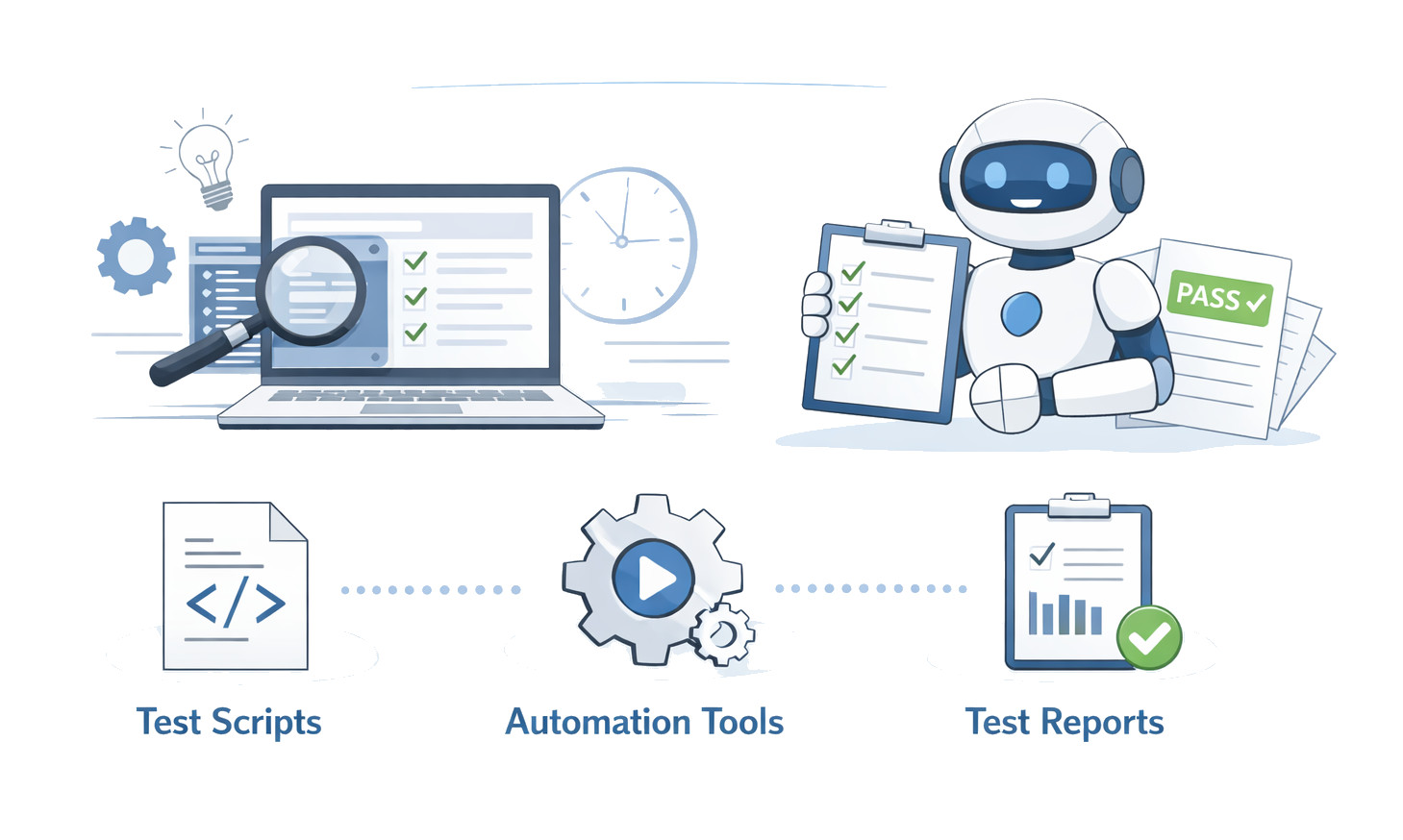
Acceptance tests are usually written from the end user’s perspective, not from the developers’. It validates that the system meets business requirements, functional expectations, user workflows, and regulatory or compliance needs (where applicable).
Key Aspects of Acceptance Testing
- Purpose: Acceptance testing confirms that the system or application meets agreed-upon acceptance criteria, not to find defects (which should have been found in earlier system testing).
- Participants: This type of testing is performed by the end users, clients, or customers.
- Timing: Acceptance testing is performed after system testing and before release.
-
Types of Acceptance Testing: Here are the common types of acceptance testing:
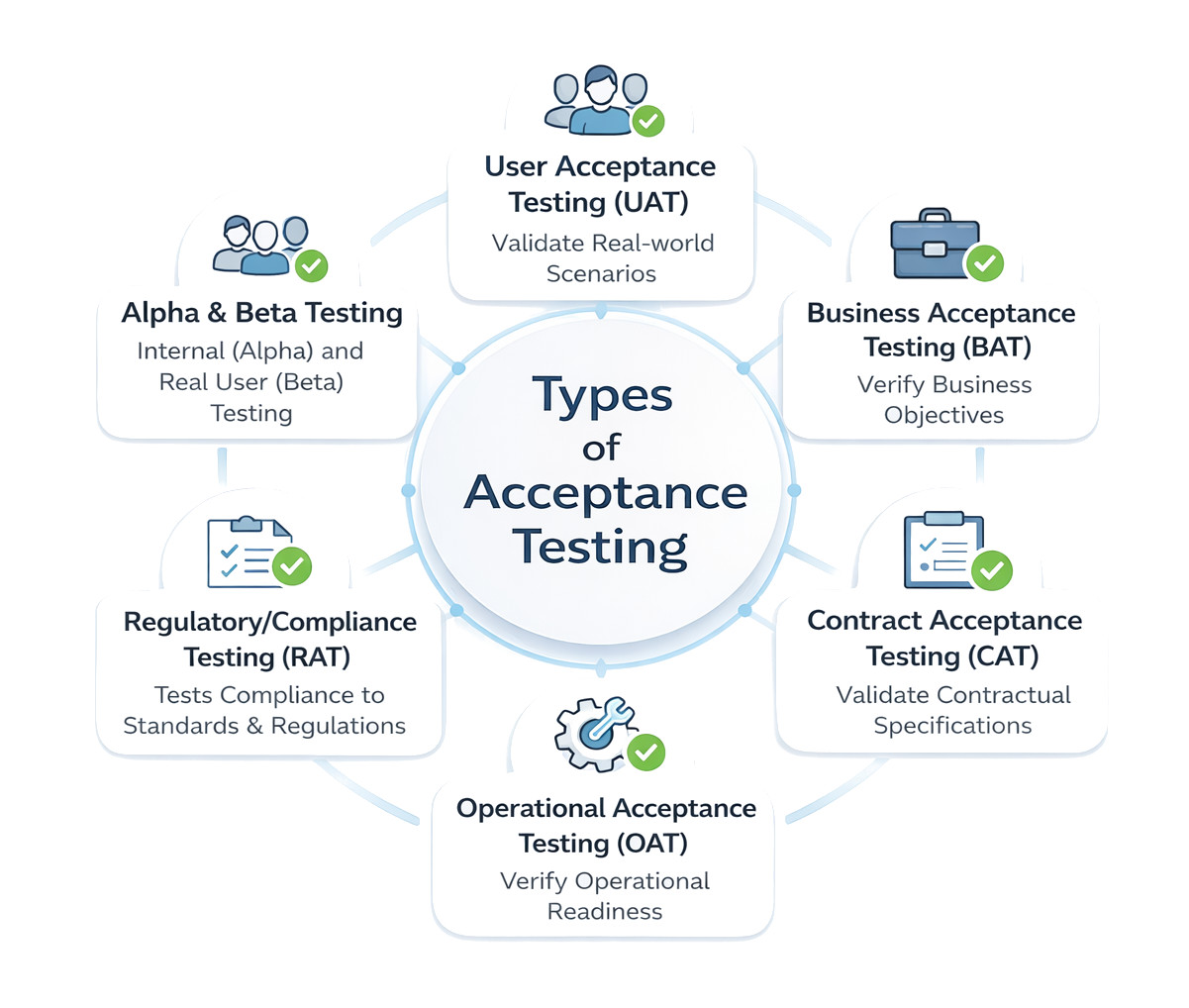
- User Acceptance Testing (UAT): End-users test the system in real-world scenarios to ensure usability.
- Business Acceptance Testing (BAT): Business stakeholders validate that the application meets business goals and ROI.
- Contract Acceptance Testing (CAT): This is performed to validate that the software meets specific criteria defined in a contract.
- Operational Acceptance Testing (OAT): Verifies the system’s operational readiness, including backup/recovery and maintenance. This is also known as production acceptance testing.
- Regulatory/Compliance Testing (RAT): Testing performed to check if the software complies with legal regulations and standards.
- Alpha & Beta Testing: Alpha testing is done by internal users, while beta testing involves external, real users.
Acceptance testing validates the software against a business model and ensures it delivers the expected value and functionality.
Why Automate Acceptance Testing?
Automating acceptance testing ensures consistent quality, reduces manual effort by validating that software meets business requirements, and accelerates release cycles. It ensures bugs do not reach production, provides rapid, reliable feedback in CI/CD pipelines, and allows teams to focus on complex scenarios rather than repetitive, manual testing.
Read: Top 10 CI/CD Tools in 2026.
- Execution is time-consuming
- It has limited coverage
- Produces inconsistent results
- Regression validation is difficult
- Release cycles are slower
Reasons to Automate Acceptance Testing
- Speed and Efficiency: Compared to manual testing, automated tests run significantly faster, providing immediate feedback on whether code changes meet business requirements.
- Consistency and Reliability: It eliminates human error and “test fatigue” from repetitive, manual clicking, ensuring consistent, accurate results every time.
- Continuous Integration/Deployment (CI/CD): Automated acceptance testing enables rapid validation of new code, crucial for agile, daily, or weekly release schedules.
- Reduced Costs and Risks: It catches critical bugs early, prevents expensive, post-deployment failures, and reduces manual testing hours. This saves high costs.
- Improved Coverage: By handling complex scenarios, large datasets, and multiple configurations, including visual regression testing, automated acceptance testing provides improved coverage for UI changes.
- Documentation: It acts as living, executable documentation of system behavior, ensuring future updates do not break existing functionality.
Read: What is CI/CD.
Automating acceptance tests transforms a major bottleneck, manual testing, into an efficient, scalable, and reliable process, ultimately boosting user satisfaction.
Principles of Automated Acceptance Testing
Automating acceptance testing is not just about tools; it’s about strategy. Here are the key principles for automating acceptance testing:
Automate Stable Requirements
You should not automate features that are constantly changing. Establish a specific, acceptable, and agreed-upon acceptance criterion to ensure everyone, including various stakeholders, has a shared understanding of what defines a successful outcome.
Develop a comprehensive UAT plan outlining the scope, objectives, schedule, and resource allocation for testing to ensure the testing effort remains on track.
Focus on Business-Critical Flows
Prioritize automating test scenarios that cover business-critical workflows and high-risk areas. By doing this, you ensure the software delivers the intended business value rather than just technical functionality.
For example, start automating modules like Login, Checkout, Registration, Payment, and core workflows.
Keep Tests User-Centric
Ensure acceptance tests reflect real-world usage. While the QA team facilitates automation, the test cases should be derived from input from actual end users or subject matter experts (SMEs). Their real-world insights are crucial for validating usability and practical application.
Avoid Over-Automation
Not everything in the application needs to be automated. Automate repetitive, stable, and time-consuming tests, such as regression testing or data-driven scenarios. Tests that require human intuition, such as exploratory or subjective usability testing, are generally better suited to manual execution.
Integrate with CI/CD Pipelines
Automated acceptance tests should be integrated into your Continuous Integration and Continuous Deployment (CI/CD) pipelines to provide continuous, fast feedback on code changes.
By adhering to these principles, organizations can build a robust, effective, and sustainable automated acceptance testing process to reduce risk and ensure high-quality software delivery.
Step-by-Step Guide to Automating Acceptance Testing
Automating acceptance testing is a continuous process to validate business requirements. Here are the steps to transition from manual User Acceptance Testing (UAT) to an automated framework.
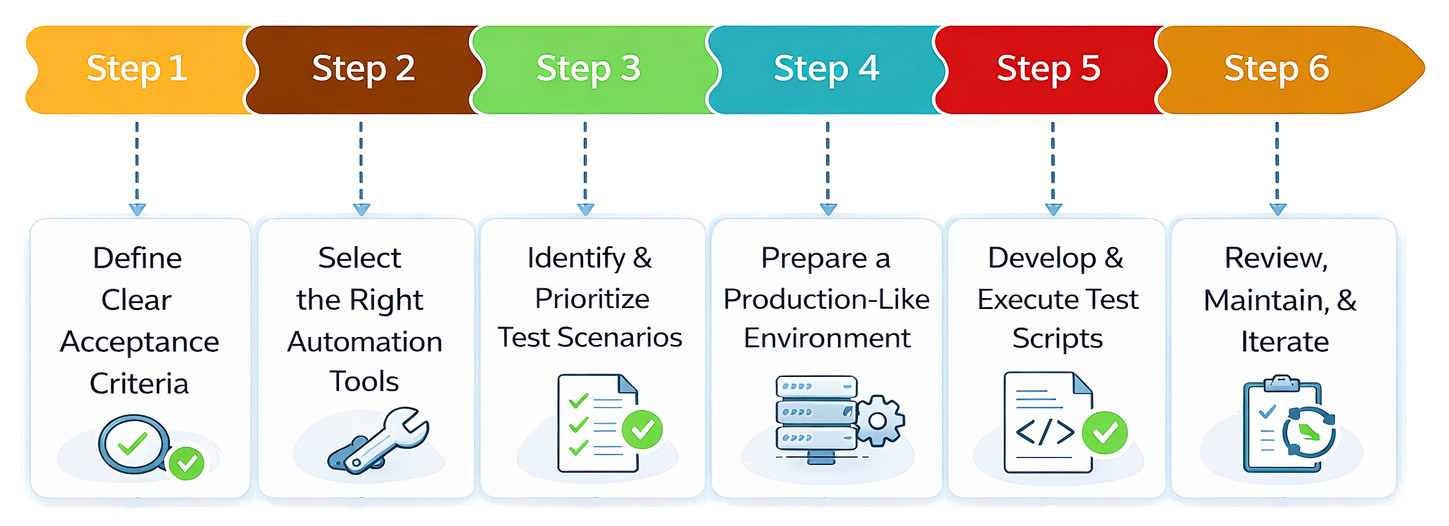
Step 1: Define Clear Acceptance Criteria
- Collaborate with Stakeholders: Translate high-level business goals into specific, measurable rules. For this, involve product owners and business analysts.
- Use SMART Goals: Ensure criteria are Specific, Measurable, Achievable, Relevant, and Time-bound (SMART).
- Structure Criteria: To translate the criteria into scripts, use formats such as Given-When-Then (common in Behavior-Driven Development, or BDD).
Here is an example of Given-When-Then:
| Example |
|---|
| Given a registered user, when they enter valid credentials, then they should be logged into the dashboard |
Step 2: Select the Right Automation Tools
- Support UI and API testing
- Integrate with CI/CD pipelines
- Stable and scalable
- Easier to maintain
- Provide good reporting
Here are some examples of automation tools:
| Tool | Used For |
|---|---|
| testRigor (low-code/no-code, AI-based, natural language) | Web/mobile/desktop/mainframe testing |
| Selenium (Widely used, multi-language) | Web testing |
| Cypress (developer-friendly) | Browser/Web testing |
| Appium (cross-platform, iOS/Android) | Mobile testing |
Step 3: Determine and Rank the Test Scenarios
Instead of automating every case, focus on high-value operations when automating test cases. Automate
Core business processes, including user login, checkout, and financial transactions, are known as critical paths.
Stable Features: Features that need to be retested often (regression).
Data-heavy Tasks: Repeated activities include submitting forms or validating big amounts of data.
For instance, give priority to operations like the full buying flow of a product, account setup on the website, and payment confirmation, rather than automating every small UI aspect.
Step 4: Prepare a Production-like Environment
- Isolate the Environment: Set up a dedicated UAT environment separate from development to avoid data conflicts.
- Realistic Data: Use anonymized or scrambled production-like data that is realistic enough to safely test real-world scenarios.
- Configurations: Ensure settings match the production server settings, API rate limits, and network conditions as closely as possible.
Step 5: Develop and Execute Test Scripts
- Modular Design: Modularize common actions like “login” or “menu navigation” into reusable utilities.
- Integrate with CI/CD: Integrate your tests into pipelines like Jenkins, GitHub Actions, or Azure DevOps to run automatically on every code change.
- Parallel Execution: Run tests across multiple browsers or devices to save time.
Step 6: Review, Maintain, and Iterate
- Comprehensive Reporting: Generate human-readable reports and capture screenshots or videos of failures.
- Refactor Regularly: Maintain confidence in the test suite by updating scripts when UI elements change and removing redundant or flaky tests.
- Human Oversight: Combine automation with manual exploratory testing for new features or usability aspects that AI cannot yet judge.
Typical Obstacles to Automating Acceptance Testing
- Flaky Tests: Tests that occasionally pass and occasionally fail are known as flaky tests. Timing problems, dynamic components, asynchronous behavior, and network latency are the causes of flaky tests. Automation is undermined by faulty tests. Because acceptance tests frequently cover several systems, they are especially vulnerable to flakiness.
- High Maintenance Cost: Acceptance tests need ongoing changes, despite the common misconception that automation is a “write once, run forever” strategy. The high maintenance costs of automated acceptability testing are caused by:
- Updates to features
- Modifications to workflow
- UI revamping
- Changes to business rules
- Modifications to the backend API
Over time, repairing malfunctioning tests could take more work than adding new coverage.
- Inadequate Cooperation Between QA and Business: To ensure the application complies with business requirements, acceptance testing is conducted. However, there is a gap between QA and companies, as automation frameworks are often code-heavy, developer-centric, and difficult for non-technical stakeholders to understand. As a result, there is less alignment between automated validation and approval criteria.
- Slow Test Execution: End-to-end workflows are typically included in acceptance tests. They use external services, rely on UI rendering, and communicate with actual systems. Consequently, as test suites expand, execution time increases, leading teams to miss regression runs, delay feedback loops, and block deployments.
- Skill Gaps in Test Automation: Teams may lack dedicated automation engineers due to a shortage of scripting expertise, a steep learning curve of automation tools, a limited understanding of framework design, and difficulty debugging failures.
This dependency on specialists becomes a bottleneck in automation instead of an accelerator.
Acceptance Testing in Agile and DevOps
Automated Acceptance Testing (AAT) is a critical practice in Agile and DevOps that ensures software continuously meets business and user requirements through fast, repeatable, and automated validation. Testing is integrated into the entire development lifecycle, enabling rapid feedback, early defect detection, and confident, frequent deployments.
Key Practices followed for AAT in Agile and DevOps
- Shift-Left Approach: Defining acceptance criteria and integrating testing activities is done as early as the requirements-gathering phase to prevent issues from the start.
- Prioritize Automation: Test cases that are repetitive, stable, and cover business-critical features (e.g., login flows, form validation) are automated first.
- Integrate with CI/CD Pipelines: Automated tests are seamlessly integrated into the CI/CD pipeline, ensuring that code cannot progress to later stages without passing key checks.
- Maintainable Tests: Automated tests are reviewed and updated regularly as the application evolves to prevent “flaky” tests that slow down the pipeline.
- Balance with Manual Testing: A balance of automated and manual testing is reached with scenarios requiring human intuition or creativity, such as exploratory testing or user experience (UX) reviews reserved for manual testing.
AAT in Agile and DevOps enables rapid iteration, ensures safe deployments, enforces continuous validation, supports rapid feedback loops, and enhances software quality.
Acceptance Testing vs. Functional Testing
The following table summarizes the key differences between acceptance and functional testing:
| Feature | Acceptance Testing | Functional Testing |
|---|---|---|
| Primary Goal | Ensures the software delivers actual business requirements and is suitable for real-world use by the end-user or client. | Ensures that each function of the software works as intended according to specified requirements. |
| Testers | End-users, clients, or business stakeholders take part in User Acceptance Testing or UAT. | Developers or a dedicated Quality Assurance (QA) team perform the testing. |
| Scope | It has a broader scope, with a focus on end-to-end business workflows, usability, and overall user experience. | Focus is on specific, detailed functionalities and technical requirements. |
| Timing | Conducted as one of the final stages, just before deployment and release to the market. | Performed throughout the development lifecycle, usually after unit and integration testing. |
| Outcome | Determines if the customer “accepts” the product and gives a formal sign-off for release. | Determines if a feature is working correctly or not. |
| Perspective | External, business-focused perspective (“Are we building the right thing?”). | Internal, technical perspective (“Are we building the thing right?”). |
Best Practices for Automated Acceptance Testing
Here are the best practices to be followed for automated acceptance testing:
| Best Practices |
|---|
| Define clear, measurable acceptance criteria early. Collaborate with business users, product owners, and other stakeholders to define explicit, testable criteria before development begins. |
| Involve stakeholders continuously from the beginning of the process (defining requirements) through test results review. |
| Prioritize tests by risk and impact. Automate test cases that are repetitive, critical to core business features, or prone to human error. |
| Focus on business workflows, such as end-to-end user journeys and business outcomes. |
| Automate high-volume, repetitive tasks such as logins or form submissions to save time and ensure consistency. |
| Reserve manual and exploratory testing for subjective evaluations, such as usability, or for ad-hoc scenarios. |
| Integrate automated tests into CI/CD pipelines. Automatically run tests with every code change, providing developers with fast feedback. |
| Establish clear bug reporting standards. Log all activities and prioritize defects. |
| Maintain test suites regularly by refactoring and updating test scripts to avoid “brittle” tests that break with minor UI changes. |
Future of Acceptance Test Automation
- AI-based self-healing tests
- Test creation using natural language
- Testing using visual validation
- Autonomous regression suites
- Parallel execution in a cloud-based environment
In the future, automated acceptance testing is expected to have less scripting, more intelligent automation, faster feedback loops, and lower maintenance overhead.
Summary
In modern software systems, automating acceptance testing is no longer optional. It is essential for delivering high-quality applications at speed.
Implemented efficiently, automated acceptance testing becomes a safety net that enables innovation rather than slowing it down. Automation transforms acceptance testing from a release bottleneck into a competitive advantage. Here, the goal is not just automation; it is confident, continuous delivery of business value.
Frequently Asked Questions (FAQs)
- What is the difference between functional testing and acceptance testing?
Functional testing verifies if individual features meet the specifications.Acceptance testing validates the entire system to ensure it meets business needs and user expectations. The primary focus of acceptance testing is on real-world usage rather than technical implementation.
- What is BDD in acceptance test automation?
Behavior-Driven Development (BDD) is a methodology that uses natural-language scenarios (e.g., the Given-When-Then format) to describe system behavior. BDD improves collaboration between business stakeholders and technical teams and makes acceptance tests easier to understand.
- Should acceptance testing be done at the UI or API level?
Both approaches are useful, however:
- API-level testing is faster and more stable.
- UI-level testing validates complete user journeys.
A balanced strategy that uses API tests for business logic validation and UI tests for end-to-end workflow validation may be advantageous. - How do acceptance tests fit into CI/CD pipelines?
Automated acceptance tests can be integrated with CI/CD pipelines to run:
- On every pull request
- During nightly builds
- Before staging or production deployments
They prevent regressions, ensuring safe, continuous delivery. - How much of acceptance testing should be automated?
There is no fixed percentage. Typically, teams automate:
- 100% of business-critical workflows
- High-risk and revenue-impacting features
- Regression scenarios
Exploratory and highly dynamic tests may remain manual.