
Software teams are pressured today to release faster. But what is the use of speed if the quality is questionable? Applications also need to perform well under real user traffic. This is where performance testing is of importance. It helps teams understand how a system behaves under load, stress, and unexpected spikes.
Traditionally, verifying how well systems ran meant manual testing, setting up testing environments, and long analysis cycles. Test engineers initiated validation and analyzed records afterward. They hunted for the exact point where bugs appeared. This method did its job. Just not fast.
Things are different today. As artificial intelligence grows, testing tools get sharper: spotting anomalies, studying patterns, and hinting at improvements. In many ways, AI in performance testing is shifting testing from reactive to predictive.
| Key Takeaways: |
|---|
|
Why Performance Testing Still Matters
Jumping into AI without knowing the role of performance testing misses a key point. This kind of testing remains central to the software lifecycle. Hidden anomalies rise only under real use.
When a system runs fine at first, but suddenly crashes when thousands of users access it simultaneously. Traffic shows how fast things respond, measuring response times, and identifying slow components.
- Measuring system response time
- Evaluating scalability
- Detecting infrastructure bottlenecks
- Understanding system stability under load
A simple everyday example makes it clearer. Think of a large e-commerce store when a sale kicks off. On regular days, things run without trouble. When hundreds rush to browse goods, add items to cart, or pay all at once, slowness shows up – sometimes everything stops.
That moment when large platforms suddenly slow down often comes up during rush hours, like flash deals or ticket-booking events. Loading times stretch out endlessly sometimes. Transactions break without warning, so people just leave. In many cases, the issue isn’t functionality; it’s performance under load.
Anomalies like these are precisely what performance tests aim to stop.
Modern systems are far more complicated than ever before. With cloud platforms, microservices, APIs, and distributed databases, each piece adds a new chance for something to break. That’s why performance testing is becoming harder to manage manually.
This is where AI testers and intelligent automation start to make a difference.
The Rise of AI Testing Tools
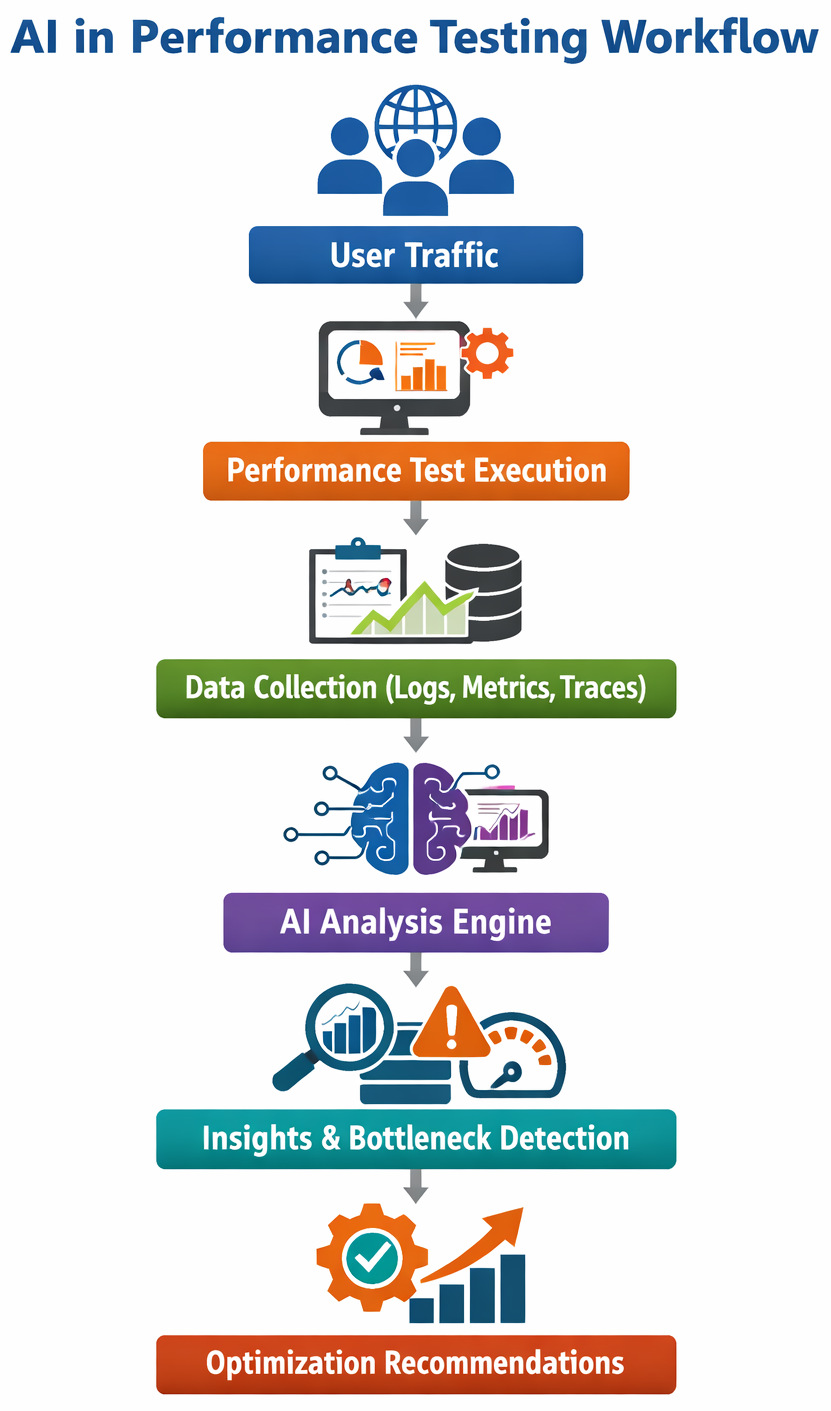
The idea behind an AI test framework is simple: let machines analyze patterns in performance data and highlight issues automatically.
Out there, AI digs through massive amounts of information far quicker than a person scanning reports ever could. Because patterns hide in plain sight, connections among metrics often escape human eyes, yet AI spots them fast.
- Identify abnormal response time spikes
- Detect patterns that signal future failures
- Automatically correlate logs, metrics, and traces
- Suggest areas where performance is degrading
Modern testing tools now use AI to automate routine testing workflows. Not aiming to replace humans, instead, they reduce the load on teams while speeding up results.
Smarter Test Design with AI Test Case Generation
One of the most interesting areas of AI-powered test automation is AI test case generation. Writing test cases manually can be time-consuming and resource-intensive. Test engineers need to predict different user behaviors, edge cases, and load patterns. Weird edge cases slip through when nobody expects them. Heavy usage or rare actions get left out, not from neglect, just difficulty picturing them.
AI helps resolve this issue.
Using ML and LLMs, testing platforms can analyze application workflows, API specifications, or historical test data to automatically generate test cases. Learning happens quietly while examples grow behind the scenes.
- Faster test creation
- Broader test coverage
- Reduced manual scripting
- Continuous updates when applications change
Sure, someone still needs to check tests made by AI. Yet these can be a useful base, cutting down on how often we do the same steps over.
Identifying the Performance Tests: Where Systems Really Break
It hits most performance engineers at some point: what really matters when things start slowing down?
What’s slowing things down?
A single bug can reduce the overall speed significantly. Sometimes the culprit hides in a slow database query, an overloaded API. Code that doesn’t flow right could be the culprit. Even hardware may simply not keep up.
Traditional methods relied on figuring out problems by wading through log data using several different monitoring systems at once.
When AI-powered tools help sort data, things get easier. Effective and relevant insights appear without hours of manual digging through charts. Patterns show up fast, and there is no need to check every screen.
Faster fixes happen when troubleshooting takes less time, because teams get directly to working on complex issues at hand without losing precious time.
AI-Driven Insights for Performance Optimization
Performance testing generates high volumes of data. Some examples include: Response times, error rates, memory usage, throughput, and network latency. Going through the entire thing manually might wear you out. Fresh insights show up right there, guided by AI-driven insights.
When AI analyzes large datasets, it spots patterns that could point to trouble in system performance. Because of these findings, engineers get a clearer picture about how things run when under stress and where improvements are required.
Let us understand this simple example to help see it better. Imagine a streaming platform gearing up for a new show launch. At first, performance tests show smooth results. Yet when more simulated users join in, an AI system spots a small but steady climb in response time for video playback requests.
Also, the system spots a small jump in CPU load on a specific microservice that is spiking slightly earlier than expected. Alone, nobody would care much about it. Yet when linked together by smart software, the timing stands out – a possible snag ahead.
AI connects the anomalies and marks these as bottlenecks. When alerts pop, engineering teams adjust the service, tweaking performance, expanding capacity, or rewriting clumsy code, all done long before launch day arrives.
Predicting problems before they happen. That’s what AI-driven tools make possible now. Teams fix issues ahead of time because warnings come early.
- Predicting performance degradation
- Detecting unusual traffic patterns
- Identifying capacity limits
- Highlighting abnormal resource consumption
With fewer graphs to go through, testers get clear insights showing how performance changes over time.
Best of AI for Test Cycle Optimization
Suddenly, test cycles that once took weeks now finish overnight. A typical test cycle includes planning, test design, execution, analysis, and reporting. AI can support each stage by automating repetitive tasks and identifying high-risk areas. What used to demand schedules now flows like water. Speed isn’t the only shift. Accuracy climbed when algorithms replaced guesswork.
- Predict which tests are likely to fail
- Prioritize test cases based on past results
- Automatically analyze performance metrics
- Generate summaries of test outcomes
When testing apps, some tasks take less time because priorities are clearer. Teams spend energy where it matters most since structure improves. What gets tested first often depends on risk, not guesswork.
AI Testers: How the Role of QA is Changing
With automation becoming more common, the role of testers is also evolving. People using AI today can do more than just write test cases. They are responsible for designing testing strategies, interpreting AI-generated insights, and ensuring test coverage remains strong.
Now, QA folks spend less time on manual testing. They work instead with developers, DevOps engineers, and performance specialists. Collaboration shifts how quality gets built right in.
Far from eliminating jobs, AI actually helps testers with smarter ways to work. Tools shift how tasks get done, yet humans stay in charge.
Read more: Top QA Tester’s Skills in 2026.
Tools to Consider for AI-Driven Performance Testing
When organizations look into using AI for validating how software runs, they find a range of options. Each platform offers different capabilities, and the right choice often depends on the size of the organization, testing requirements, and infrastructure complexity.
Below are some commonly used tools worth considering.
JMeter with AI Extensions
Apache JMeter is one of the most widely used open-source tools for performance testing. It enables teams to mimic heavy loads on applications, APIs, and servers to measure system performance. AI-powered tools that directly optimize the JMeter workflows include Streamlit integrations, PFLB (cloud-based platform), and FeatherWand.
One of JMeter’s biggest pros is its flexibility. Being an open-source solution, teams can extend its functionality using plugins and integrations. In recent years, some organizations have started combining JMeter with AI-based analytics platforms to improve test result analysis.
- AI improves JMeter by automating test case generation and parameter optimizing
- AI-enhanced anomaly detection in test results
- Support for web, API, and database performance testing
- Extensive plugin ecosystem
- Distributed load testing capabilities
- Integration with CI/CD pipelines
- Free and open-source
- Extremely customizable
- Large community and documentation
- Steeper learning curve for beginners
- Test scripts require maintenance as applications evolve
- Limited built-in AI capabilities without integrations
Best suited for: Startups, development teams, and organizations that want a flexible and cost-effective testing solution.
NeoLoad
NeoLoad is a newer AI-powered performance testing platform built for large-scale applications and enterprise environments. It focuses highly on automation and integration with DevOps workflows. The tool’s Agentic AI performance testing (these are powered by domain-specialized AI).
The platform offers detailed performance monitoring and supports continuous testing across development pipelines. Some versions of NeoLoad also include intelligent analytics to help teams identify performance anomalies.
- AI-powered performance testing
- Automated test design and maintenance
- Real-time performance monitoring
- CI/CD integration with tools like Jenkins and Azure DevOps
- Cloud and on-premise load testing
- Easier scripting compared to traditional tools
- Strong integration with DevOps pipelines
- Scalable for large applications
- Licensing costs may be high for smaller teams
- Requires some training to use advanced features effectively
Best suited for: Medium-to-large organizations that require automated performance testing integrated with DevOps workflows.
Dynatrace
Dynatrace is mainly known as an observability and monitoring platform, but it also plays a major role in application performance analysis. It uses AI-driven analytics to monitor system behavior and identify performance problems automatically.
The platform continuously gathers telemetry data from applications, infrastructure, and cloud services. Its AI engine analyzes this data to catch issues and conduct automated root-cause analysis.
- AI-powered observability
- Automatic root-cause detection
- Real-time performance monitoring
- Distributed tracing across microservices
- Excellent visibility across complex environments
- Powerful AI-based analytics
- Minimal manual configuration required
- It can be expensive for smaller organizations
- Primarily focused on monitoring rather than load generation
Best suited for: Large enterprises, cloud-native organizations, and teams managing complex microservices architectures.
LoadRunner
LoadRunner has been a popular enterprise performance testing platform for the past few years. It supports testing across a wide range of protocols and application environments.
The platform allows teams to simulate thousands of concurrent users and analyze how systems respond under heavy load. Modern versions also include analytics features that help teams identify performance trends and anomalies.
- AI-powered assistance with OpenText™ Aviator™
- AI-powered Shift Left converter for converting and improving scripts
- Support for multiple testing protocols
- Advanced performance analytics
- Large-scale user simulation
- Integration with enterprise testing environments
- Extremely powerful for large-scale testing
- Wide protocol support
- Mature enterprise ecosystem
- High licensing costs
- Requires specialized expertise to configure and manage
Best suited for: Large enterprises with complex applications that require extensive load testing capabilities.
OctoPerf
OctoPerf is a cloud-based performance testing platform designed to simplify load testing for modern web applications. It builds on the capabilities of JMeter while providing a more user-friendly interface.
As it is cloud-based, teams can generate load from multiple geographic locations without managing infrastructure themselves.
- MCP server integration (connects AI assistants like Claude and ChatGPT) with OctoPerf
- Cloud-based load generation
- JMeter compatibility
- Real-time performance dashboards
- Test collaboration features
- Easier setup compared to traditional tools
- Scalable cloud testing environment
- Visual dashboards for easier analysis
- Costs may increase with large-scale tests
- Limited customization compared to raw JMeter setups
Best suited for: Teams that want a cloud-based testing solution without managing infrastructure manually.
Performance Testing Tools: Comparison Table
| Tool | AI Features | Best For | Complexity |
|---|---|---|---|
| JMeter | AI-based test case generation, parameter optimization, anomaly detection via integrations (Streamlit, PFLB, FeatherWand) | Startups, dev teams, cost-sensitive orgs | Medium |
| NeoLoad | Agentic AI performance testing, intelligent analytics, automated test design, and maintenance | Mid-to-large enterprises with DevOps pipelines | Medium |
| Dynatrace | AI-powered observability, automatic root-cause analysis, anomaly detection across metrics, logs, and traces | Cloud-native enterprises, microservices apps | High |
| LoadRunner | OpenText™ Aviator™ AI assistance, AI-based script conversion (Shift Left), performance trend analysis | Large enterprises with complex environments | High |
| OctoPerf | MCP server integration (AI assistants like ChatGPT/Claude), AI-assisted workflows via integrations, smart dashboards | SaaS teams, cloud-first teams | Low-Medium |
Challenges of Using AI in Performance Testing
Even with benefits, using AI for testing has its own set of cons.
Right off the bat, AI systems need high-quality data to work well. When test information is incomplete or inconsistent, what comes out may not be reliable.
AI systems must be continuously updated as applications evolve. Performance patterns change over time, and models need to adapt.
There is a need for human oversight. Though AI spots patterns, engineers have to confirm them prior to acting on big decisions.
Final Thoughts
Performance testing has always been about understanding how software behaves under pressure. How we analyze and respond to the data generated during tests is the only change.
With the help of AI test automation, AI-driven insights, and smarter testing platforms, teams can identify bottlenecks faster and improve system performance more effectively. Teams move ahead not because they rush, but because guesswork fades.
With collaboration, people and AI-driven machines may shape how tests evolve in the future. Humans bring judgment; technology offers speed. Both matter more when paired. Not one replacing the other, but each adjusting as challenges shift.
Frequently Asked Questions (FAQs)
How does AI improve traditional performance testing?
A: Traditional performance testing relies heavily on manual scripting, log analysis, and repeated test execution. AI enhances this process by automating several stages of the testing workflow.
- Analyze historical performance data to predict bottlenecks
- Automatically identify anomalies in response times or resource usage
- Generate performance insights faster than manual analysis
- Recommend areas where performance optimization may be required
This reduces the time spent on manual analysis and allows testers to focus on improving system architecture and reliability.
How do AI-driven insights help identify performance bottlenecks?
A: AI-driven insights analyze multiple data sources such as logs, system metrics, and request traces to detect patterns that indicate performance issues.
- Slow database queries
- High memory or CPU consumption
- API latency spikes
- Infrastructure limitations
These insights make it easier to run a performance test and quickly determine which part of the system is affecting overall performance.
What types of organizations benefit most from AI in performance testing?
A: Organizations that operate large, complex applications benefit the most from AI-powered testing solutions. This includes companies working with cloud-native architectures, microservices environments, and high-traffic web platforms.
However, even smaller development teams can benefit from AI tools because they reduce manual work and improve testing efficiency.