
Nearly all software testers bump into this confusion of integration testing vs. end-to-end testing. Let us understand how integration testing differs from end-to-end testing with real-life examples that show what each one does, especially in modern systems built with microservices. The focus stays on actual usage, not abstract concepts.
| Key Takeaways: |
|---|
|
Software Testing Levels Explained (Quick Context)
- Unit testing – individual functions or classes
- Integration testing – interactions between components
- System testing / End-to-end testing – the full application flow
- Acceptance testing – business validation
Each level answers a different question. Problems pop up most often around the upper parts – especially between integration tests, system tests, and E2E tests.
What is Integration Testing?
- A service talking to a database
- An API calling another API
- A backend service integrating with a message queue
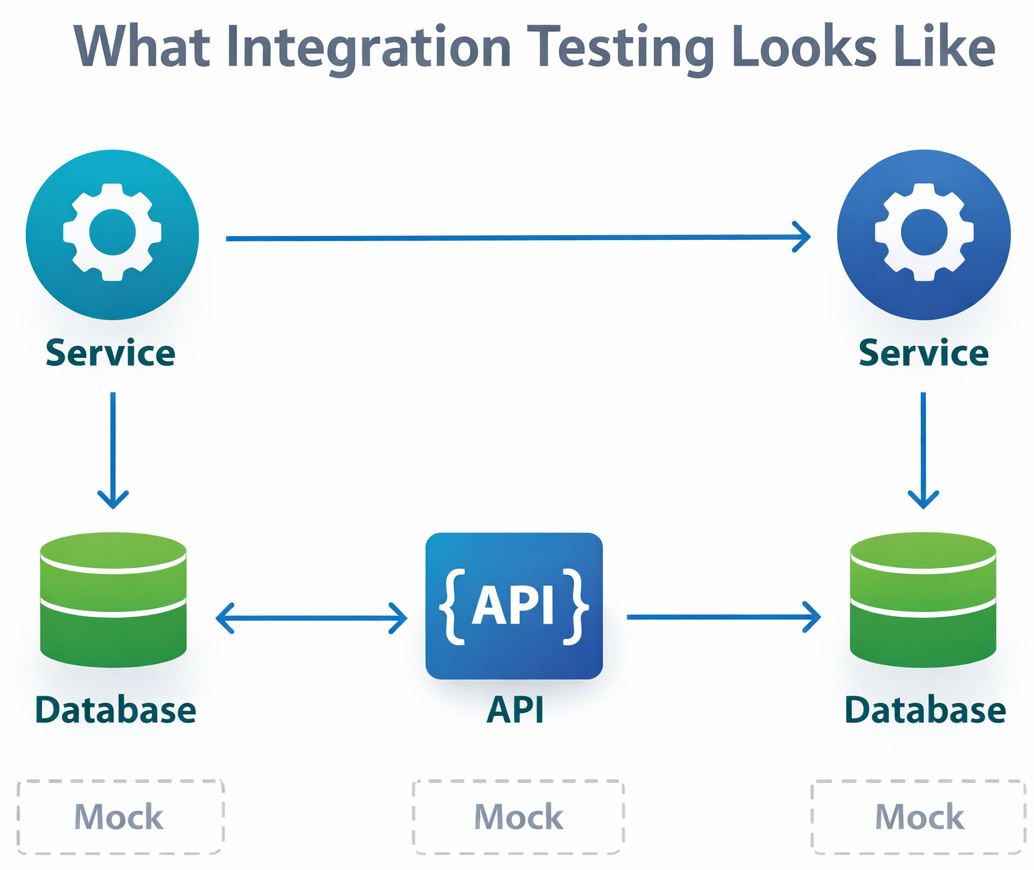
API Integration Testing in Practice
- Request/response formats
- Data mapping between services
- Error handling when dependencies fail
Faster testing often happens without the UI getting in the way, making issues simpler to track down.
Microservices Integration Testing
- Service contracts are respected
- Data flows correctly between services
- Authentication and authorization work across boundaries
Most of the time, teams pretend outside connections aren’t there while leaving core integrations real. Yet inside systems stay exactly as they are meant to run.
In short: Integration testing answers, “Do these parts work together the way we expect?”
What is End-to-End Testing?
So, how does one describe end-to-end testing?
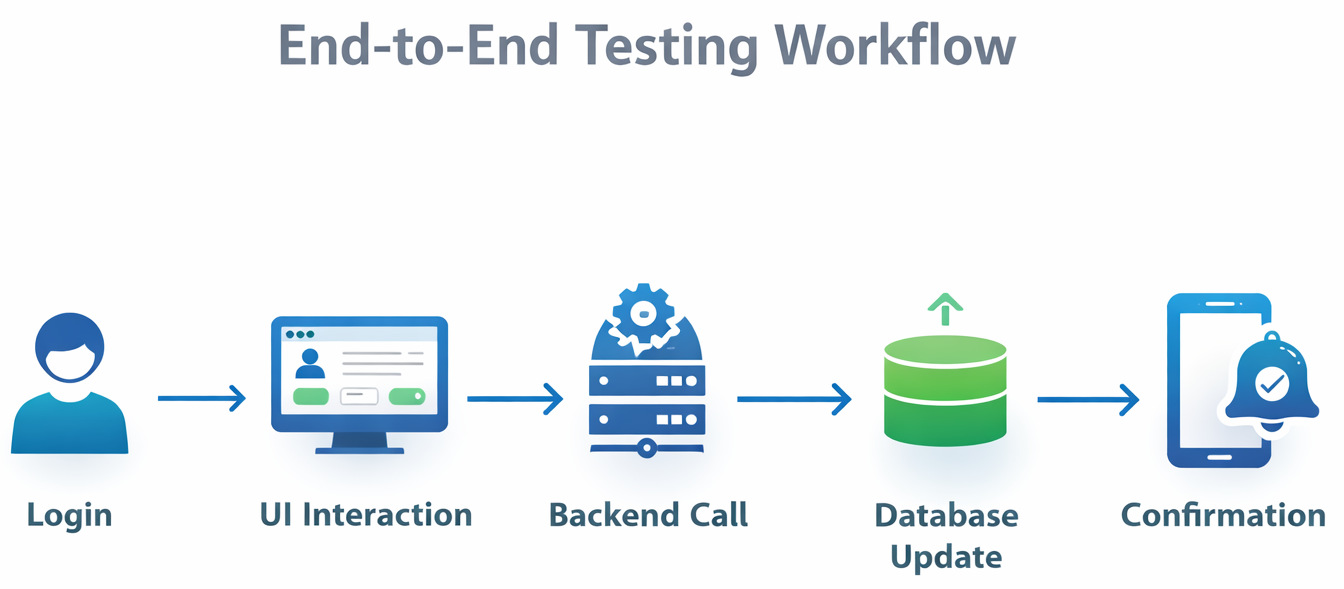
End-to-end testing validates complete user journeys through an app. Real behavior shapes these simulations, mirroring actual usage step by step.
- Logging in through the UI
- Creating an account
- Placing an order
- Receiving a confirmation
Everything is included: frontend, backend, database, third-party services, and infrastructure. Even the support systems run on full auto, tied together without gaps.
Functional Testing vs. E2E Testing
- Functional tests check what a feature does
- E2E tests check how everything works together in a real scenario
You can have functional tests that are not end-to-end, and end-to-end tests that verify multiple functional requirements at once.
Integration Testing vs. End-to-End Testing: Core Differences
- Scope
- Integration testing tests only what matters, focused on specific interactions.
- End-to-End testing has a broader scope, full application workflows. Testing moves across all stages, one after another.
- Speed and Stability
- Integration tests are faster and more stable.
- E2E tests are slower and more prone to flaky failures.
- Debugging
- When integration tests fail, the reason often shows up right away.
- E2E failures can be harder to diagnose because many systems are involved.
- Cost
- Integration tests are cheaper to build and maintain.
- E2E tests require more infrastructure and upkeep.
This confusion pops up because integration tests tackle one kind of issue while E2E handles another – each brings its own baggage. Yet they’re both trying to catch bugs before users do.
Key Differences: Scope, Purpose, and Focus
| Aspect | Integration Testing | End-to-End (E2E) Testing |
|---|---|---|
| Scope | Tests interactions between specific components or services (e.g., service-to-service, API-to-database). | Tests the entire application workflow from start to finish, including UI, backend, database, and external services. |
| Purpose | Ensures that integrated modules communicate correctly and exchange data as expected. | Ensures the complete system behaves correctly from a real user’s perspective. |
| Focus | Technical correctness of interfaces, data flow, and service contracts. | Business-critical user journeys and real-world usage scenarios. |
| Level in Testing Pyramid | Middle layer (between unit tests and E2E tests). | Top layer of the testing pyramid. |
| Execution Speed | Relatively fast to run and suitable for frequent execution. | Slower due to full system setup and dependencies. |
| Failure Diagnosis | Easier to debug because fewer components are involved. | Harder to debug since failures can originate from many layers. |
| Environment Needs | Can run with partial environments, mocks, or stubs. | Requires production-like environments with real integrations. |
| Maintenance Effort | Moderate and more stable over time. | Higher maintenance due to UI changes and external dependencies. |
| Typical Use Cases | API integration testing, microservices communication, and database interactions. | Login-to-checkout flows, onboarding journeys, payment, and notification workflows. |
Integration Testing vs. System Testing (Are They the Same?)
Not quite.
- Integration testing validates groups of components.
- System testing validates the entire system against requirements.
While end-to-end testing has a strong focus on real user workflows.
Where the Test Pyramid Strategy Fits In
The classic test pyramid strategy helps explain how these tests should be balanced.
- Lots of unit tests
- A healthy layer of integration tests
- Fewer E2E tests
The idea is pretty simple: Cost climbs when tests get tougher, dragging speed down with it.
Starting off, integration tests build trust fast. Near the finish line, it is E2E tests that confirm everything holds together.
Testing Trophy Model Comparison
Nowadays, a few teams lean towards the testing trophy model comparison, especially at frontend-heavy ecosystems.
- Fewer unit tests
- More integration tests
- Some E2E tests
- A small amount of manual testing
Here’s where integration tests step into the spotlight – their mix of real-world feel and quick feedback creates just enough pull to stand out.
CI/CD Testing Pipeline: Where Each Test Type Belongs
A placement within the CI/CD testing pipeline changes how testing will be carried out.
- Unit tests: Run on every commit
- Integration tests: Run on pull requests and merges
- E2E tests: Run nightly or before releases
Finding problems sooner happens through integration tests, while E2E tests step in quietly, more like backup than blockage.
A Quick Look at E2E Test Automation Tools
Most of the time, people automate E2E tests with programs that run inside browsers. Tools such as Selenium or Cypress show up often in these setups.
These tools are powerful, but they also require discipline. Too many E2E tests can slow teams down if they’re not carefully chosen.
When Integration Testing Shines
- You’re working with APIs or backend-heavy systems
- Your application uses microservices
- You want fast feedback in CI
- You need precise failure signals
It’s often the best return on investment in terms of confidence per test.
When End-to-End Testing is Worth it
- You’re validating critical user journeys
- Third-party integrations must work end-to-end
- You are close to a production release
The key is restraint. Often, just a small set of well-chosen end-to-end tests does the job.
Integration Testing vs. E2E Testing: Not a Competition
This isn’t about choosing one and ignoring the other.
- Integration tests catch most defects early
- E2E tests confirm the system works as a whole
Together, they create confidence without overwhelming your pipeline.
Which Should You Use & When?
| Goal | Testing Type |
|---|---|
| Early defect detection | Integration Testing |
| Validate module collaborations | Integration Testing |
| Test full user experience | End-to-End Testing |
| Validate 3rd-party integrations across the entire app | End-to-End Testing |
| Quick CI feedback | Integration Testing |
| Pre-release confidence check | End-to-End Testing |
Final Thoughts
- Integration testing ensures your building blocks fit together
- End-to-end testing ensures the house actually works when someone lives in it
Knowing when to use integration tests versus end-to-end ones and then slotting them just right into your CI/CD testing pipeline does more than catch bugs. It keeps things steady, sharpens outcomes, yet somehow also calms the chaos around releases. Placement matters, quietly but deeply.
Done right, testing stops feeling like a burden and starts acting like a safety net, one that lets you move faster, not slower.
Frequently Asked Questions (FAQs)
Do I need both integration testing and end-to-end testing?
A: Yes, most teams benefit from using both. Integration testing helps catch issues early by validating how components work together, while end-to-end testing ensures critical user workflows function correctly in real-world scenarios. Relying on only one usually leaves gaps in coverage.
Can integration tests replace end-to-end tests?
A: Not entirely. Integration tests are excellent for validating service interactions, APIs, and data flow, but they don’t fully simulate real user behavior. End-to-end tests are still needed to confirm that the entire system works correctly from the user’s perspective.
Are end-to-end tests always UI-based?
A: Most end-to-end tests involve the UI, but not all of them have to. Some E2E tests can run at the API level if they still validate a complete business workflow from start to finish. UI-based E2E tests are just the most common form.