
Modern-day software testing looks nothing like it did just a while back.
Teams checking quality? They’re scattered around the globe, working from different time zones. Automation isn’t rare anymore: It is integrated into almost every step. With so much hustle at once, the management of test suites needs structure.
That’s where test management platforms come in. They bring order: organizing test steps neatly and tracking how runs execute. Progress stays clear because everyone sees what’s happening. Quality doesn’t lag when each phase gets tracked from start to finish.
| Key Takeaways: |
|---|
|
This blog explores the top test management tools for 2026 and dives into what each one offers. Their choice depends on team size, needs, and workflow styles.
Test Management Tools Explained
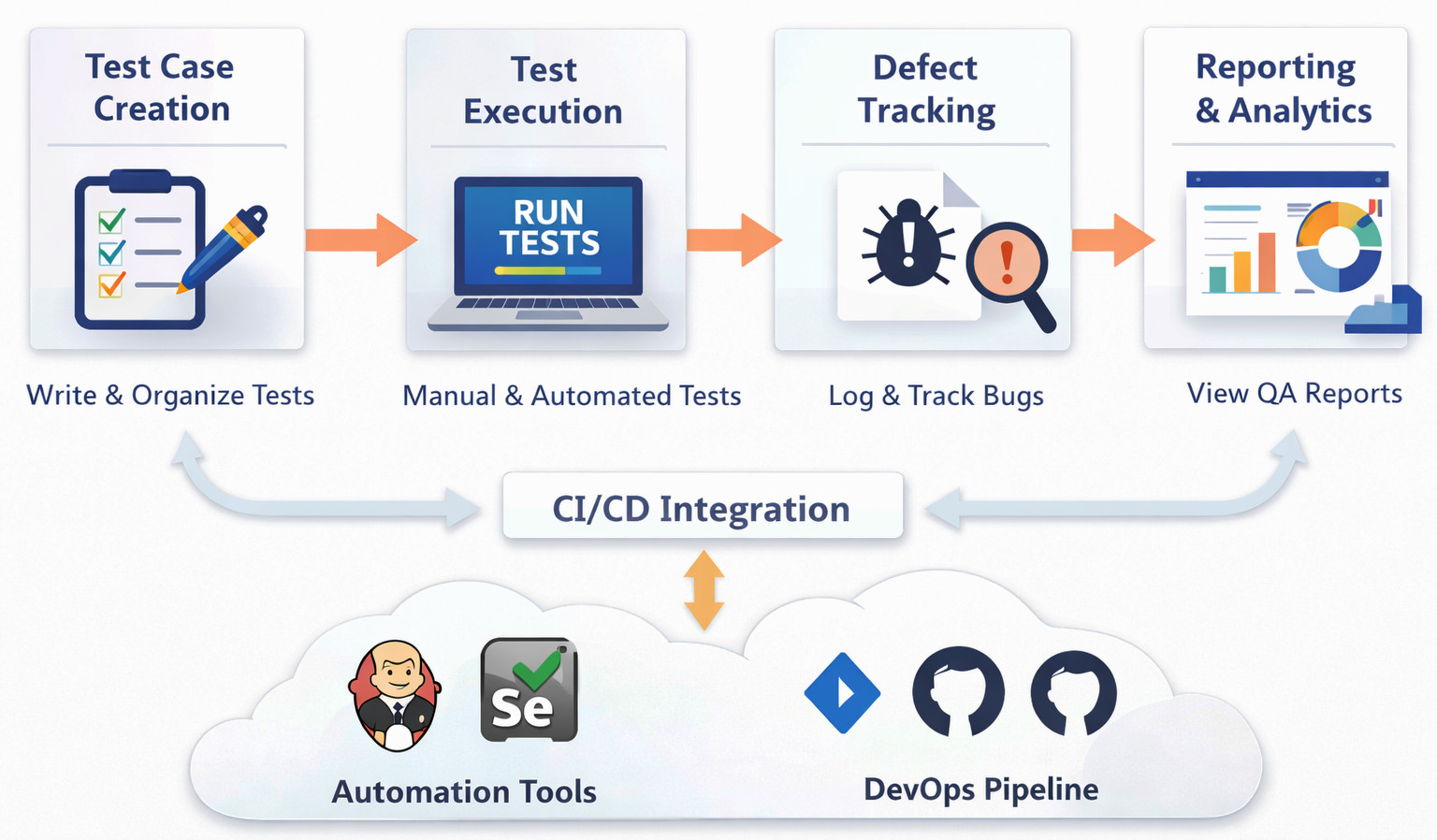
Test management tools help shape how teams handle software validations. These systems keep everything in line: planning, organizing tasks, executing tests, and watching progress. One thing leads to another: creating cases, following outcomes, tying each test back to what it should cover or where issues pop up. Details stay connected without falling through gaps.
Most QA groups now integrate their tools straight into automated pipelines along with issue trackers. That way, everyone sees how tests are moving through each project, keeping things lined up.
In many organizations, test results are monitored through centralized dashboards.
Test Management Tools: Features
Finding the right test management tool often highlights certain features. Let us find out about them.
Centralized Test Case Management
A centralized repository sits at the core of most platforms, letting teams build test scenarios in one place. Stored there, those tests get organized neatly, pulled into different work streams when needed. Duplicates are not there simply because everyone taps into the same pool. Working together flows better since access stays shared and updates are visible.
Integration with CI/CD and Automation Tools
Modern test setups run on automated tests. With Jenkins, Selenium, or Jira integrated, automated tests flow into manual testing workflows.
Reporting and Test Analytics
Most test tools show results through dashboards where you see how many tests passed or failed. These views also reveal what parts of the software are tested. Progress gets marked step by step, visible at a glance. Coverage levels appear alongside timelines, giving a full picture without extra steps.
Detailed reports are often generated automatically after test runs.
Collaboration Across QA Groups
When teams work from different locations, they stay in sync via common digital spaces where updates appear automatically. One person leaves comments right beside tasks, so others see what changed. Notifications and alerts come when something needs attention, keeping everyone aware without alert fatigue. These tools fit together like puzzle pieces across time zones.
Best Test Management Tools for QA Teams in 2026
Below are the top test management tools for 2026, in no particular order.
TestRail (Among widely used test case management tools)
Few tools have held onto their spot quite like TestRail. Built for clarity, it shapes how teams arrange testing tasks. Execution flows more smoothly when steps are laid out ahead of time. Tracking outcomes becomes routine once patterns emerge over sessions. Structure guides each phase, from start to finish.
A centralized repository lets teams manage and track test cases across projects. Different tools flow into one space, keeping checks organized without overlap. Work moves smoothly when updates show up in real time, visible to everyone involved. The tool offers 100% human control for automatically generated tests. It boasts of enterprise-grade accuracy and 90% accelerated test building.
Many QA teams adopt TestRail because it’s simple to learn.
- AI-driven test management
- Automatically generate tests and BDD scenarios from user stories and requirements
- Easy-to-use interface for managing large test repositories
- Strong reporting and analytics features
- Integration with CI/CD tools and issue trackers (unifies manual and automated workflows)
- Supports test planning and execution workflows
- Limited built-in requirement management
- Large repositories can become difficult to navigate over time
- Some advanced features require integrations
Best For Teams: TestRail works well for mid-size QA teams, Agile development teams, and companies that already use Jira or DevOps tools. The tool is good to go with both waterfall and agile methodologies.
Test execution reports can be generated automatically.
PractiTest (A complete test management platform)
One thing PractiTest does very well? Handle every step of the QA lifecycle in a single place. Teams find it useful because requirements flow into tests without jumping between tools, and results show up right alongside. Defects get logged as they pop up, tied back to what was being checked. Everything stays connected, so nothing slips just by falling out of sight. The tool has SmartFox Assistant for AI powered QA efforts. It acts as an execution strategist, adaptive test generator, and prevents duplication.
Truth is, PractiTest fits best when a team needs an all-in-one test management tool. Yet it really shines only if everyone uses it fully across projects. Always depends on how strict the workflow must be from the start.
- AI-powered test management with in-built SmartFox Assistant
- Centralized management of tests, requirements, and defects
- Real-time dashboards and customizable reports
- Built to integrate with different tools. PractiTest works alongside Jira; it connects smoothly with Jenkins for automation. Testing flows link up through Selenium, while code syncs directly via GitHub
- PractiTest is compatible with both manual and automated testing.
- Costs can feel steep when you are just starting out
- Learning curve for new users
- Getting things ready can be slow when there are many systems involved in a large environment
Best For Teams: PractiTest is well suited for organizations with complicated testing workflows, DevOps teams in need of cross-project reporting, and enterprise QA teams.
Xray (A test management tool for Jira)
Inside Jira, testing gets a dedicated space through Xray. This tool is integrated directly with Jira, so you handle tests without switching contexts. One place holds both tasks and validation. Testing isn’t added on; it runs under the same roof. Xray has AI Assistance and not AI automation. It is a relatively new feature, but it is available to all Xray Cloud users on the Open Beta version.
- In-built AI test case generation
- Human monitoring with the step “Review, Edit & Select” to vet the tests and approve only relevant test cases
- Allows the user to select between manual and Cucumber format as required by the workflow
- Native Jira integration
- Traceability between requirements, tests, and defects
- Supports automated and manual testing
- Works well with Agile workflows
- Fully working only when linked to Jira
- Setup can feel complex initially
- Depending on what you need, extra tools might be necessary for certain reports
Best For Teams: Exceptional with Jira-centric development teams, Agile organizations, and DevOps environments using Atlassian tools. Test cases are often linked directly with Jira issues.
Zephyr (Test management for agile teams)
A fresh breeze in testing tools, Zephyr fits right into Jira workflows. It drills down on test execution tracking, test planning, and real-time reporting. It offers smooth test management and AI-powered test automation in Jira.
Zephyr fits right into how Agile squads run their sprints, no awkward steps needed. It just works where teams already do their work.
- AI-powered test automation
- Strong Jira integration
- Good test planning and execution tracking
- Real-time dashboards and reporting
- Works well with Agile and Scrum workflows
- The interface can feel cluttered
- Only basic reports can be made
- Performance issues may occur in large projects
Best For Teams: Works perfectly well for Agile development teams, Scrum environments, and companies juggling multiple sprint cycles. In fact, Zephyr offers different solutions per the team size, i.e, Zephyr Squad, Zephyr Scale, and Zephyr Enterprise.
Test execution status is usually updated automatically during test runs.
TestCollab (Modern cloud test management software)
Built for the cloud, TestCollab supports manual testing along with automated runs. Teamwork takes center stage while links to dev tools stay smooth and natural. The tool has Agentic QA for AI autonomous test generation, execution, self-healing, results analysis, and reporting.
- Good AI capabilities with the QA Copilot tool
- Zero release delays and zero script maintenance
- Cloud-based architecture
- Integration with CI/CD tools
- Collaboration features for distributed QA teams
- Supports automated testing workflows
- Limited customization compared to enterprise tools
- Reporting features could be improved
- Some integrations require configuration
- Has a smaller community
Best For Teams: New startups with scaling businesses, Agile and DevOps teams, and remote QA teams; all benefit from TestCollab. It offers integration with different tools like Jira, Azure DevOps, GitHub, Selenium, GitLab, and more.
Test activities can be monitored from centralized dashboards.
TestLink (Open-source test management tool)
Stands out among free testing platforms. Around for ages, it remains a top pick for teams wanting to self-host.
A single workspace holds test cases, along with full test suites and structured plans. All tied to live reporting tools. Tools track results the moment tests run, linking outcomes directly back to each plan’s layout. Reports form automatically, built as teams move through steps. Every test feeds data into summaries that update without prompting. The TestLink AI allows for AI-assisted test generation and evidence platforms.
Such open-source tools are appreciated because they give teams more control over customization.
- Generates tests from requirements and offers integration with external automation (pytest)
- AI-assisted test generation
- Free and open-source
- Supports requirement traceability
- Integration with bug-tracking systems
- Self-hosted deployment options
- Interface feels outdated
- Limited capabilities when it comes to artificial intelligence or automated functions
- Setup requires server configuration
Best For Teams: It is good for small teams with limited budgets, companies needing self-hosted tools, and teams comfortable with open-source software.
Test results can be recorded and tracked within the platform.
A Quick Comparison of the Tools
| Tool | Key Strength | AI Capabilities | Best For | Deployment |
|---|---|---|---|---|
| TestRail | Structured test case management with strong reporting | AI-driven test generation, BDD scenario creation, accelerated test building, human-controlled AI workflows | Mid-size QA teams, Agile teams, Jira/DevOps users | Cloud / Self-hosted |
| PractiTest | End-to-end QA lifecycle management | SmartFox AI Assistant for test generation, execution strategy, and duplication prevention | Enterprise teams, complex QA workflows, and DevOps environments | Cloud |
| Xray | Deep Jira-native test management | AI-assisted test case generation with human review (“Review, Edit & Select”) | Jira-centric teams, Agile & DevOps teams | Cloud |
| Zephyr | Agile-focused test planning & execution | AI-powered test automation within Jira workflows | Agile teams, Scrum teams, sprint-driven organizations | Cloud |
| TestCollab | Modern cloud-based collaboration platform | Agentic AI for autonomous test generation, execution, self-healing, and reporting | Startups, scaling teams, remote QA teams | Cloud |
| TestLink | Open-source flexibility and customization | AI-assisted test generation and evidence tracking | Small teams, budget-conscious orgs, self-hosted environments | Self-hosted |
Final Thoughts
What works best for testing tasks ties back to how big your team is, how you get work done, and what tools must connect together.
Lightweight setups appeal to certain teams when only handling test cases matters. Where testing links into automated workflows, CI/CD tools, or data displays, broader toolsets become necessary instead.
Most of the time, teams look at how well a tool connects with others, then check whether it’s simple to operate. Following that comes whether the reports come out clearly. What matters often shows up in these spots.
In many organizations, test management platforms are adopted gradually as QA maturity increases. Change never stops in this space. Right now, tools pack AI abilities, sharper number-crunching, while linking tasks without extra effort. Truth is, smarter testing tools are likely to show up in the coming years.
Frequently Asked Questions (FAQs)
What is the difference between test management tools and test automation tools?
A: In the simplest possible terms: Test management tools are used to organize and track the entire testing process. They help teams manage test cases, monitor execution results, and generate reports.
Test automation tools, on the other hand, are used to automatically run test scripts against applications.
Take, for example, a QA team might run automated tests using Selenium or Playwright. The results from those tests can then be synced into a test management tool like TestRail or PractiTest so they can be tracked alongside manual tests.
Why do QA teams need a dedicated test management tool?
A: At first, many teams try to track testing activities using spreadsheets or simple task boards. That works for a while, but it quickly becomes difficult to maintain. With a dedicated test management tool, this issue is easier to handle.
How do test management tools support Agile and DevOps workflows?
A: Agile and DevOps practices rely heavily on continuous testing. So tests need to be executed frequently, and results must be shared ASAP with development teams.
Modern test management tools support this by integrating with tools like Jira, Jenkins, GitHub, and CI/CD pipelines.