
Automation has become an important part of software development, reducing manual efforts, improving efficiency, streamlining workflows, and accelerating delivery cycles. Continuous integration (CI) and continuous deployment (CD), along with DevOps practices, automate tests, builds, and deployments, saving teams countless hours. All this while making sure that higher-quality code reaches production.
As organizations embrace CI/CD methodologies and DevOps practices, automation platforms play an important role in software development. GitHub Actions is one such platform gaining popularity and transforming the way developers build, test, and deploy applications directly within the GitHub ecosystem.
| Key Takeaways: |
|---|
|
This article provides an in-depth overview of GitHub Actions, explores its key features, and highlights the advantages it offers to developers and organizations.
What is GitHub Actions?
GitHub Actions is a tool that automates software development workflows, integrated directly into GitHub. It allows developers to create automated workflows triggered by specific events in a GitHub repository.
Developers can also streamline their processes and automate tasks such as code testing, building, and deployment. Individual tasks are called “actions” and can be written separately, then combined into a workflow.
This workflow can then be executed in response to specific events within a repository.
- Running automated tests
- Building applications
- Deploying software
- Managing pull requests
- Sending notifications
- Performing code analysis
- Automating repository maintenance
With GitHub Actions, you don’t need a separate CI/CD tool for providing built-in automation capabilities within the GitHub environment.
Building and testing every pull request (PR) to your repository, or deploying merged PRs to production, can be automated using GitHub Actions workflows.
GitHub provides Linux, Windows, and macOS virtual machines to run your workflows, or you can host your own self-hosted runners in your own data center or cloud infrastructure.
How GitHub Actions Works
GitHub Actions operates using several key components:
1. Events
Events are specific activities that trigger a workflow.
- push
- pull_request
- release
- schedule
- workflow_dispatch (manual trigger)
- label
- issues
- milestone
# .github/workflows/example.yml

on:
  issues:
    types: [opened, edited, milestoned]
  pull_request:
    types:
      - opened
    branches:
      - 'releases/**'
The code fragment above defines the pull_request event that triggers the action whenever a user creates a PR in the GitHub repository.
2. Workflows
A workflow is a configurable, automated process defined in a YAML file inside the .github/workflows/ directory. It executes one or more jobs and runs when an event is triggered. A workflow can also be triggered manually or on a defined schedule.
name: Build and Test

on: [push]

jobs:
  test:
    runs-on: ubuntu-latest
    steps:
      - uses: actions/checkout@v4
      - name: Run Tests
        run: npm test
This workflow checks out the code and executes tests whenever code is pushed.
As seen in the example above, a workflow consists of multiple jobs, each containing one or more steps that execute commands or predefined actions.
- Building and testing pull requests (PRs)
- Deploying an application on the cloud
- Running a test on every PR
3. Jobs
A workflow contains one or more jobs that are a set of steps executed sequentially. Jobs run on virtual machines called runners. Jobs within the same workflow can run sequentially or in parallel. They can run independently or can depend on other jobs.
jobs:
  build:
    runs-on: ubuntu-latest
  test:
    needs: build
    runs-on: ubuntu-latest
In this example, the test job starts only after the build job completes successfully.
4. Steps
Each job contains individual steps. A step is an individual task that can execute shell commands, run scripts, and use reusable actions.
steps:
  - name: Install Dependencies
    run: npm install
  - name: Run Tests
    run: npm test
In the above code, there are two steps: one installing dependencies (npm install) and the other running tests (npm test).
5. Actions
Actions are reusable units of code that perform specific tasks.
Some examples of actions are checking out code, setting up programming environments, deploying applications, and sending notifications.
actions/checkout@v4This action checks out version 4 code.
There are thousands of community-created actions you can find through the GitHub Marketplace.
6. Runners
Runners are servers that execute workflows when triggered. Each runner can handle only one job at a time.
- GitHub-hosted Runners: GitHub offers pre-configured environments for Ubuntu, Windows, and macOS.
- Self-hosted Runners: You can host runners on your own infrastructure for greater control and customization.
runs-on option as a single string or an array of strings as shown in this code:# .github/workflows/example.yml
# String
runs-on: ubuntu-latest
# Array of string
runs-on: [ ubuntu-latest, windows-latest, macos-latest ]
Key Features of GitHub Actions
GitHub Actions makes automation powerful and flexible through its rich set of features.
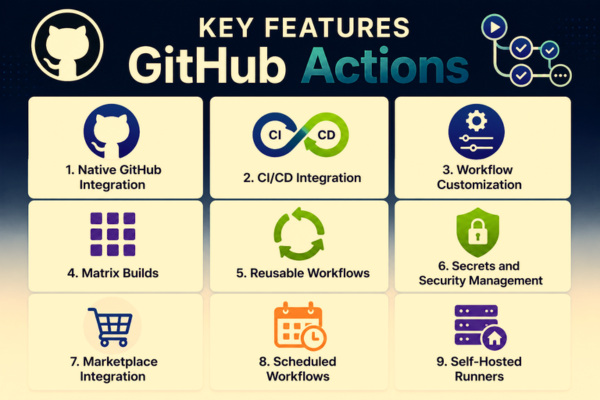
1. Native GitHub Integration
GitHub Actions has seamless integration with GitHub repositories and is one of its biggest strengths. Developers can automate workflows based on pull requests, commits, issues, releases, and branch updates. Since it is built directly into GitHub, workflows run right next to your code, allowing automated testing and feedback directly within issues and pull requests without any additional integrations.
2. CI/CD Integration
GitHub Actions enables automated code validation whenever changes are introduced and supports automated deployments to multiple environments.
CI/CD pipelines can trigger actions on any GitHub webhook event, including automatically applying labels to new issues, triaging bug reports, or assigning code reviewers.
CI workflows can compile code, run unit tests, execute integration tests, and perform security scans. GitHub Actions also supports deployment targets including AWS, Azure, Google Cloud Platform (GCP), Kubernetes, Docker Containers, Heroku, Netlify, and so on.
This helps with early bug detection, improved code quality, and faster feedback loops.
3. Workflow Customization
GitHub Actions provides extensive workflow customization capabilities. You can define conditional execution, job dependencies, environment variables, secrets management, and matrix builds.
For example, the condition if: github.ref == 'refs/heads/main' ensures deployment occurs only from the main branch.
4. Matrix Builds
Matrix builds automate multi-version testing by running multiple jobs simultaneously across multiple configurations, including different operating systems (Linux, Windows, and macOS) and runtime environments (multiple Node.js or Python versions).
Matrix builds offer benefits like better compatibility testing, reduced testing time, and increased confidence in releases.
5. Reusable Workflows
Reusable workflows can be created in GitHub Actions to standardize automation across projects and improve scalability in large development teams.
Reusable workflows offer reduced duplication, easier maintenance, and consistent development practices.
6. Secrets and Security Management
With its secure secret management capabilities, GitHub Actions users can securely store API keys, database credentials, cloud access tokens, deployment secrets, and other environment variables. It can also cache dependencies to reduce subsequent build times and optimize performance.
7. Marketplace Integration
GitHub Marketplace offers thousands of prebuilt, community-tested actions including Docker Actions, AWS Deployment Actions, Slack Notifications, Terraform Automation, and Kubernetes Management.
Developers can quickly integrate third-party services without building custom automation, and use drop-in verified extensions for cloud deployment, security scanning, or notifications.
8. Scheduled Workflows
GitHub Actions supports cron-based job scheduling, primarily used for use cases including database backups, dependency updates, security scans, and report generation.
9. Self-Hosted Runners
Self-hosted runners are used when you need to execute jobs within your own private data center or cloud network. This flexibility of using self-hosted runners makes GitHub Actions suitable for enterprise environments.
With self-hosted runners, you can have custom hardware configurations, access internal networks, improve compliance, and have greater resource control.
Advantages of GitHub Actions
- Simplified CI/CD Implementation: GitHub Actions provides integrated automation capabilities and eliminates the need for additional tools. This reduces setup complexity, lowers maintenance costs, and offers faster onboarding.
- Faster Development Cycles: Automation through GitHub Actions significantly reduces manual intervention and accelerates software delivery. It also shortens release cycles. Developers can automatically build applications, execute tests, and deploy updates.
- Improved Code Quality: With automated testing, code changes are validated before deployment, and developers receive immediate feedback for the new changes. This helps with early defect detection, consistent testing, and reduced production issues.
- Enhanced Collaboration: GitHub Actions integrates with PRs and code reviews, promoting collaboration and maintaining development standards. Teams can verify code automatically, enforce quality gates, and share workflow configurations.
- Cost Efficiency: GitHub Actions reduces infrastructure and operational costs as it eliminates external CI/CD tools, uses GitHub-hosted runners, and reduces manual deployment efforts.
- Scalability: GitHub Actions adapts to varying workload requirements and scales effectively for projects of all sizes. It also supports parallel job execution that further improves scalability.
- Extensive Ecosystem: GitHub Marketplace gives developers access to a vast ecosystem of reusable actions that help in faster implementation, reduced development effort, and community-supported integrations. Instead of building automation from scratch, teams can use these existing solutions.
- Flexibility and Customization: GitHub Actions is a flexible platform suitable for diverse workflows and supports virtually any automation scenario. Users can write custom scripts, create custom actions, integrate external systems, and build complex deployment pipelines.
- Security and Compliance: Modern software development emphasizes security. GitHub Actions ensures security and compliance by providing secret encryption, role-based access control, environment protection rules, workflow approvals, and audit capabilities.
- Multi-Platform Support: GitHub Actions supports multiple operating systems and programming languages, including Linux, Windows, macOS, Java, Python, Node.js, Go, .NET, PHP, Ruby, and Rust.
GitHub, which includes GitHub Actions, offers free usage tiers for public repositories and generous allowances for private repositories, saving high costs.
This broad compatibility allows teams to standardize automation across diverse technology stacks.
Common Use Cases of GitHub Actions
- Automated Testing: You can run tests automatically using GitHub Actions after every code change. Various tests, including unit, integration, and regression testing, can be performed. Read: Codeless Automated Testing.
- Continuous Deployment: Users can deploy applications automatically after successful validation on various target platforms like cloud platforms, containers, and virtual machines.
- Dependency Management: GitHub Actions automatically updates dependencies using scheduled workflows, such as security patch updates or package version checks.
- Code Quality Analysis: GitHub Actions can integrate with code quality analysis tools such as SonarQube, ESLint, and CodeQL to maintain coding standards and consistency.
- Security Scanning: You can perform automated vulnerability assessments using GitHub Actions, including secret scanning, dependency scanning, and container image scanning.
- Notifications and Reporting: GitHub Actions can send updates and notifications through Slack, Microsoft Teams, Email, and Discord, keeping stakeholders informed of workflow outcomes.
Best Practices for Using GitHub Actions
- Use Reusable Workflows: Create shared workflows that can be reused to reduce duplication.
- Protect Secrets: Never hardcode credentials; instead, use GitHub Secrets for sensitive information.
- Implement Branch Protection: Require successful workflow execution before merging code.
- Optimize Workflow Performance: Use caching mechanisms to reduce build times.
- Monitor Workflow Usage: Continuously track resource consumption and execution times.
- Keep Actions Updated: Always use the latest stable versions of GitHub Actions for improved security and functionality.
Conclusion
GitHub Actions is one of the most powerful and user-friendly automation platforms in modern software development. As it integrates CI/CD capabilities directly into GitHub, it simplifies workflow automation, improves development efficiency, and accelerates software delivery.
GitHub Actions has a rich feature set including automated testing, continuous deployment, reusable workflows, matrix builds, secret management, and marketplace integrations, making it suitable for projects ranging from small open-source repositories to large enterprise applications.
The platform provides significant advantages for development teams seeking to adopt DevOps practices and modern software delivery pipelines. As organizations continue to adopt automation and rapid delivery, GitHub Actions is seen as a valuable tool for building efficient, reliable, and scalable development workflows.
Frequently Asked Questions (FAQs)
Can GitHub Actions be used for Continuous Integration (CI)?
Yes. GitHub Actions is widely used for Continuous Integration by automatically building code, running tests, performing code quality checks, and validating changes whenever developers push code or create pull requests.
Can GitHub Actions automate deployments?
Yes. GitHub Actions supports Continuous Deployment (CD) and can automatically deploy applications to platforms such as AWS, Azure, Google Cloud, Kubernetes, Docker, Heroku, Netlify, and Vercel after successful testing.
What are GitHub-hosted runners?
GitHub-hosted runners are pre-configured virtual machines provided by GitHub to execute workflows. They are available with Linux, Windows, and macOS environments, eliminating the need for infrastructure management.
How does GitHub Actions handle secrets and sensitive data?
GitHub Actions provides encrypted secret storage through GitHub Secrets. Users can securely store API keys, access tokens, passwords, and other sensitive information without exposing them in workflow files.
What is GitHub Marketplace in relation to GitHub Actions?
GitHub Marketplace is a repository of reusable actions, integrations, and tools created by GitHub and the community. Developers can quickly add functionality such as deployments, notifications, testing tools, and cloud integrations to their workflows.