
In modern software development, speed and quality go hand in hand. Software applications and features should be delivered faster, while reliability, stability, and user trust remain intact. Continuous Integration and Continuous Delivery (CI/CD) pipelines are the backbone of this fast-paced development model and help tremendously. However, automation alone does not suffice. There is a need for a mechanism to quickly verify whether a newly generated build is viable. If it is good, it is worth testing further; or, it should be rejected.
This is precisely the role that Build Verification Testing (BVT) plays.
BVT is a fundamental testing practice that validates the basic stability and functionality of a software build before it can be passed on for more extensive testing phases. It is a crucial, quick test suite that is run on a new software build and acts as a gatekeeper, ensuring that only testable builds move forward in the development pipeline.
This article explores BVT in depth, what it is, why it matters, how it differs from other testing types, when and how it should be executed, best practices, common challenges, and its role in modern DevOps environments.
What is Build Verification Testing (BVT)?
Definition of BVT
Build Verification Testing (BVT) is a set of automated or manual tests that are run on a newly created software build to ensure that the build is stable enough for further testing.
BVT’s primary objective is not to find all bugs, but to answer a simple and crucial question: Is this build good enough to test?
A build that passes BVT is promoted for deep testing, such as regression, functional, performance, or user acceptance testing. The build is rejected if it fails BVT and is sent back to the development team for fixes.
The BVT test suite usually consists of test cases that validate the core features of the software build. The idea behind BVT is to save time and resources by eliminating the back-and-forth between the build and testing phases.
BVT is highly useful when there are multiple interdependent builds. It is often called smoke testing, as both serve the same purpose and mainly check for build verification and acceptance.
Verifying the basic functions of a registration form, such as page rendering and successful registration with valid inputs, is a classic example of BVT. In general, any build that functions as per the expected behavior passes the BVT testing and moves ahead for further testing.
Key Aspects of BVT
- Purpose: To test whether the build is stable and testable, confirming that the major features are not broken before detailed testing.
- Scope: BVT is limited to a small, focused set of tests covering essential, high-priority, and core functions (e.g., application starts, database connects, login works).
- Timing: It is performed immediately after a new build is generated and is often automated within CI/CD pipelines.
- Outcome: If BVT passes, the build is passed to the QA team for detailed testing. If it fails, the build is rejected and sent back to developers.
Principles of BVT
- Early Testing: BVT is expected to be performed as early as possible in the development cycle to catch issues and bugs at an early stage so that problems are identified and rectified before they become complex and costly to fix.
- Focus on Critical Functionality: BVT focuses on testing the core functionalities of the software component or application that will potentially impact the overall build performance or user experience.
- Test End-to-End Scenarios: BVT includes test scenarios that cover the end-to-end functionality of the system. This helps to verify the interaction between different components of the system.
- Clear and Measurable Criteria: BVT testing has clear and measurable criteria for determining each test case’s expected behavior and success measure.
- Reproducibility: BVT should be reproducible, with the tests being able to execute multiple times with the same inputs and produce the same results. This is important for debugging and investigating issues that arise during testing.
- Documentation: BVT process should be well-documented and include test plans, test cases, and test results. Maintaining a detailed record of the testing process helps facilitate collaboration among team members and provides a reference for future testing and maintenance activities.
- Automation: Automation tools and frameworks should be used whenever feasible to streamline the testing process. Automation increases efficiency, reduces human errors, and enables repeated execution of tests, allowing for faster feedback on the system’s behavior.
Why Is BVT Necessary?
New builds are often generated, sometimes multiple times a day, in a large and fast-moving development environment. Without BVT to assess the builds, testers may waste valuable time and resources executing test cases on broken or unstable builds.
- Detect critical build-blocking issues early, before the build is passed to the QA team for detailed testing.
- Prevent broken builds from entering the test cycle and wasting resources and time.
- Save time, effort, and cost by catching issues early and preventing testing an unstable build that ultimately will be rejected.
- Improve collaboration between development and QA teams.
- Maintain confidence in CI/CD pipelines, as only stable builds will pass BVT and proceed to the next stage.
- Improve efficiency by filtering out unstable builds, allowing QA to focus on more in-depth testing.
- Maintain velocity in Agile/DevOps for rapid, iterative releases by providing quick feedback.
BVT in the Software Development Lifecycle (SDLC)
Placement of BVT in SDLC
BVT is typically performed immediately after a build is deployed to a test environment. It takes place after build creation (by developers or CI systems) and before detailed testing phases (functional, regression, system testing, etc.)
- Developer commits code.
- The CI system generates a build.
- Build is deployed to a test environment.
- BVT is executed to test the core functionality.
- If BVT passes → proceed with detailed testing, including regression, UAT, and functional.
- If BVT fails, → the build is rejected and passed to the dev team for fixing.
BVT in Agile and DevOps
- Builds are frequent in Agile and DevOps setups.
- Releases are continuous.
- Feedback loops must be short and quick.
In these environments, BVT is usually fully automated and tightly integrated into CI/CD pipelines to ensure rapid validation of every build.
What Does BVT Typically Cover?
BVT focuses on critical, high-priority areas that define the core functionality of the application, and not exhaustive testing. The exact scope varies depending on the application, but common checks include:
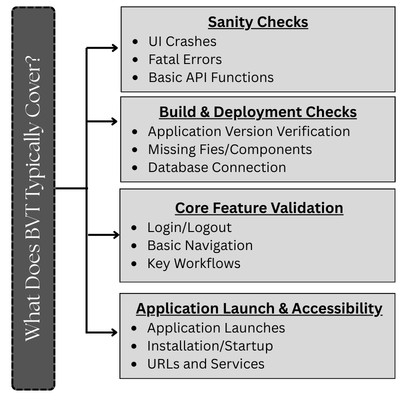
1. Application Launch and Accessibility
- Application launches and starts successfully.
- No installation or startup failures are observed.
- URLs or services are reachable.
2. Core Feature Validation
- Login/logout functionality.
- Basic navigation of the application.
- Key workflows essential to the application, for example, adding a product to a cart and ordering.
3. Build and Deployment Checks
- The correct version of the application is deployed.
- No missing files or components.
- Successful database connection and access.
4. Sanity Checks
- No major UI crashes observed.
- No fatal errors in logs.
- Basic API responses are functional and working.
What Does BVT Not Cover?
- BVT does not replace regression testing.
- It does not validate edge or boundary cases.
- BVT does not ensure full functional correctness.
- It does not test performance, security, or scalability in depth.
BVT is broad in coverage but not deep, as it focuses on speed and coverage of critical functionality, but not in depth.
BVT vs Smoke Testing vs Sanity Testing
BVT is often confused with smoke testing and sanity testing. While they are related, they serve different purposes as summarized in the sections below:
BVT vs Smoke Testing
| Aspect | BVT | Smoke Testing |
|---|---|---|
| Purpose | Verify build stability | Verify basic features |
| Focus | Build acceptance | Feature validation |
| Timing | Immediately after build | After minor changes |
| Scope | Build-level checks | Feature-level checks |
| Automated | Usually | Often automated |
| Trigger | Every code integration | Scheduled or CI |
In many organizations, BVT and smoke testing overlap or are even combined.
BVT vs Sanity Testing
| Aspect | BVT | Sanity Testing |
|---|---|---|
| Purpose | Verify build stability | Validate new changes |
| Focus | Build acceptance | Validate fixes |
| Timing | Immediately after build | After a bug fix or update |
| Scope | Broad but Shallow | Narrow but deep |
| Automated | Usually | Often manual |
| Trigger | Every code integration | Post-defect fix |
Sanity testing is more targeted (checking defect fixes), whereas BVT is broader and more systematic.
Read: Sanity Testing vs. Smoke Testing
Manual vs Automated BVT
Manual BVT is performed by human testers for flexibility and intuition, but is slow and error-prone. Automated BVT is a modern standard for CI/CD pipelines and uses scripts for speed, accuracy, and scalability. It requires a higher initial investment and setup. Automated BVT quickly verifies core functionalities in new builds, preventing regressions. Manual BVT, on the other hand, is better for exploratory testing or UI/UX. However, automation is still superior for repetitive, frequent build checks.
Why is Automation Essential for Build Verification Testing?
Automation makes testing extremely accessible and easy. BVT tests are executed repeatedly to ensure the build is ready for the testing phase, and automating these tests saves time and cost. The best way is to automate everything from start to end, including the build release process and the BVT results.
Automation tools are used for executing the test. BVT focuses only on core functionalities, and hence, tools that offer simple yet effective ways to write and execute tests can be used.
Manual BVT
- Small projects
- Early development stages
- Applications with limited automation
- Manual BVT is easy to set up.
- It is flexible and uses human insight for complex UI/UX issues.
- No automation tools required, and hence does not involve an initial setup cost.
- Manual BVT is adaptable to rapid UI testing and is good for exploratory testing.
- Manual BVT is slow and time-consuming.
- It is error-prone due to human oversight.
- Manual BVT is not scalable and is inconsistent.
Automated BVT
Automated BVT is the preferred approach in modern development environments that include CI/CD pipelines.
- Automated BVT is fast and reliable.
- It provides consistent results.
- Automated BVT can easily integrate with CI/CD and save significant time and effort.
- Scales well with frequent builds.
- Initial setup effort for automated BVT is high.
- It is less flexible for unique scenarios.
- It needs maintenance with code changes.
Automated BVT is highly effective with automation frameworks, test scripts, and CI tools.
BVT in CI/CD Pipelines
In CI/CD pipelines, BVT acts as a crucial first quality gate, a set of automated, high-priority tests that are executed after a new build to confirm its stability and core functionality. If a build fails its BVT, it’s immediately rejected, saving resources and maintaining pipeline velocity.
How BVT Fits into CI/CD
- Code Commit: Developer commits code.
- Build Generation: Code is compiled into a runnable artifact.
- Deployment to the Test Environment: Build is deployed to the test environment.
- Automated BVT Execution: Basic tests are run to check build stability.
- Outcome: If
- Pass → Further tests (unit, integration, acceptance) are triggered.
- Fail → Build is rejected and feedback sent to the dev team.
In essence, BVT acts as the first quality gate, providing immediate feedback to developers and reducing testing bottlenecks. It also results in faster release cycles and improves overall build quality.
Entry and Exit Criteria for BVT
For BVT, Entry Criteria are the conditions a software build must meet to start testing, while Exit Criteria are the conditions for completing BVT. These criteria focus on core functionality and quick feedback and act as gatekeepers for build acceptance, preventing unstable builds from progressing.
Entry Criteria
- A complete and deployable build is available.
- Build is deployed correctly.
- Smoke test/pre-BVT has passed.
- The test environment is stable, with tools and data set up and configured.
- Critical features and workflows are implemented and accessible.
- BVT test cases are prepared and aligned with requirements.
Exit Criteria
- All defined BVT test cases have been executed, and a high percentage of critical BVT test cases have passed.
- No build-blocking defects or showstoppers exist in core features.
- Results (pass/fail) are reported to the team quickly (e.g., within hours).
- A clear decision is made about the build; accepted for further testing (like regression) or rejected for fixes.
Best Practices for Effective BVT
- Keep BVT Short and Focused: Aim to execute the BVT suite quickly, typically in minutes and not in hours, to avoid bottlenecks in the development cycle.
- Automate Wherever Possible: Automation BVT to fit seamlessly into CI/CD pipelines, improving speed and reliability, and providing immediate, unbiased feedback on every code commit.
- Focus on Business-critical Flows: Test the most critical, high-level test cases, such as app startup, user login, main navigation, and database connection, that ensure the application is testable.
- Run BVT on Every Build: Execute BVT on every build to maintain consistency.
- Maintain BVT Scripts Regularly: Update the BVT test suite regularly to reflect functional changes in the application.
- Fail Fast and Notify Clearly: If BVT fails, reject the build immediately and provide actionable feedback to developers.
- Use Only Stable Tests: Include only mature, reliable test cases and not flaky tests that can cause false failures and reduce trust.
- Detailed Logging: Use comprehensive logging that can aid in debugging and help to quickly identify the root cause of failures.
- Key Metrics Tracking: Use metrics such as build pass rate, execution time, and flakiness rate to improve reliability over time.
Challenges in Implementing BVT
- Identifying the proper test scope and including the “critical” functionalities in the BVT is challenging. Including too few tests may miss major bugs, while including too many turns BVT into a slow, regression-like suite.
- Maintaining scripts with frequent UI changes is a challenge and can slow down the testing process.
- BVT test cases must be regularly updated to reflect frequent changes in the application’s functionality, failing which may result in outdated, ineffective, or broken tests.
- Tests that produce inconsistent results (failing and passing without code changes) or Flaky Tests undermine trust in the BVT process, leading developers to ignore failures.
- BVT should be a fast process, but including too many tests or overly complex scenarios can make the process too slow. This defeats the purpose of providing immediate feedback to developers.
- Manual execution of BVT is too time-consuming, but developing and maintaining a robust, automated suite requires significant upfront and ongoing investment.
Conclusion
Build Verification Testing (BVT) is a foundational testing practice in modern software development. It validates the basic stability and critical functionality of a build early, preventing broken builds from progressing through the pipeline and wasting valuable testing effort.
In Agile, DevOps, and CI/CD-driven modern environments, BVT serves as a crucial quality gate, ensuring stable builds, smoother releases, and fast feedback. Although BVT cannot replace detailed testing, it is indispensable in maintaining speed without sacrificing quality.
Organizations that invest in well-designed, automated BVT processes gain better control over build quality, faster delivery cycles, and higher confidence in every release.