
Gone are the days when the Waterfall model reigned supreme – we’re in a new era where quality assurance isn’t an afterthought. In modern software development, quality cannot be “tested in” at the end; it must be incorporated into the process from the very beginning. Test-Driven Development (TDD) and Acceptance Test-Driven Development (ATDD) are the two practices that strongly support this philosophy.
| Key Takeaways: |
|---|
|
In this article, we’ll dive into the finer points of how to make ATDD and TDD work for your project and also discuss dos and don’ts for successful development.
What is TDD?
- Unit tests are written first, even before there’s any code.
- Then, the tests are run. Naturally, they fail. This is the Red stage.
- Now, you write just enough code to make the tests pass, that is, make it Green.
- Developers run these tests multiple times to make them pass, and refactor code wherever necessary to make it efficient.
This cycle, involving the steps above, is often referred to as Red → Green → Refactor. TDD focuses on small units of functionality, ensuring correctness at the code level.
TDD is known to be efficient. But this seems a bit cumbersome, don’t you think? Especially if you’re working in an environment where changes are frequent. Well, fret not.
We will look at some great tips in the sections below, based on Urs Enzler’s clean TDD and ATDD cheatsheet.
General TDD Principles
| Principle | Explanation |
|---|---|
| A test checks one feature | A test checks exactly one feature of the testee. That means it tests all the things included in this feature, but no more. This includes more than one call to the testee. This way, the tests serve as samples and documentation of the testee’s usage. |
| Baby steps | Make tiny little steps. Add only a little code to the test before writing the required production code. Then repeat. Add only one Assert per step. |
| Keep tests simple | Whenever a test becomes complicated, consider splitting it into multiple classes. |
| Prefer verifying state over behavior | Use behavior verification only if there is no state to verify. Since TDD tests are more direct, state verification will yield better results. Refactoring also becomes easier due to less coupling to the implementation. |
| Test Domain-Specific Language (DSL) | Use test DSLs to simplify reading tests, builders to create test data using fluent APIs, and assertion helpers for concise assertions. |
The Relation Between TDD and Unit Tests
If you’ve understood TDD, then you’ve realized that we need some form of test cases to get coding started. These will be unit tests. However, the two differ: TDD is a methodology that requires writing tests before code, whereas unit testing can be done after code is written. Thus, TDD is “using” unit tests.
In other words, unit tests serve as the primary driver for designing and developing production code.
Unit Testing Principles
| Principles | Explanation |
|---|---|
| Fast | Unit tests have to be fast so that they can be executed often. |
| Isolated | No dependencies between unit tests. It should be clear where the failure happened. |
| Repeatable | No assumed initial state, nothing left behind, no dependency on external services that might be unavailable (databases, file system …). |
| Self-validating | Tests should be clear – either pass or fail, no in-betweens |
Use of Fakes in Unit Tests
Unit testing heavily relies on Fakes such as Stubs, Spies, Mocks, and Test Doubles. Fakes in unit tests are simplified, working implementations of dependencies to simulate real-world behavior without the overhead of production infrastructure. A fake contains actual logic, such as an in-memory database or a file system emulator, unlike stubs (which return fixed data) or mocks (which verify interactions).
You want to use fakes to ensure isolation in your unit tests. Here are some dos and don’ts to manage them.
| Do’s ✅ | Don’ts ❌ |
|---|---|
| Isolation from the environment Use fakes to simulate all dependencies of the testee. | Mixing stubbing and expectation declaration Make sure that you follow the AAA (arrange, act, assert) syntax when using fakes. Keep it clean by allotting a block to set up stubs for the testee to function as intended. Then, list your expectations from the testee. |
| Faking framework Use a dynamic fake framework for fakes that show different behavior in different test scenarios (little behavior reuse). | Checking fakes instead of the testee Tests that do not check the testee but values returned by fakes. Normally, it is due to excessive fake usage. |
| Manually written fakes Use manually written fakes when they can be used in several tests, and they have only a little changed behavior in these scenarios (behavior reuse). | Excessive fake usage If your test needs a lot of fakes or fake setup, then consider splitting the testee into several classes or providing an additional abstraction between your testee and its dependencies. |
Unit Test Smells
- Test not testing anything: A passing test that at first sight appears valid but does not test the testee.
- Test needing excessive setup: A test that needs dozens of lines of code to set up its environment. This noise makes it difficult to see what is really tested.
- Large test with assertions for multiple scenarios: While the test might be valid, it might be too large. Reasons can be that this test checks for more than one feature or the testee does more than one thing.
- Checking internals: A test that directly accesses the internals (private/protected members) of the testee. This is a refactoring killer.
- Test only runs on the developer’s machine: A test that is dependent on the development environment and fails elsewhere. Use continuous integration to catch them as soon as possible.
- Test checking more than necessary: A test that checks more than it is dedicated to. The test fails whenever something changes that it checks unnecessarily. Especially probable when fakes are involved or when checking for item orders in unordered collections.
- Irrelevant information: The test contains information that is not relevant to understanding it.
- Chatty test: A test that fills the console with text – probably used once to check for something manually.
- Test swallowing exceptions: A test that catches exceptions and lets the test pass.
- Test not belonging in host test fixture: A test that tests a completely different testee than all other tests in the fixture.
- Obsolete test: A test that checks something no longer required in the system. It may even prevent the clean-up of production code because it is still referenced.
- Hidden test functionality: Test functionality is hidden in either the SetUp method, base class, or helper class. The test should be clear by looking at the test method only – there should be no initialization or assertions elsewhere.
- Bloated construction: The construction of dependencies and arguments used in calls to the testee makes the test hardly readable. Extract to helper methods that can be reused.
- Unclear failure reason: Split test or use assertion messages.
- Conditional test logic: Tests should not have any conditional test logic because it’s hard to read.
- Test logic in production code: Tests depend on special logic in production code.
- Erratic test: The test sometimes passes and sometimes fails due to leftovers or the environment.
Now, let’s look at some points to keep in mind at each stage of TDD.
Test Writing
| Area | Guideline |
|---|---|
| Design tests keeping in mind testability | A constructor should be simple Objects have to be easily creatable. Otherwise, easy and fast testing is not possible. |
| Constructor – lifetime Pass dependencies and configuration/parameters into the constructor that have a lifetime equal to or longer than the created object. For other values, use methods or properties. | |
| Understand the Algorithm Working alone is not enough, so make sure you understand why it works. | |
| Test structure | Arrange – Act – Assert Structure the tests always by AAA. Never mix these three blocks. |
| Test namespace Put the tests in the same namespace as their associated testee. | |
| Unit test methods show the whole truth Unit test methods show all the parts needed for the test. Do not use the SetUp method or base classes to perform actions on the testee or dependencies. | |
| Set up / TearDown for infrastructure only Use the SetUp / TearDown methods only for the infrastructure that your unit test needs. Do not use it for anything that is under test. | |
| Test method naming Use a pattern that reflects the behavior of tested code, e.g., Behavior [_OnTrigger][_WhenScenario] with [] as optional parts. | |
| Resource files Test and resource are together. | |
| Naming | Naming SUT test variables Give the variable holding the System Under Test always the same name (e.g., testee or SUT). Clearly identifies the SUT, robust against refactoring. |
| Naming result values Give the variable holding the result of the tested method always the same name (e.g., result). | |
| Anonymous variables Always use the same name for variables holding uninteresting arguments to tested methods (e.g., anonymousText, anyText). |
Red Bar Patterns
These patterns occur when tests are failing, typically in the “Red” phase of TDD. This phase helps identify the problem you’re solving and ensures your test setup is meaningful.
| Pattern | Explanation |
|---|---|
| One-step test | Pick a test you are confident you can implement that maximizes the learning effect (e.g., impact on design). |
| Partial test | Write a test that does not fully check the required behavior but brings you a step closer to it. Then, use the Extend Test as mentioned below. |
| Extend test | Extend an existing test to match real-world scenarios better. |
| Another test | If you think of new tests, then write them on the TO DO list, and don’t lose focus on the current test. |
| Learning test | Write tests against external components to make sure they behave as expected. |
Green Bar Patterns
These patterns occur when tests are passing, typically in the “Green” phase. This phase focuses on ensuring the implementation satisfies the test, often with minimal effort.
| Pattern | Explanation |
|---|---|
| Fake it (Till you make it!) | Return a constant to get the first test running. Refactor later. |
| Triangulate-drive abstraction | Write a test with at least two sets of sample data. Abstract implementation of these |
| Obvious implementation | If the implementation is obvious, then just implement it and see if the test runs. If not, then step back and just get the test running and refactor it. |
| One-to-many – drive collection operations | First, implement the operation for a single element. Then, step to several elements (and no element). |
What is ATDD?
ATDD (Acceptance Test-Driven Development) follows a trajectory similar to that of TDD. Just that over here, you write acceptance tests before you start coding. Acceptance tests are the ones that are derived from acceptance criteria that are decided at the time of formulating the requirement.
- You collaborate with your team of developers, testers, and business stakeholders to get a list of acceptance criteria. This is the process of discussing and defining.
- Then, you write the actual tests. These are written before any code is developed.
- Developers now write the code to pass these tests.
- Now, run the tests to ensure that they pass. This is a cyclic process. Once tests start to run, you can refactor them too, over time.
ATDD is a collaborative approach involving developers, testers, and business stakeholders and defines the acceptance criteria before development begins, typically using executable specifications.
Tips for Better ATDD
| Tips | Explanation |
|---|---|
| Use acceptance tests to drive your TDD tests | Acceptance tests check for the required functionality. Let them guide your TDD. |
| User feature test | An acceptance test is a test of a complete user feature, from top to bottom, that provides business value. |
| Automated ATDD | Use automated Acceptance Test-Driven Development for regression testing and executable specifications. |
| Component acceptance tests | Write acceptance tests for individual components or subsystems so that these parts can be combined freely without losing test coverage. |
| Simulate system boundaries | Simulate system boundaries like the user interface, databases, file system, and external services to speed up your acceptance tests and to be able to check exceptional cases (e.g., a full hard disk). Use system tests to check the boundaries. |
| Avoid the acceptance test spree | Do not write acceptance tests for every possibility. Write acceptance tests only for real scenarios. The exceptional and theoretical cases can be covered more easily with unit tests. |
The Importance of Combining ATDD and TDD
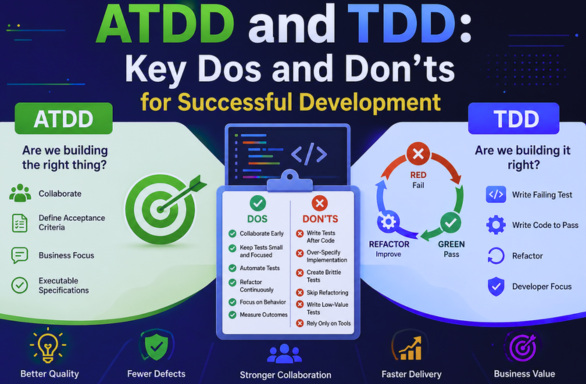
- ATDD defines what needs to be built. It typically answers the question “Are we building the right thing?”
- TDD ensures that what is built is correct and answers the question “Are we building it right?”
Together, TDD and ATDD create a powerful feedback loop from business intent to implementation, reducing ambiguity, improving collaboration, and minimizing rework.
Key Dos for Successful Implementation
- Start with Clear Acceptance Criteria
ATDD begins with clarity. Before writing any code or tests, ensure that the acceptance criteria are specific, measurable, and testable.Use formats like Given-When-Then (Gherkin Syntax) to clearly define behavior.For example, to define the user behavior of adding items to the cart. The syntax will be:
Given that a user is logged in
When they add an item to the cart
Then the cart count should increase
This ensures everyone, developers, testers, and stakeholders, shares the same understanding. - Collaborate Across Roles
ATDD is not just a testing activity, but is a team activity involving product owners (business intent), developers (implementation feasibility), and QA (edge cases and validation). These are the three amigos that collaborate to help reveal hidden assumptions early and reduce costly misunderstandings later.
- Keep Tests Small and Focused (TDD)
In TDD, each test should validate only one behavior or feature. This is beneficial for easier debugging, better readability, and faster feedback.Avoid writing large, complex tests that verify multiple conditions in a single test. Granular tests lead to cleaner code design.
- Follow the Red-Green-Refactor Cycle Strictly
Skipping steps in TDD weakens its effectiveness. Follow the Red->Green->Refactor cycle of TDD to ensure the test fails for the right reason (Red), write just enough code to pass the test (Green), and improve the code without changing behavior (Refactor), as already discussed.This way, you can prevent over-engineering and keep code lean.
- Treat Tests as First-Class Citizens
Tests are part of your codebase and not secondary artifacts. Hence, treat them as primary artifacts and maintain, refactor, and review them during code reviews.High-quality tests are easier to maintain and act as living documentation.
- Use ATDD to Drive Conversations, Not Just Tests
ATDD is not mere automation but is about shared understanding. You can use it to clarify requirements, identify edge cases, and define success criteria.The discussion itself among developers, QA, and business stakeholders is often more valuable than the resulting test.
- Automate Acceptance Tests
Manual acceptance testing doesn’t scale as projects grow and is not practical enough. Automated ATDD tests provide fast feedback, reduce regression risks, and enable continuous delivery.Use tools like Cucumber, SpecFlow, or modern AI-based testing platforms that bridge the gap between business language and executable tests.
- Refactor Tests Along with Code
Your tests must evolve with your code. Hence, refactor regularly to remove duplication, improve naming, and simplify setup. Over time, neglected tests become brittle and unreliable, reducing confidence in the system.
- Use TDD to Improve Design
TDD naturally leads to loose coupling, high cohesion, and better modularity.If you feel it is difficult to write tests, it often indicates poor design. At this point, you should rethink your architecture.
- Measure Outcomes, Not Just Adoption
Remember, you should not adopt TDD/ATDD just because they’re popular. Instead, measure parameters such as defect rates, deployment frequency, cycle time, and code maintainability, and then adopt the approach.Ultimately, the goal is improved outcomes and not just following a methodology.
Key Don’ts to Avoid Common Pitfalls
- Don’t Write Tests After the Code (TDD Anti-pattern)
In TDD, you begin with tests. If you write tests after implementation, it’s no longer TDD but just testing. Without TDD, you may miss edge cases, lower design quality, and reduce confidence. So, follow TDD and always write tests first.
- Don’t Over-Specify Implementation Details
Tests should focus more on behavior, not internal implementation. It is a bad practice to test private methods or verify internal state unless absolutely required.Rather, it’s a good practice to test observable outcomes.Tests should not be overly rigid, as they make refactoring difficult and slow down development.
- Don’t Treat ATDD as Just Another Testing Layer
ATDD is a requirement discovery tool that works on collaboration between developers, QA, and business stakeholders. It is not “extra testing”.You lose its biggest benefit if you skip this collaboration and jump straight to writing tests.
- Don’t Create Brittle Tests
Brittle tests are tests that break frequently, require constant updates, and reduce trust in the test suite.Hardcoded data, poor test design, and tight coupling to UI elements are some of the common causes of brittle tests.You should keep these causes in mind and aim for stable, resilient tests that fail only when behavior truly changes.
- Don’t Ignore Test Readability
Tests should be readable and easy to understand, even for non-developers (especially in ATDD).Avoid creating tests with cryptic names or adding complex logic.Instead, prefer creating tests with descriptive names and a clear structure. Tests that are readable with self-descriptive names double as documentation.
- Don’t Skip Refactoring
Many times, teams stop after making tests pass, leading to messy code over time.Refactor regularly to improve structure, remove duplication, and maintain clarity. Skipping refactoring undermines the entire TDD process.
- Don’t Write Too Many Low-Value Tests
Keep in mind that not all tests provide equal value. Avoid redundant tests or testing trivial getters/setters.Instead, focus on business logic, edge cases, and critical paths.Quality matters more than quantity (number of tests).
- Don’t Isolate ATDD from Development Workflow
ATDD should be integrated into most of the process, including sprint planning, development cycles, and CI/CD pipelines. It loses its effectiveness and becomes a bottleneck if you keep it as a separate activity.
- Don’t Rely Solely on Tools
You can use tools for TDD and ATDD as they help. But don’t rely on them completely, as they don’t guarantee success. Along with tools, you should also have a positive mindset, discipline, and collaboration to be successful. For instance, if you don’t follow proper practices, even the best tools will fail.
- Don’t Expect Immediate Perfection
When you adopt any methodology, including TDD and ATDD, it takes time to produce results. TDD and ATDD used together have common early challenges as follows:
- Slower development speed
- Learning curve
- Resistance from teams
However, they reap long-term benefits in the form of faster debugging, higher quality, and reduced rework.So, be patient and focus on continuous improvement.
Practical Tips for Teams
- Start Small: Introduce TDD and ATDD gradually:
- Begin with a single feature
- Expand as the team gains confidence
- Invest in Training: Ensure team members understand:
- The purpose behind practices
- How to write effective tests
- Integrate with CI/CD: Automated tests should run on every build to:
- Catch issues early
- Maintain code quality
- Encourage Pair Programming: Pairing helps:
- Share knowledge
- Improve test quality
- Reinforce best practices
Conclusion
ATDD and TDD are powerful methodologies that have the potential to transform how teams build software. When they are applied correctly to the development process, they ensure the process is quality-driven and business-aligned.
This article has highlighted ways to ensure effective TDD and ATDD, along with dos and don’ts you should consider when applying these methodologies. But remember that your testing will only be as helpful if you write clean code. While there are many ways to test code, make sure to pick approaches that fit your specific needs.
You can embrace this mindset (ATDD & TDD) to consistently deliver software that is more reliable, maintainable, and aligned with user needs.
Frequently Asked Questions (FAQs)
What is the main difference between ATDD and TDD?
ATDD (Acceptance Test-Driven Development) focuses on defining requirements and validating that the system meets business needs, while TDD (Test-Driven Development) focuses on writing unit tests to ensure the code works correctly at a technical level.
Why should teams use both ATDD and TDD together?
Using both ensures that teams build the right product (ATDD) and build it correctly (TDD). This combination reduces misunderstandings, improves quality, and minimizes rework.
Can TDD and ATDD slow down development?
Initially, they may seem slower due to the learning curve. However, they significantly speed up development in the long run by reducing bugs, rework, and debugging time.
When should teams adopt ATDD and TDD?
Ideally, both should be adopted early in the development lifecycle. However, teams can introduce them gradually, starting with new features or critical modules.
Are ATDD and TDD suitable for all types of projects?
They are highly beneficial for most projects, especially those requiring high reliability and frequent changes. However, adoption may vary depending on team maturity and project complexity.