
In today’s digital world, mobile applications have become a necessity for businesses and individuals. Developers and QA teams must ensure that mobile apps function flawlessly across different environments, operating systems, and devices.
This is where mobile testing tools like Kobiton play an important role.
| Key Takeaways: |
|---|
|
This article provides a comprehensive review of Kobiton, including its features, advantages, disadvantages, and overall effectiveness in mobile testing.
What is Kobiton?
Kobiton is a cloud-based mobile device testing platform that supports both automated and manual testing of mobile applications.
Kobiton allows developers and testers to access a wide range of real mobile devices and simulators and perform functional, visual, and performance testing. The platform offers features such as device logs, screenshots, and video recording, which developers and testers can use to debug issues and track the progress of their testing efforts.
Kobiton supports testing on both real devices and virtual environments, including Android and iOS.
- Real device cloud access
- Automated and manual testing capabilities
- Integration with CI/CD pipelines
- Performance monitoring and analytics
Common mobile testing challenges, such as device fragmentation, limited access to physical devices, and inconsistent test environments, are effectively addressed by Kobiton.
Kobiton is particularly helpful for organizations that need to ensure their applications perform consistently across multiple devices and operating systems.
Kobiton Key Features
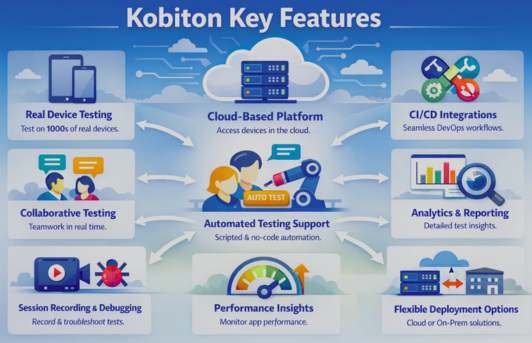
Kobiton offers a range of features that help the team perform mobile testing effectively. Here are some of the features:
Real Device Testing
One of Kobiton’s standout features is its real device testing capabilities. Unlike simulators or emulators, testing on actual devices provides more accurate results because it accounts for each device’s unique hardware and software configurations. Using Kobiton, teams can access an extensive library of real devices, including iOS and Android mobile phones, tablets, and wearables. Kobiton also allows remote access to these devices, so developers and testers can test from anywhere, at any time.
Cloud-Based Platform
Kobiton is a cloud-based platform, meaning you can access it from anywhere, at any time, as long as you have an internet connection. It is ideal for remote teams, developers, and testers who need to collaborate from different physical locations. Since Kobiton is a cloud-based platform, teams can add or remove devices as needed, enabling scalability and flexibility.
It also eliminates the need for maintaining physical device labs and supports parallel testing.
CI/CD Integrations
Kobiton integrates seamlessly with popular DevOps tools such as Jenkins, GitHub, and Jira. Teams can incorporate testing into their CI/CD pipelines, reducing release cycles and improving efficiency.
Analytics and Reporting
Kobiton provides detailed analytics and reporting that help you identify trends and patterns in your testing data and make informed decisions about your mobile application. For example, you can view device logs, screenshots, and video recordings to pinpoint the source of issues and identify areas for improvement.
Collaborative Testing
Teams can collaborate on testing efforts, share devices, and test scripts, providing real-time access to test results and feedback using Kobiton. This collaboration can improve team productivity and efficiency, ensuring that everyone is working towards a common goal.
Automated Testing Support
Kobiton supports popular testing frameworks such as Appium, Selenium, Espresso, and XCUITest, making integration into your existing testing workflow easy. This integration allows you to use your existing scripts and test suites, saving time and effort.
Teams can use scriptless automation and AI-driven testing features to automate test cases without extensive coding.
Session Recording and Debugging
Kobiton can record testing sessions, allowing teams to replay test sessions, analyze logs, and identify issues quickly. These features further enhance collaboration between developers and testers.
Performance Insights
The Kobiton platform provides detailed insights into app performance, device behavior, and test execution results, and helps teams optimize application performance before release.
Flexible Deployment Options
Kobiton supports multiple deployment models, including public cloud, private cloud, and on-premise models. This makes it a flexible platform suitable for both small teams and large enterprises.
Kobiton Reviews (User Feedback)
Users highly regard Kobiton for its real-device mobile testing, offering a vast, accessible library of Android and iOS devices for manual and automated testing. Its ease of use, a user-friendly interface, scriptless automation capabilities, and detailed session logging are often praised. However, some users report limited availability of specific devices and occasional slow connections.
Overall Ratings: According to Gartner, the average rating for Kobiton is around 4.2 – 4.3 out of 5.
Positive Feedback
- Ease of use and quick setup
- Access to a wide range of devices
- Ability to test on real devices
- Seamless integration with development tools
- Robust CI/CD support
For example, users often highlight Kobiton’s features as “easy to use and user-friendly” and “testing from anywhere.”
Negative Feedback
- Occasional device unavailability
- Slow performance or lag
- Limited reporting features
- Learning curve for beginners
Examples of Successful Kobiton Use
Many companies have used Kobiton to improve their mobile testing efforts. Here are some examples of successful Kobiton use:
EngagedMedia
EngagedMedia needed a real device cloud to test their mobile patient engagement solution. They chose Kobiton for its robust infrastructure, secure Real Device Cloud, and automation capabilities. With Kobiton, their app became over 10 times more stable, experienced 28 times faster issue resolution, and saw actual device performance improve by over 4 times. In addition, they achieved 40% automation with Kobiton and ensured compliance with FDA regulations. Kobiton helped EngagedMedia deliver high-quality digital experiences to patients quickly and efficiently.
ABN AMRO Bank N.V.
ABN AMRO Bank N.V. faced challenges testing mobile applications due to a dispersed domestic and international team using different physical devices, leading to high costs and limited collaboration.
Kobiton, a device management solution, helped ABN AMRO overcome these challenges by providing a shared bank of devices for testing and enabling regression testing automation through HP UFT. Additionally, Kobiton’s private device cloud ensured compliance with data security restrictions. As a result, in less than 9 months, ABN AMRO saw increases in efficiency, productivity, and release quality, and a reduction in manual regression testing time.
Simplyhealth
Simplyhealth, a UK-based health insurance company, faced multiple challenges in delivering mobile applications as its customers increasingly used mobile devices. They were using mobile device simulators that did not accurately represent real devices, cross-platform testing was becoming impossible, and testing bottlenecks were affecting customer service levels.
Simplyhealth opted for Kobiton, which offered a private cloud infrastructure, secure implementation, and comprehensive management of mobile application testing assets. The solution enabled early-stage testing, leveraged existing automation frameworks, offered a simple user interface, enabled scalability for future growth, and was backed by dependable, knowledgeable support.
Kobiton helped Simplyhealth strengthen the mobile user experience through more efficient testing and adoption across the organization, promote collaboration, increase efficiency, and enable a flexible work environment for a distributed workforce.
Pros and Cons of Kobiton
- Access to Real Devices: Real device testing is Kobiton’s biggest strength. It provides more accurate results than simulators and emulators.
- Extensive Device Coverage: Kobiton provides access to a wide range of devices across brands, operating systems, and screen sizes, ensuring compatibility across diverse environments.
- Cloud-Based Accessibility: The cloud-based platform provides flexibility and scalability. It also allows teams to test from anywhere, collaborate effectively, and reduce infrastructure costs.
- Integration with DevOps & Other Tools: Kobiton integrates seamlessly with CI/CD pipelines, enabling faster releases, continuous testing, and improved workflow automation. It also integrates with popular testing frameworks, saving time and effort.
- Automation Capabilities: Kobiton simplifies test creation, execution, and maintenance with its scriptless automation, improving productivity and reducing manual effort.
- Session Recording and Collaboration: Kobiton offers a session recording feature that enhances debugging, issue tracking, and team collaboration. This improves overall team productivity and efficiency.
- Performance Monitoring: Kobiton helps the team identify performance bottlenecks, optimize user experience, and ensure app stability.
- Flexible Deployment Options: Kobiton adapts to different organizational needs by supporting cloud and on-premises deployments.
- Detailed Reporting: Detailed analytics and reporting enable informed decision-making.
- High Cost: Kobiton is relatively expensive, especially for small teams or individual developers. Its pricing depends on usage, device access, and features.
- Execution Speed: Slow compared to competitors, leading to automated tests failing due to connection timeouts.
- Not Intuitive UI: The UI is non-customizable, making it hard to resize windows, hide logs, and split windows.
- Limited Support for Certain Devices: While Kobiton offers an extensive library of devices, the most modern devices are scarce and may not be available for testing.
- Learning Curve: The platform can be complex, and some users, particularly beginners, may need time to learn.
- Device Availability Issues: Certain public cloud devices are unhealthy and experiencing issues with memory, network, etc., affecting test results. Users have also reported limited access to some devices, device downtime, and maintenance issues.
- Performance and Stability Issues: Performance and execution efficiency may be affected due to slow device response, connectivity issues, and occasional bugs.
When to Use Kobiton, and When Not to Use It?
Kobiton is best suited for medium-to-large-sized teams that prioritize scaling, high-performance testing, and speed. When you want access to a large cloud library of real iOS and Android devices, you go for Kobiton.
- Real Device Testing: When you want to test hardware-, network-, and OS-specific behavior, you choose Kobiton. In general, go with Kobiton when you need to test on physical devices, not emulators.
- AI-Powered Automation: If your requirement is scriptless automation or AI-driven Appium script generation, choose Kobiton to reduce maintenance efforts.
- Parallel Testing: Kobiton speeds up CI/CD workflows and runs tests concurrently.
- Manual Exploration: If you want high-performance, low-latency manual testing with features like 30 frames-per-second recording, opt for Kobiton.
- Accessibility Testing: Choose Kobiton when you use AI for automated accessibility checks (WCAG 2.2 AAA).
- Small/Simple Projects: If mobile apps are simple and low-budget, it can be overkill.
- Limited Budgets: As a premium service, it can cost more than using basic simulators or entry-level cloud tools.
- Desktop/Web-Only Needs: Kobiton is focused solely on mobile apps and browsers. It is not suited for desktop or web-only applications.
- Strict Privacy Environments: If some teams need on-premises infrastructure rather than private devices, this is not suitable.
Future of Kobiton in Mobile Testing
The future of Kobiton in mobile testing emphasizes AI-driven, scriptless automation and real-device testing with a focus on speeding up release cycles while improving quality.
- AI-driven Testing Automation Capabilities: Kobiton uses AI to detect, aggregate, and analyze bugs faster. It uses AI-powered scriptless testing, which automatically converts manual tests into executable Appium scripts.
- Improved Device Reliability: The platform emphasizes testing on real devices rather than simulators, ensuring a high level of accuracy in the user experience.
- Intelligent Quality Suite: The platform includes visual automated testing and payload capture to improve performance testing.
- Accessibility and Audio Testing: Recently, Kobiton expanded its audio injection capabilities to automated and manual testing, which is crucial for testing voice-driven applications.
Conclusion
Kobiton is a powerful mobile testing platform that offers a wide range of features and benefits. It offers a comprehensive solution for testing mobile applications on real devices and ensures a seamless user experience. It improves your mobile testing efforts with its accurate device testing, a cloud-based platform, integrations, analytics and reporting, and collaborative testing capabilities.
However, it also has some drawbacks, including cost, a steep learning curve, and occasional performance issues. You have to consider these limitations when deciding whether or not to use Kobiton. By weighing the pros and cons and using the tips provided in this article, you can decide whether Kobiton is the right mobile testing tool for your needs.
Frequently Asked Questions (FAQs)
- Is Kobiton better than emulators?
Yes, it is. Kobiton, with access to real devices, delivers more accurate test results than emulators that simulate device behavior.
- Does Kobiton support automation testing?
Yes, Kobiton supports automated testing with frameworks such as Appium, Selenium, Espresso, and XCUITest. It also offers scriptless automation features.
- Is Kobiton suitable for small teams?
Kobiton can be used by small teams, but its pricing may be more expensive than other tools with more affordable plans.
- Does Kobiton offer cloud-based testing?
Yes, Kobiton provides a cloud-based device lab that allows users to test apps remotely without maintaining physical devices.
- How reliable is Kobiton based on user reviews?
Kobiton generally receives positive reviews (around 4.2-4.3/5), with users praising its real-device testing and ease of use. However, some report performance issues.