
Tricentis Tosca is a big name in the software test automation industry. Their tool offers various capabilities that help automate different types of testing. If your team is evaluating which software testing tools to use moving forward, it’s important to understand the pros and cons of a tool like Tricentis Tosca to see if the fit makes sense.
To help you in this endeavor, here is a summary of the benefits and drawbacks of Tricentis Tosca, along with a summary of important information gleaned from consumer reviews.
Overview of Tricentis Tosca
Tricentis Tosca is a software testing automation tool developed by Tricentis, a software company focused on providing software testing solutions to the enterprise market. Tricentis has been around since 2007, making the company and product established and mature.
Tosca minimizes the need for scripting by allowing testers to design reusable test cases using models, making automation faster to build, easier to maintain, and accessible even to non-developers.
Tosca supports functional, regression, API, and mobile testing, and integrates well with DevOps pipelines to enable continuous testing. Its core advantage lies in reusable modules and risk-based testing, which help improve coverage while reducing maintenance effort.
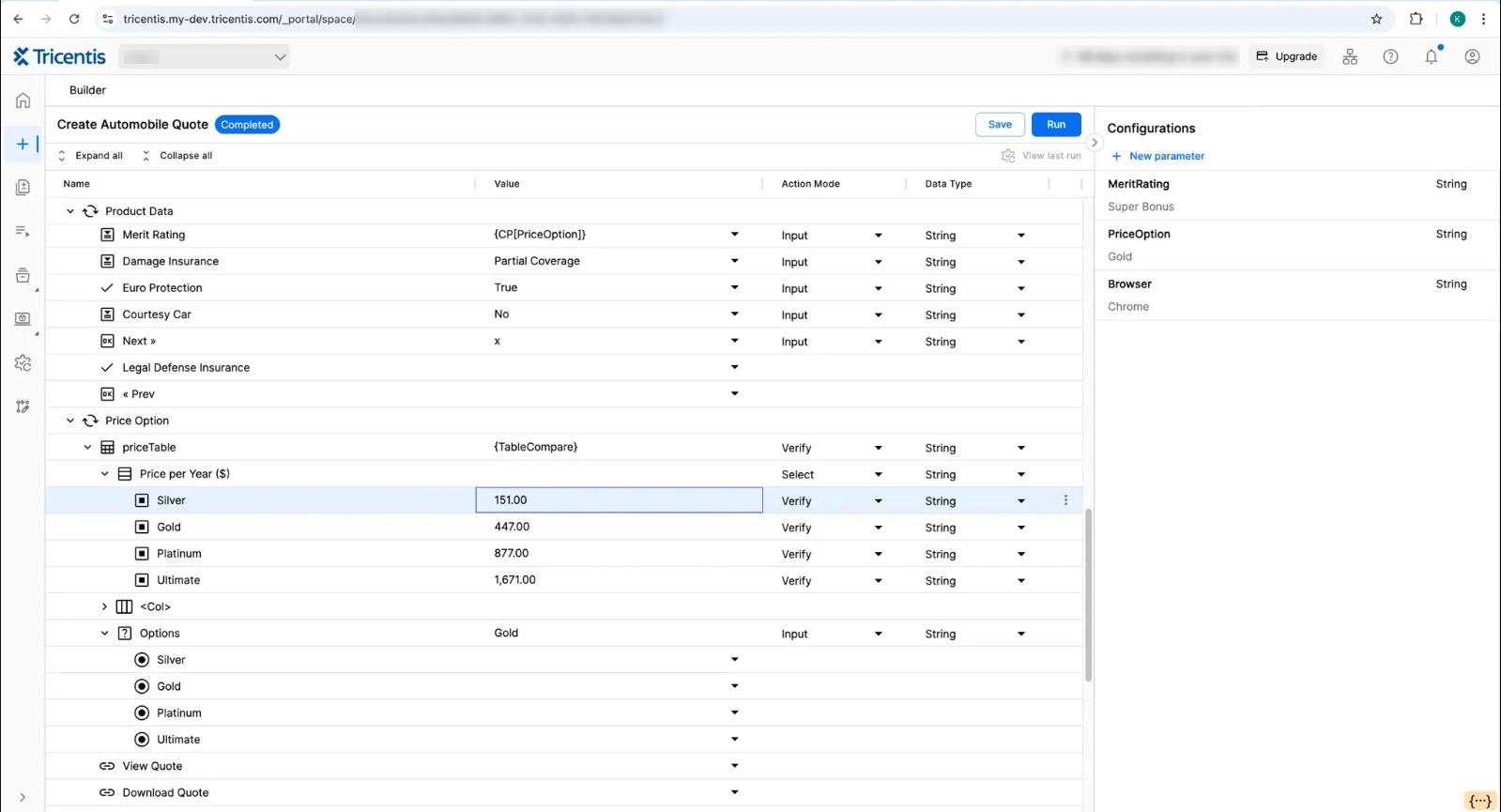
Key Components of Tosca
- Tosca Commander – The main interface used to design, organize, and execute test cases. It also manages test artifacts such as modules, test data, and execution results.
- Tosca XScan – A tool for scanning and identifying UI elements of the application, used to create reusable automation modules.
- Tosca Workspace (Repository) – Tosca uses a workspace-based structure (single-user or multi-user) to store test cases, modules, and related assets. In multi-user setups, this enables team collaboration and version control.
- Tosca Executor – Executes test cases locally or on distributed machines, supporting parallel execution for faster results.
- Tosca XBrowser Engine – A browser automation engine that enables reliable testing of modern web applications without depending on third-party drivers.
- Tosca Mobile Engine – Supports automation of mobile applications across different platforms, enabling consistent mobile testing.
- Tosca TestCase Design (TCD) – A component for designing test cases using structured techniques such as combinatorial testing, helping reduce the number of test cases while maintaining coverage.
Together, these components support Tosca’s model-based approach to test automation and enable teams to manage test design, execution, and maintenance within a single platform.
Tricentis Tosca Feature Highlights
- Tosca includes Vision AI, which enables automation based on visual elements rather than underlying UI properties.
- Tosca has introduced agentic test automation, which uses GenAI to convert natural language into executables like models automatically.
- Parallel and highly scalable test execution is made possible with the Tricentis Elastic Execution Grid. It uses modern cloud tech to improve speed, cost, and flexibility.
- Tosca uses a model-based approach where test logic is separated from technical implementation details. This allows teams to build reusable test components and reduces maintenance when the application UI changes. It is one of Tosca’s core design principles and a key differentiator from script-heavy tools.
- Tosca provides risk-based testing capabilities that prioritize test cases based on business risk and change impact. This helps teams focus execution on the most critical areas instead of running the entire test suite.
- Service virtualization allows customers to set up realistic services that behave precisely as specified, making it easier to test responses from systems that are difficult to access or provision, or perhaps haven’t even been built yet.
- Test data management enables teams to automatically create and provision on-demand stateful data, whether it be synthetic, masked, or imported.
- The tool supports API testing that includes support for REST, SOAP, and converting SoapUI projects to Tosca API testing for improved reusability of tests.
- Tosca is known for its strong support for complex enterprise systems like SAP.
- Automation recording assistant is the Tricentis Tosca feature for recording actions for conversion into automated tests.
- Mobile testing features facilitate end-to-end testing on native, hybrid apps, and mobile websites on iOS and Android devices.
- Tosca provides reporting through dashboards and integrations (e.g., qTest), offering visibility into test execution results and coverage.
- Tosca provides workspace-level features like versioning, object history, and multi-user collaboration within Tosca Commander.
When to Pick Tosca?
Tosca is not a one-size-fits-all solution. It is designed primarily for enterprise environments, and its strengths are most visible in specific scenarios.
- Enterprise environments with complex system landscapes: Tosca is commonly used in organizations that work with large, interconnected systems such as ERP-driven platforms like SAP, APIs, web applications, and legacy platforms. It is particularly useful when testing needs to span multiple layers and technologies within a single workflow.
- Large and complex test suites: The model-based approach and reusable components help manage large test suites by reducing duplication and maintenance effort over time.
- Need to reduce scripting effort: Tosca’s low-code approach allows teams to create and maintain tests without deep programming expertise. This can reduce dependency on highly specialized automation engineers, although some technical knowledge is still required.
- End-to-end testing across multiple layers: Tosca supports testing across UI, API, and ERP systems within a single platform, which is useful for validating complete business workflows.
- Focus on risk-based testing and optimization: Teams that want to prioritize testing based on business risk and change impact can benefit from Tosca’s built-in risk-based testing capabilities.
- Projects requiring auditability and traceability: Tosca provides traceability between requirements, test cases, and execution results, which is important in regulated industries.
- Small teams or startups with limited budgets: Tosca is typically used in enterprise settings and may be difficult to justify for smaller teams due to licensing and setup costs.
- Teams that prefer code-first frameworks: If your team is comfortable with tools like Selenium, Playwright, or Cypress and prefers full control through code, Tosca’s model-based approach may feel restrictive.
- Need for deep customization or low-level control: Tosca abstracts much of the implementation detail. While this improves usability, it can limit flexibility for teams that need fine-grained control over test logic or custom frameworks.
- Simple applications with limited integration points: For smaller or less complex applications, the overhead of setting up and maintaining Tosca may outweigh its benefits.
Pros and Cons of Tricentis Tosca
| Pros of Tricentis Tosca | Cons of Tricentis Tosca |
|---|---|
|
|
Final Verdict
Tricentis Tosca continues to hold its place as an enterprise-focused test automation tool even today. Its model-based approach, support for complex systems, and ability to handle end-to-end workflows make it a practical choice for large organizations, especially those dealing with SAP or multiple integrated applications.
That said, it’s not a default choice for every team. The cost, learning curve, and limited flexibility compared to code-first tools are real considerations. For smaller teams, simpler applications, or engineering-heavy environments, it can feel heavier than necessary.
In the end, Tosca makes sense when you’re dealing with scale, complexity, and the need for structured test management. If your priorities are flexibility, speed, and lower cost, other tools may be a better fit.
Frequently Asked Questions (FAQs)
Is Tricentis Tosca really “scriptless”?
A: Tosca is mostly scriptless, but that doesn’t mean zero complexity. Complex scenarios still need a good understanding of the model-based approach.
Is Tosca suitable for small teams or startups?
A: In most cases, no. The licensing cost and infrastructure requirements themselves make it out of reach for smaller teams and make it better suited for enterprise environments.
Is Tosca better than open-source tools like Selenium?
A: Tosca trades flexibility and cost efficiency for ease of use, faster onboarding, and reduced maintenance at scale.