
Modern software applications rely heavily on Application Programming Interfaces (APIs) to communicate with various systems, services, and platforms. As their importance in the software world is increasing, their reliability, performance, and security are critical. To ensure this, API testing tools are significant. One of the most popular and widely used API testing tools is SoapUI.
| Key Takeaways: |
|---|
|
This article provides an in-depth overview of SoapUI, including its key features, benefits, and advantages, helping organizations understand why it remains a valuable tool for API testing and quality assurance.
What is SoapUI?
SoapUI is an open source, cross-platform API testing tool specifically designed to test SOAP and Representational State Transfer (REST) web services. It enables users to create, execute, and automate tests for web services and APIs.
SoapUI, at its core, is a functional testing platform that is used to create, execute, and automate test cases for APIs without extensive coding. This tool is used to validate functionality, verify data accuracy, evaluate application performance, and test service reliability.
Since SoapUI does not require much programming experience, it makes it accessible for both technical QA engineers and business analysts who need to verify service behavior.
- SoapUI Open Source: This is a free version that offers basic API testing capabilities, including functional testing, API request creation, response validation, test suite management, and script-based test automation.
- ReadyAPI (Commercial Version): This is the premium version from SmartBear, and it extends SoapUI’s capabilities by adding advanced features such as data-driven testing, advanced reporting, load testing, security testing, test management integration, and CI/CD support.
Depending on project requirements and budget considerations, both these versions are widely used across software development teams.
In this blog, we have mentioned the features of both SoapUI and ReadyAPI under the same umbrella of SoapUI.
Importance of API Testing
Before we discuss SoapUI’s importance in API testing, let us understand the importance of API testing.
Modern applications use multiple interconnected services that need to constantly communicate with each other. APIs are the tools that act as communication bridges between these components. If these APIs fail at some point, not only will the components fail to communicate, but it will also result in application malfunctions, poor user experiences, or security vulnerabilities.
- Verify API functionality
- Validate business logic
- Ensure data accuracy
- Improve application stability
- Detect defects early
- Enhance software quality
- Improve system integration
- Speeds Up Testing Cycles: SoapUI’s visual test editor lets you create a comprehensive test suite in hours with drag-and-drop assertions, chaining test steps, and configuring data-driven scenarios without touching a code editor. It also offers reusable test components, built-in CI/CD integrations, and parallel test execution that speeds up the testing cycle.
- Bridges Technical and Non-Technical Team: SoapUI effectively bridges the gap between developers and QA related to API testing. It provides the dual-interface approach that serves developers and testers. Technical users leverage Groovy scripting for complex assertions and database validations, while non-technical users rely on the graphical interface of SoapUI without interfering with code and relying on UI actions like selecting endpoints, filling forms, and executing tests.
- Enterprise Features at Open-Source Cost: SoapUI’s open-source edition provides a remarkable value with features it provides, including authentication mechanisms, unlimited test cases, reporting capabilities, and execution in a production environment managing hundreds of APIs. The commercial version of SoapUI, ReadyAPI, also costs significantly less than other platforms and delivers superior SOAP protocol support.
- Scales from Simple to Complex Testing: SoapUI can test simple scenarios consisting of basic request-response validation, intermediate workflows, to enterprise orchestration, scaling from simple to complex testing. Its Groovy scripting means you’re never blocked, can decrypt custom formats, connect to Kafka, and generate synthetic data, all achievable within the platform.
Key Features of SoapUI
SoapUI specializes in functional, security, and performance testing for SOAP and REST web services. This tool is popular for its ability to test APIs without requiring advanced programming skills. SoapUI offers a wide range of features that make API testing efficient and effective.
1. SOAP and REST API Testing
Its support for SOAP and REST APIs is one of SoapUI’s strongest capabilities.
For SOAP services, SoapUI can automatically import WSDL files, generate requests, validate XML responses, and test service operations.
For REST APIs, it supports GET/POST/PUT/DELETE/PATCH requests. Using this ability, teams can test virtually any modern architecture using SoapUI.
2. Functional Testing
Functional testing is performed to verify that an API meets business requirements.
Using SoapUI, users can create test cases, execute multiple test steps, validate responses, and compare expected and actual results. Users can test request parameters, responses, error handling, and business workflows. Functional testing ensures APIs deliver correct outputs under various conditions and scenarios.
3. Automated Test Creation
Automated tests can be generated from API definitions using SoapUI. Users can import API specifications, automatically generate requests, create a test suite, and reuse test cases.
Automation reduces manual effort and accelerates testing.
4. Data-Driven Testing
Many APIs must be tested with different datasets to ensure they work as expected. SoapUI supports this data-driven testing through Excel, CSV files, databases, and external data sources.
Testers can use multiple input values and run the same test repeatedly without manually modifying test cases. Data-driven testing significantly improves test coverage.
5. Assertions and Validation
Assertions are rules that validate API responses. SoapUI provides various built-in assertions such as response assertions (Contains, Not Contains, XPath Match, XQuery Match), HTTP assertions (Status Code validation, Response Time validation), and schema assertions (XML Schema Compliance, JSON Schema Validation). Users can automatically identify failures using assertions.
6. Security Testing
With rising cyber threats, API security is of extreme importance. SoapUI provides security testing capabilities to help identify vulnerabilities. It supports security tests, including SQL injection testing, Cross-Site Scripting (XSS), XML bomb attacks, boundary testing, and invalid input testing.
By using security testing, organizations strengthen their API protection mechanisms.
7. Load and Performance Testing
Using performance testing, APIs are tested under heavy traffic conditions. SoapUI enables teams to simulate multiple users, measure response times, identify bottlenecks, and analyze throughput. Performance testing ensures APIs remain stable and work without any hiccups during peak usage periods.
Read: AI in Performance Testing: Tools to Consider.
8. Groovy Scripting Support
SoapUI supports extensive scripting capabilities through Groovy. It allows users to customize test logic, create dynamic requests, process responses, and automate complex workflows.
Groovy scripting is flexible and enables advanced testing scenarios.
9. Mock Services
You can use SoapUI to create mock services that simulate API behavior. Mock services help to test before APIs become available, support faster development cycles, have independent testing environments, and reduce external dependencies. They are especially useful during early development stages.
10. Continuous Integration Support
SoapUI integrates with modern DevOps practices and CI/CD pipelines such as Jenkins, Bamboo, Azure DevOps, GitLab CI, and TeamCity. This integration enables automated API testing during software deployment.
11. Reporting and Analytics
SoapUI can generate comprehensive reports that include test execution results, pass/fail statistics, performance metrics, and error summaries. Teams can monitor quality and identify issues quickly using detailed reports.
12. Database Testing
As APIs often interact with databases, SoapUI supports direct database connectivity for data validation, query execution, and backend verification. Using database testing of SoapUI, testers can validate both API responses and database integrity.
Advantages of SoapUI
- Open-Source Availability: SoapUI offers an open-source version that provides benefits such as no licensing costs, community support, easy adoption, and is suitable for small teams. With the open-source version, organizations can start API testing using SoapUI without significant investment.
- User-Friendly Interface: SoapUI offers an intuitive user interface that helps users create requests visually, build test cases, view responses, and manage test suites efficiently. You can learn the UI quickly, and it is also easy to navigate.
- Comprehensive API Testing Platform: SoapUI combines functional, security, performance, and automation testing in one platform, simplifying workflows.
- Strong SOAP Support: Although REST APIs are more popular nowadays, numerous enterprises still rely on SOAP services. SoapUI provides excellent support for SOAP through automatic WSDL import, XML validation, SOAP request generation, and WS-Security testing.
- Extensive Customization: Using SoapUI, you can achieve significant flexibility through Groovy scripting, custom assertions, reusable test cases, and dynamic properties. You can also customize testing processes according to your specific needs.
- Improved Test Reusability: Users can reuse requests, share test suites, create common assertions, and maintain centralized test assets using SoapUI. Using reusable test components, you can reduce duplication and improve efficiency.
- Enhanced Collaboration: SoapUI facilitates collaboration between developers, QA teams, business analysts, and DevOps engineers. Test artifacts can be shared to improve communication and reduce conflicts.
- Platform Independence: SoapUI supports multiple operating systems, including Windows, Linux, and macOS. This cross-platform compatibility helps teams to work in diverse environments.
- Faster Defect Detection: SoapUI tests APIs in development, thus identifying issues before they reach production. This results in lower defect resolution costs, faster development cycles, improved software quality, and reduced business risk. Early testing contributes significantly to successful software delivery.
- CI/CD Integration: SoapUI seamlessly integrates with CI/CD pipelines, providing advantages including automated testing, faster releases, continuous quality validation, and reduced manual intervention.
- Scalability: SoapUI is a scalable product and supports projects of varying sizes. Whether you are testing small internal APIs, enterprise web services, microservices architecture, or large-scale integration, SoapUI provides the necessary scalability and flexibility.
- Community and Industry Adoption: SoapUI has a large user base globally, providing extensive documentation, active community forums, tutorials, learning resources, and industry best practices. This support and guidance are especially useful for new SoapUI users.
Common Use Cases of SoapUI
SoapUI is primarily used for the functional, automation, and performance testing of SOAP and RESTful web services. QA engineers and developers use SoapUI to ensure that APIs comply with enterprise compliance, security, and reliability standards.
- API Functional Testing: SoapUI validates API functionality and behavior to ensure it works as per the requirements.
- Regression Testing: Test cases and test suites are created to run repeatable checks, ensuring new changes do not break the existing functionality.
- Security Testing: Vulnerabilities and security weaknesses can be identified using built-in vulnerability scans, and the system can be tested to ensure it withstands common security exploits like SQL injections, fuzzing, or boundary violations.
- Integration Testing: Communication between multiple services and components can be verified to ensure the system’s integration is working properly.
- Load Testing: SoapUI can be used to assess API performance under conditions such as heavy traffic, thousands of users, and other load scenarios.
- Database Validation: SoapUI can verify backend data consistency through database testing.
- Continuous Testing: SoapUI integrates seamlessly with popular CI/CD tools, encouraging automated testing for continuous validation.
- Service Virtualization: Mock services can be created using SoapUI for development and testing.
Creating a Test Case in SoapUI
You can create test cases for various types of testing in SoapUI.
To create a test case in SoapUI, you need to follow a structured hierarchy: Project -> TestSuite -> TestCase -> TestStep.
- Step 1: Create a New SOAP Project: Before making a test case, you must import your API definition. Create a new SOAP Project from File -> New SOAP Project (or press Ctrl + N). Input the initial WSDL path or URL and click OK.
- Step 2: Create a TestSuite: Test cases in SoapUI must live inside a TestSuite. To create a test suite, right-click the newly created project from Step 1 and select New -> Test Suite, then enter a valid name.
- Step 3: Create the TestCase: Create a new testcase by right-clicking the TestSuite and selecting New TestCase. Provide a logical name for the test case.
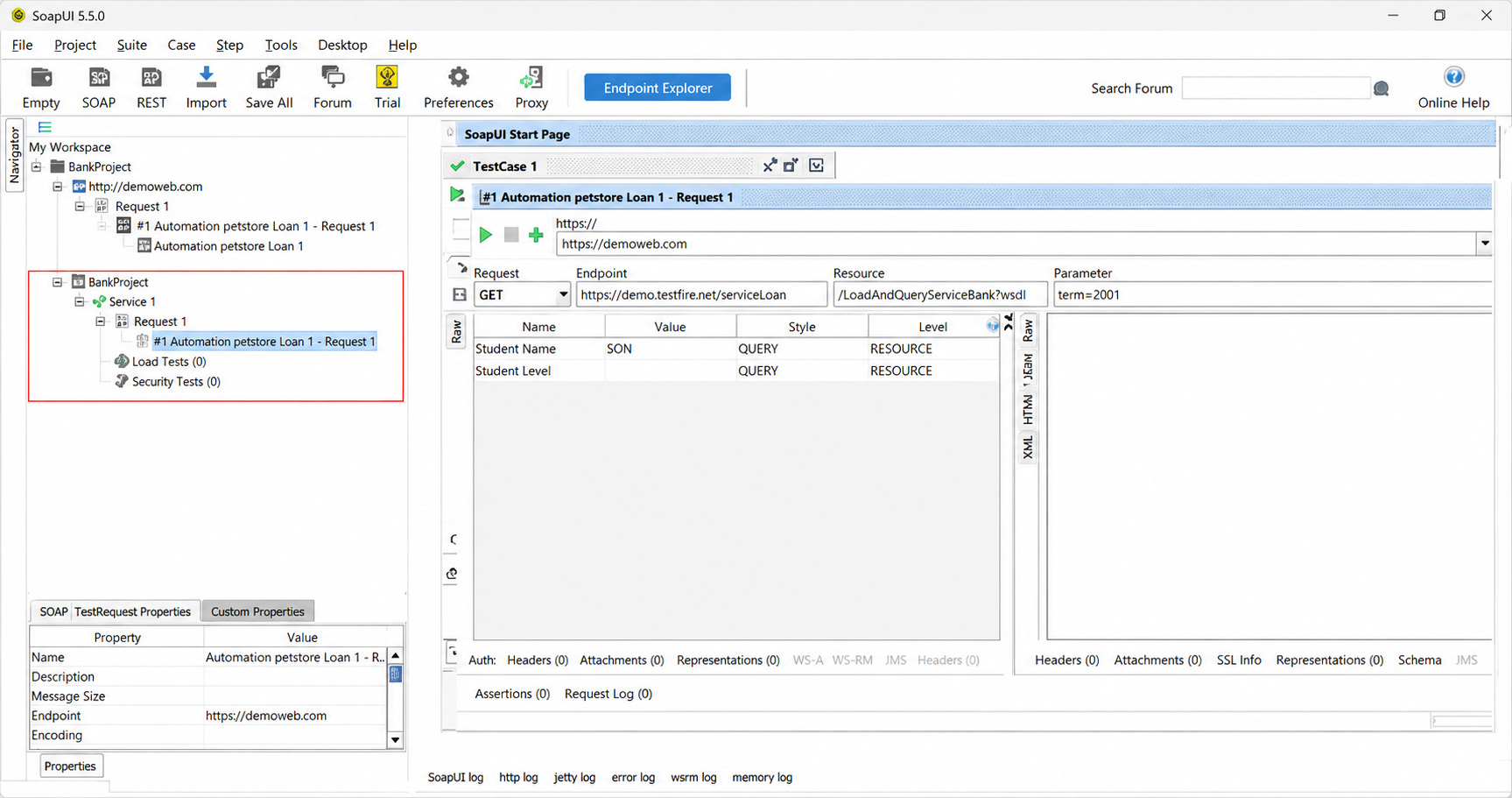
Here is the SoapUI tool interface with the WSDL project and a test case.
- Step 4: Add a TestStep (SOAP Request): Test steps are the actual execution blocks of your test case. You can add a TestStep within the testcase. SoapUI prompts you to select the type of test request from your WSDL.
- Step 5: Input Test Data and Add Assertions: You can then provide actual test inputs in the XML payload and add assertions.
- Step 6: Run the Test Case: Once the appropriate test input values are provided, you can use Test Case Runner to execute the test case.
Note that the status bar will turn Green if all assertions pass, or Red if any assertion fails.
The SoapUI tool interface is easy to navigate and self-explanatory. It is simple to create test cases and execute them.
Limitations of SoapUI
- Resource Consumption: Large projects consume significant resources, such as RAM and CPU, leading to performance lags.
- Learning Curve for Scripting: Beginners often find SoapUI difficult to get started, especially when it comes to advanced automation that requires Groovy scripting.
- UI Complexity: The user interface of SoapUI is too complex and may become difficult to manage for complex test suites.
- Limited Open-Source Features: Many must-have, advanced capabilities are locked behind the ReadyAPI, commercial version of SoapUI.
- Basic Modern API Support: Provides basic support for modern API formats such as GraphQL and REST, but lacks native import support for OpenAPI 3.x.
Best Practices for Using SoapUI
- Organize test suites logically.
- Use reusable features, properties, and variables that SoapUI provides.
- Implement data-driven testing where applicable.
- Automate regression tests.
- Maintain version control for test projects.
- Integrate testing into CI/CD pipelines.
- Use assertions extensively.
- Monitor test execution reports regularly.
Conclusion
SoapUI is a powerful and versatile open-source API testing tool. With its support for SOAP and REST services, as well as functional, regression, security, performance, and automation testing, it has become a cornerstone of modern software quality assurance.
The user-friendly interface, open-source availability, extensive customization options, and strong community support have contributed significantly to this tool’s widespread adoption. SoapUI offers a comprehensive solution for validating API functionality, performing load testing, automating regression tests, or integrating testing into CI/CD pipelines.
As businesses increasingly rely on APIs for application integration and digital transformation initiatives, tools like SoapUI will remain essential for ensuring reliability, performance, security, and overall software quality.
Frequently Asked Questions (FAQs)
- Is SoapUI free to use?
Yes, SoapUI offers a free open-source version with core API testing capabilities. SmartBear also provides a commercial version called ReadyAPI, which includes advanced features such as enhanced reporting, security testing, and load testing.
- Does SoapUI support both SOAP and REST APIs?
Yes, SoapUI supports both SOAP and REST APIs. It can import WSDL files for SOAP services and allows users to create and test RESTful API requests using methods such as GET, POST, PUT, DELETE, and PATCH.
- Can SoapUI be integrated with CI/CD tools?
Yes, SoapUI can integrate with popular CI/CD tools such as Jenkins, Bamboo, GitLab CI, Azure DevOps, and TeamCity, enabling automated API testing throughout the software development lifecycle.
- Is SoapUI suitable for beginners?
Yes, SoapUI is suitable for beginners due to its graphical user interface, drag-and-drop features, and easy test creation process. However, advanced users can leverage Groovy scripting for more complex testing scenarios.
- Why is SoapUI popular among API testers?
SoapUI is popular because it provides a comprehensive API testing platform that supports functional, security, performance, and automation testing in a single tool, helping teams improve software quality and accelerate development cycles.