
In the software testing world, performance testing is of utmost importance. Traditional testing methods and tools often fail to satisfy the scale, agility, and flexibility needed by modern enterprises. Today, organizations majorly depend on a combination of software testing and QA services to make sure their apps provide flawless user experiences.
LoadRunner is one of the most popular names in the performance testing world. LoadRunner has a range of protocol support, which includes nearly all types of software platforms. This tool, currently branded as OpenText Professional Performance Engineering, is a premier enterprise-grade performance and load testing tool.
| Key Takeaways: |
|---|
|
What is LoadRunner?
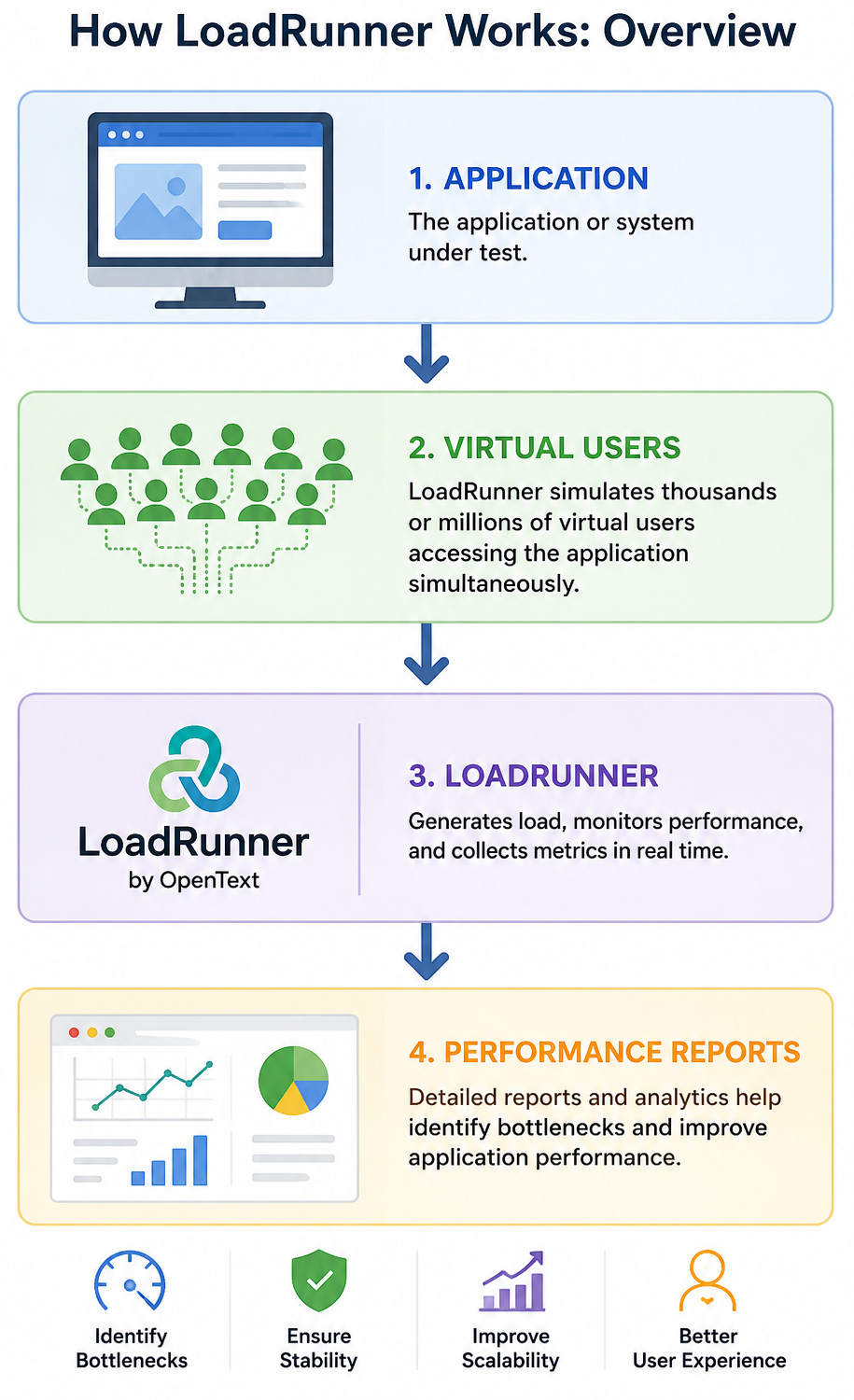
LoadRunner is a performance testing tool that mimics thousands or even millions of virtual users working with an application simultaneously. It helps teams understand how applications behave under stress and catch performance bottlenecks before deployment.
- How many users a system can support
- Whether response time remains acceptable
- Which components create bottlenecks
- Whether the application can maintain stability under heavy traffic
Organizations use LoadRunner for testing web applications, mobile applications, APIs and web services, ERP applications, cloud applications, enterprise systems, and client-server applications. Rather than becoming aware of performance issues after production release, teams can identify and resolve them earlier in the development cycle.
Core Components of LoadRunner
LoadRunner has a distributed architecture in which multiple components collaborate to design, execute, monitor, and analyze performance. Each component is tasked with handling a particular phase of the testing process. This allows teams to mimic real-world traffic at scale while closely tracking system behavior.
Virtual User Generator (VuGen)
Virtual User Generator, also called VuGen, is the script development environment in LoadRunner. It is needed to record and create test scripts that simulate how real users communicate with an app.
- User login and authentication
- Product search and navigation
- API requests and service calls
- Form submissions
- Payment and checkout transactions
In addition, the tool also allows parametrization and correlation, enabling scripts to manage dynamic values like session IDs, user-specific data, and authentication tokens. Once built, these scripts are the core of the performance test.
Performance Engineering Aviator (AI Assistant)
Latest versions of LoadRunner have Performance Engineering Aviator, an AI-powered assistant integrated directly into the scripting environment. Aviator allows testers to speed up script development by offering contextual recommendations during script writing.
- Generating scripting logic faster
- Troubleshooting script errors
- Explaining protocol-specific configurations
- Suggesting code optimizations
- Answering scripting-related queries in natural language
For teams working with large and complex test scenarios, Aviator helps bring down repetitive manual work and shortens the scripting process.
Controller
The Controller works as the central management layer during test execution. Once scripts are readied, the Controller is used to design test scenarios and understand how virtual users will behave during the test.
- Scheduling test execution
- Defining the number of virtual users
- Configuring ramp-up and ramp-down patterns
- Distributing workloads across load generators
- Starting and stopping test runs
- Monitoring system behavior in real time
In other words, the Controller coordinates the entire performance test.
Load Generators
Load Generators are the machines responsible for making the actual user traffic against the application being tested. They run the scripts developed in VuGen and replicate thousands of concurrent users interacting with the system.
- Run virtual user scripts
- Generate user traffic at scale
- Simulate concurrent transactions
- Replicate real-world workload conditions
In large enterprise environments, multiple load generators are often distributed across servers or cloud environments to mimic traffic from different geographic regions.
Agent
The Agent functions as the communication bridge between the Controller and Load Generators. It makes sure that commands issued by the Controller are properly executed on the machines generating the test load.
- Establishing communication between components
- Managing remote execution of scripts
- Synchronizing load generators
- Monitoring execution status during test runs
Without the Agent process, distributed testing across multiple machines would not work properly.
Analysis
Once the test execution is finished, the Analysis component processes all collected performance data and converts it into reports and visual insights.
- Response time trends
- Throughput metrics
- Server resource consumption
- Error rates during execution
- Transaction performance under load
The reporting engine helps teams detect bottlenecks, compare test runs, and determine where system performance begins to drift under increasing traffic.
LoadRunner Architecture
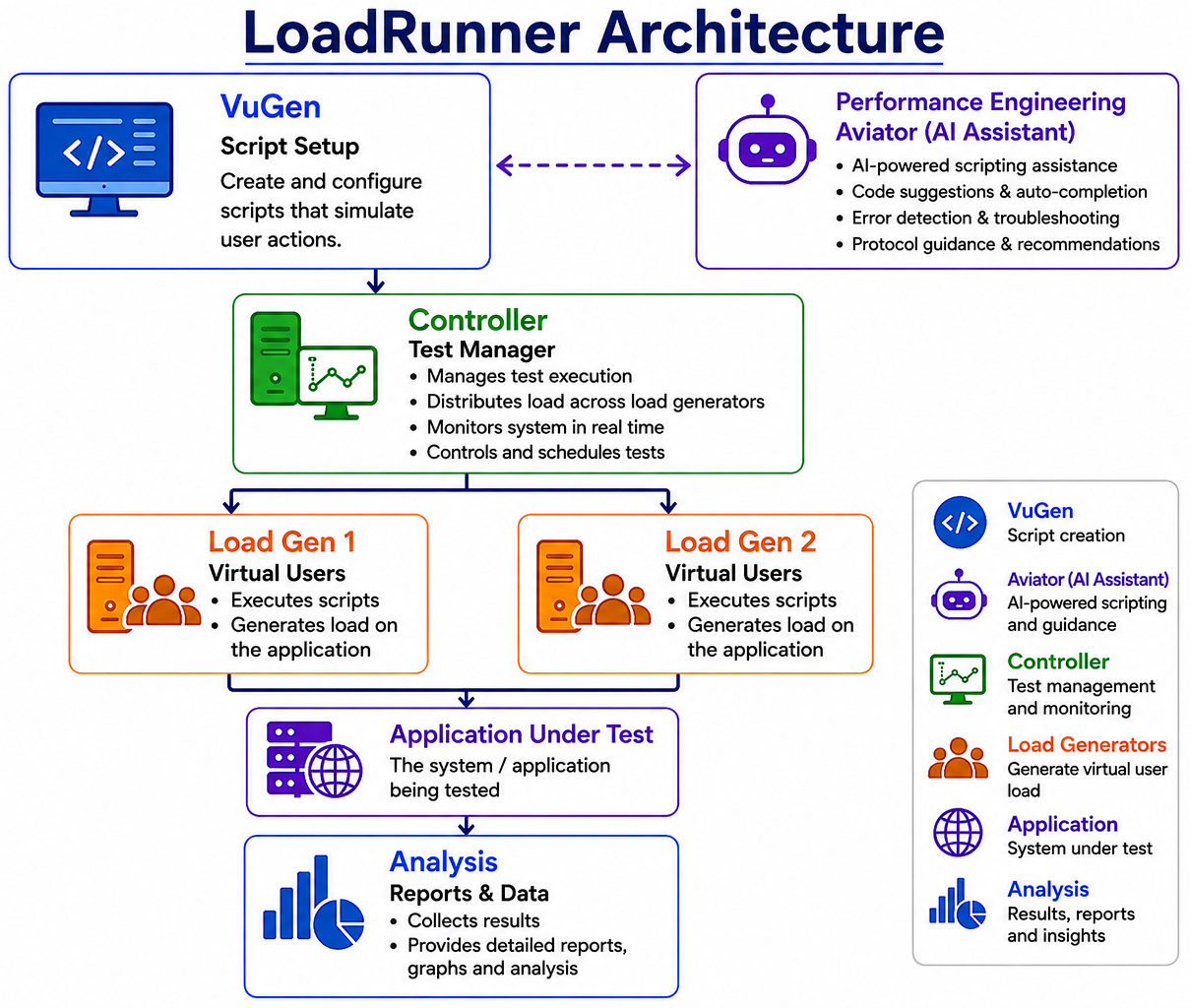
A normal LoadRunner test follows the simple architecture flow below.
Testers build scripts in VuGen. These scripts are then forwarded to the Controller, which defines the test scenario and workload configuration. The Controller distributes execution tasks to one or more Load Generators, while the Agent manages communication between systems during execution. Once the test finishes, performance data is processed inside Analysis to generate reports and identify bottlenecks.
This distributed architecture is one of the main reasons LoadRunner remains widely used for enterprise-scale performance testing.
Key Features of LoadRunner
LoadRunner provides multiple powerful functionalities that make it suitable for enterprise-level performance testing.
Broad Protocol Support
One of LoadRunner’s biggest strengths is its support for numerous technologies and protocols. This flexibility allows organizations to test almost any type of application.
- HTTP/HTTPS
- SAP
- Oracle
- Java
- .NET
- Citrix
- Web Services
- Mobile applications
- TruClient browser testing
Scalable Load Generation
LoadRunner can simulate a very large number of virtual users simultaneously. Organizations can perform load, stress, endurance, spike, and scalability testing. This allows businesses to understand application behavior during peak usage periods.
Real-Time Monitoring and Analytics
LoadRunner provides real-time monitoring capabilities that track data like CPU consumption, memory utilization, database performance, network activity, and server metrics. Teams can immediately catch performance bottlenecks and investigate issues.
Parameterization and Correlation
- Session IDs
- Authentication tokens
- User credentials
LoadRunner automatically manages dynamic values through parameterization and correlation techniques, creating more realistic tests.
CI/CD and DevOps Integration
LoadRunner integrates with modern DevOps environments and continuous integration pipelines. The integrations allow automated performance testing throughout the software development lifecycle.
- Jenkins
- GitHub Actions
- Azure DevOps
- GitLab
- Bamboo
Cloud and Distributed Testing
Organizations can execute tests from multiple locations and cloud environments.
- Geographic load distribution
- Improved scalability
- Better real-world simulation
- Reduced infrastructure limitations
Enhanced Observability Integrations
Modern versions of LoadRunner now support deeper observability integrations. It allows teams to correlate application performance data with infrastructure-level monitoring tools during test execution.
- Application-level bottlenecks
- Infrastructure resource usage
- Service dependencies
- Distributed system performance during high load
This is especially useful when testing microservices and cloud-native applications.
Kubernetes and Containerized Environment Testing
As enterprise applications are moving toward container-based deployments, newer LoadRunner versions offer stronger support for Kubernetes-based environments.
- Container scaling behavior
- Pod performance under load
- Service communication latency
- Performance stability in orchestrated environments
This makes performance testing more in sync with modern cloud infrastructure.
Improved Cloud-Based Load Execution
Recent releases have improved cloud load generation capabilities, allowing organizations to run large-scale tests without depending entirely on on-premise infrastructure.
- Faster test environment setup
- Distributed load generation across regions
- Reduced infrastructure management overhead
- Better scalability for enterprise testing workloads
This helps teams more efficiently mimic real-world traffic conditions.
Extended Support for Modern Application Protocols
LoadRunner continues to expand protocol support for modern application architectures, particularly API-driven and distributed systems.
- REST APIs
- gRPC-based services
- Microservices architecture
- WebSocket communication
- Cloud-native distributed applications
This allows performance teams to test modern software stacks more effectively.
AI-Powered Scripting Assistance
Modern versions of OpenText Performance Engineering cover AI-assisted scripting capabilities that help reduce manual effort during script creation. AI assistance can speed up script generation and maximize productivity for performance testing teams.
- Faster script creation
- Reduced repetitive manual tasks
- Better script accuracy
- Improved productivity
AI-Driven Performance Analysis
AI is also boosting performance analysis capabilities within newer OpenText performance engineering solutions. AI-powered analysis can detect anomalies, identify patterns, and provide intelligent insights from large volumes of performance data.
Examples include detection of abnormal response-time spikes, performance trend analysis, identification of bottlenecks, and faster root-cause analysis.
Support for LLM and AI Application Testing
As AI applications become more common, newer LoadRunner capabilities also support testing workloads involving large language model (LLM) applications. It also allows organizations to validate AI apps, chatbots, gen AI systems, and LLM-based workflows.
LoadRunner Work Process
- Script Creation: Test engineers write scripts that replicate common user activities such as user login, product search, form submissions, API requests, and checkout processes.
- Configure Virtual Users: Virtual users are configured based on expected traffic patterns.
For example:
- 1,000 users logging in
- 5,000 users browsing products
- 500 users making payments
- Execute Load Tests: LoadRunner simulates user activity and generates traffic against the application.
- Monitor Performance: The tool collects metrics such as:
- CPU utilization
- Memory usage
- Server health
- Network behavior
- Response times
- Analyze Results: Reports and dashboards help teams zero in on performance issues and improve applications.
LoadRunner Product Variants
OpenText currently provides LoadRunner in multiple deployment models, enabling organizations to select a setup based on infrastructure requirements, team size, and testing complexity.
LoadRunner Professional
LoadRunner Professional is built for individual testers and small performance engineering teams. It offers local test creation, script development through VuGen, test execution, monitoring, and detailed performance analysis.
It is commonly used when teams need standalone performance testing without centralized management.
LoadRunner Enterprise
LoadRunner Enterprise is designed for larger organizations running complex performance testing programs across multiple teams. It provides centralized test management, resource scheduling, collaboration features, distributed load generation, and enterprise-scale reporting.
This version is generally used in organizations with mature QA and performance engineering processes.
LoadRunner Cloud
LoadRunner Cloud is a SaaS-based version designed for teams that want cloud-based performance testing without maintaining dedicated infrastructure.
It allows teams to run large-scale tests from distributed cloud environments while integrating with CI/CD pipelines, APIs, and modern DevOps workflows. This deployment model is often preferred by teams building cloud-native and distributed applications.
Advantages of LoadRunner
Early Detection of Performance Problems: LoadRunner identifies issues before deployment, reducing production failures.
Handles Large-Scale Testing: The tool can simulate thousands or millions of concurrent users.
- Banking systems
- E-commerce platforms
- Enterprise applications
- Large web applications
Supports Multiple Technologies: Unlike some testing tools with limited compatibility, LoadRunner supports multiple technologies and protocols.
Rich Reporting and Analysis: LoadRunner provides visual reports and dashboards that simplify performance analysis. Reports may include transaction response time, throughput, errors, resource utilization, and user activity.
Reusable Test Assets: Scripts and scenarios can be reused across projects, reducing testing effort and increasing productivity.
Enables Better User Experience: Applications that perform consistently under heavy traffic deliver improved customer satisfaction and lower abandonment rates.
Security and Compliance Concerns: LoadRunner handles security and compliance concerns by offering secure connectivity for hybrid and cloud-based apps, data residency options to adhere to regional regulations, and enterprise-grade compliance functionalities to secure sensitive data while supporting best QA services standards.
Which Teams are Best Suited for LoadRunner?
LoadRunner is generally best suited for teams working with large-scale applications, enterprise systems, or environments where performance directly impacts user experience and business operations.
Enterprise QA and Performance Teams: Teams responsible for performance validation can utilize LoadRunner to replicate real-world traffic, identify bottlenecks, and verify application stability before release.
DevOps and Release Teams: Organizations using CI/CD pipelines can integrate LoadRunner into automated workflows to catch performance issues early in the development cycle.
E-commerce Teams: Online retail platforms often experience sudden traffic spikes during promotions or seasonal sales. LoadRunner helps teams evaluate system behavior under heavy user loads.
Banking and Financial Services Teams: Financial applications require consistent performance and high reliability. LoadRunner can help validate transaction-heavy systems under realistic conditions.
Cloud and AI Application Teams: Teams working with cloud-native applications, APIs, microservices, and AI-powered solutions can use LoadRunner to test scalability, response times, and workload handling.
When LoadRunner may Not be the Best Fit
While LoadRunner is a strong choice for large and complex environments, smaller teams with limited testing requirements may find lighter tools sufficient and LoadRunner to be overkill.
For example, startups or small development teams testing simple APIs with moderate traffic levels may select open-source alternatives when enterprise-level functionality is unnecessary. The tool generally offers the maximized value when teams need broad protocol support, large-scale simulations, detailed monitoring, and deeper performance analysis.
Read: AI in Performance Testing: Tools to Consider.
Conclusion
The selection of a performance testing tool for an organization depends on the technology, size of the team, and the budget available. LoadRunner is a licensed performance testing tool that also has a free trial version. Currently, organizations and clients have various options for performance testing tools in the market. Other performance testing tools include Apache JMeter, Gatling, BlazeMeter, etc. LoadRunner is the leading choice for many organizations. Also, for testers, the tool is a good option to learn and build a career in the performance testing field.
Frequently Asked Questions (FAQs)
What is LoadRunner used for?
LoadRunner is used for performance and load testing applications by replicating multiple virtual users. It helps organizations identify bottlenecks, measure response times, and validate system stability under different workloads.
What is the difference between load testing and performance testing?
Performance testing is a bigger category that evaluates the speed, stability, scalability, and responsiveness of an application. Load testing is a subset of performance testing that checks system behavior under expected user loads.
Does LoadRunner support AI and LLM application testing?
Modern versions of LoadRunner support AI application workloads and can help test chatbots, generative AI applications, and LLM-based workflows for scalability and response performance.
Can LoadRunner test APIs and microservices?
LoadRunner supports testing APIs, web services, and microservices architectures. Teams can replicate API requests, validate response times, and monitor system behavior under varying workloads.
Is LoadRunner suitable for cloud-native applications?
LoadRunner supports cloud environments and distributed testing, making it useful for testing cloud-native applications, containerized environments, and microservices-based systems.