
There are various test automation tools available today supporting advanced features. Among them is one tool that has dominated the test automation field over the years: Selenium.
| Key Takeaways: |
|---|
|
Testers and developers can create automated scripts with Selenium to simulate real user interactions, including clicking buttons, entering text, navigating pages, and verifying outputs.
Testers and developers can create automated scripts with Selenium to simulate real user interactions, including clicking buttons, entering text, navigating pages, and verifying outputs.
Selenium is perhaps the most ubiquitous automated testing tool for web-based software in the space, and it’s very likely that most web software teams use Selenium in some form.
- Selenium WebDriver: Core component for browser automation
- Selenium IDE: Record-and-playback tool for beginners
- Selenium Grid: Enables parallel test execution across machines
Selenium WebDriver allows users to interact programmatically with a project by using a wide range of programming languages, whereas Selenium IDE is a browser extension used for record-and-playback testing. Originally developed in 2004, with Selenium Grid introduced in 2008 to provide a hub for allowing multiple Selenium tests to run concurrently, locally or remotely.
This modular architecture enables teams to build flexible, scalable testing frameworks tailored to their needs.
Key Features of Selenium
Selenium has a wide range of features. The key features are listed here:
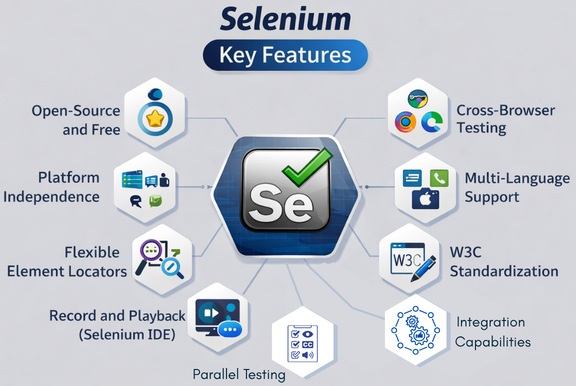
Selenium is open source and free to use, making it a cost-effective solution for teams of all sizes. Being open-source, it is supported and continuously improved by a large, active community of developers.
Selenium supports a wide range of browsers, including Chrome, Chromium, Firefox, Safari, Opera, and Edge, allowing teams to ensure a consistent user experience across platforms.
Multi-Language Support
Multi-Language Support
Selenium is language-agnostic, with native bindings for languages such as Java, Python, C#, JavaScript, PHP, Ruby, Perl, and more. It also has its own syntax and offers developers great flexibility.
Platform Independence
Selenium offers portability across various operating systems, including Windows, macOS, and Linux environments.
Flexible Element Locators
Selenium provides various strategies (ID, Name, XPath, CSS Selector, etc.) for accurately locating and interacting with dynamic web elements, including dynamic content and pop-ups. It supports methods like Contains() for using partial text to find an element, Absolute XPath() that comes with a complete set of paths for web UI automation, and StartsWith() to find dynamic web elements based on matching or finding starting text.
W3C Standardization
Selenium 4 is fully compliant with the W3C WebDriver protocol and ensures better consistency and stability across different browsers.
Record and Playback (Selenium IDE)
The Selenium IDE, which is a browser extension for Chrome and Firefox, offers a simple record-and-playback feature. This feature is ideal for quick script creation and for users with limited programming knowledge.
Parallel Testing with Grid
Selenium Grid enables tests to run across multiple machines simultaneously (in parallel), reducing execution time.
Integration Capabilities
- Testing Frameworks: Selenium works well with JUnit, TestNG, NUnit, and PyTest for test case management and reporting.
- CI/CD Tools: Integrates with tools such as Jenkins, GitLab, and Docker to automate testing in CI/CD pipelines.
The Pros of Selenium
There are a number of benefits of Selenium that have made it successful in the software testing space for so many years. Here are some of these pros:
1. Open Source and Cost-Effective
Selenium is open-source and completely free to use. This is one of its biggest advantages. There are no licensing fees, and teams, especially small companies and startups, can build powerful automation frameworks without any financial constraints.
2. Strong Community Support
Selenium is boasted as one of the largest communities in the testing world. With strong community support, Selenium users have access to extensive documentation, active forums (e.g., Stack Overflow), and continuous updates. Users can find quick solutions to most problems.
3. Cross-Browser and Cross-Platform Compatibility
With its cross-browser and cross-platform compatibility feature, Selenium can test applications across multiple browsers and operating systems, ensuring consistent functionality for end users.
This is especially crucial in modern web development, where applications are deployed across diverse environments.
4. Flexibility and Customization
Teams can design custom automation frameworks using Selenium that can be highly customized according to their requirements. Selenium is very flexible and supports integration with various testing frameworks (JUnit, TestNG, pytest), reporting tools (Allure, Extent Reports), and CI/CD pipelines.
With its flexibility and customization ability, Selenium is seen as a highly adaptable tool.
5. Language Versatility
Selenium supports multiple programming languages, and teams can work in their preferred technology stack. It also supports its own syntax.
6. Scalability with Selenium Grid
Selenium Grid supports parallel execution of tests, reducing testing time in large projects, and is particularly valuable in Agile and DevOps environments.
With Selenium Grid, the test environment significantly streamlines infrastructure management through automated and parallel testing. It reduces manual setup and provides scalable, on-demand infrastructure with its integration with containerization (Docker) and CI/CD tools.
7. Real Browser Interaction
By interacting directly with browsers using WebDriver, Selenium provides an accurate simulation of real user behavior. It supports the injection and execution of JavaScript code within the browser through its JavscriptExecutor interface, a functionality of the WebDriver API.
Selenium also provides headless browser support.
The WebDriver API of Selenium offers a stable and reliable way to interact directly with web elements, handle dynamic content, and simulate real user actions.
8. Integration with Modern Ecosystems
- Docker and Kubernetes
- Cloud testing platforms (e.g., Sauce Labs)
- AI-based testing tools
This makes it compatible with modern software development practices.
- AI-based Test Maintenance (Self-Healing)
- AI for Test Generation
- Visual Testing with AI
- Smart Element Identification
9. Reusable Test Scripts
Selenium supports modularity, and you can create reusable code modules and test components. This simplifies maintenance and reduces code duplication.
Read: Selenium Test Example.
The Cons of Selenium
Despite its strength, Selenium still has some drawbacks reported by the software testing community. Some of the cons of Selenium are:
1. Limited to Web Applications
Selenium only supports web application testing. It does not support desktop applications or mobile apps (without additional tools like Appium).
Hence, teams with desktop or mobile app software projects may have reservations about support for those platforms.
2. Steep Learning Curve
Selenium requires programming knowledge, understanding of frameworks, and expertise in locators (XPath, CSS). This makes it less accessible to beginners, particularly when there are numerous low-code tools in the market.
3. No Built-in Reporting
Selenium lacks native reporting capabilities, and teams must rely on third-party tools for all kinds of reports, dashboards, and analytics.
4. Complex Setup and Maintenance
Selenium setup is complex and involves installing drivers, configuring frameworks, and managing dependencies. This increases the maintenance overhead. It also lacks dynamic scalability of infrastructure.
5. High Maintenance Costs
Selenium is free to use but incurs various hidden costs in the form of time spent maintaining scripts, debugging flaky tests, or updating locators. These costs outweigh initial savings.
Additionally, ongoing maintenance can be daunting as devices and browsers tend to go down from time to time.
6. Performance Issues with Large Test Suites
As test suites grow, Selenium may face challenges like slower execution or increased resource consumption.
7. Limited Built-in Features
Selenium lacks many built-in functionalities, such as test management, reporting, and image comparison. Users rely heavily on third-party integrations. There is no object repository in Selenium.
8. Flaky Tests and Stability Issues
Selenium has dynamic web elements, synchronization issues, and environment inconsistencies, making tests unstable (flaky).
It also lacks smart features such as self-healing capabilities, resulting in tests being unstable.
9. Slower Development Speed
Selenium requires manual scripting that increases the development time and reduces productivity. Scripts also need a large amount of code.
Selenium Reviews and Industry Perspective
Selenium is widely accepted as the industry-standard, open-source tool for web browser automation and testing. While it is hailed for its flexibility, cross-browser compatibility, and extensive community support, it gathers criticism for its steep learning curve and lack of built-in features like reporting and dedicated support.
Positive Reviews
- Flexibility and extensibility
- Strong community support
- Cost-effectiveness
It is often considered the industry standard for browser automation testing.
Critical Reviews
- High maintenance overhead
- Complexity in setup
- Lack of built-in features
Some experts also argue that Selenium fulfills the needs of an earlier era and is slow to meet the demands of fast-paced development cycles in modern systems.
Selenium vs. Modern Alternatives
Selenium competes with tools like Playwright, Cypress, and AI-powered no-code tools, such as testRigor.
Many organizations opt for a hybrid approach, in which Selenium is used alongside modern tools to balance flexibility and efficiency.
The following table provides a feature comparison of Selenium with Playwright and Cypress.
| Feature | Selenium | Playwright | Cypress |
|---|---|---|---|
| Architecture | WebDriver Protocol (client-server) | CDP (Chrome DevTools Protocol) directly | In-browser event loop |
| Language Support | Java, Python, C#, JS, Ruby, Kotlin | TypeScript, JS, Python, Java, C# | JavaScript, TypeScript only |
| Cross-Browser | All major and legacy browsers | Chrome, Firefox, Safari (WebKit), Edge | Chrome, Firefox, Edge (limited Safari) |
| Auto-Wait | No (requires explicit waits) | Yes, built-in | Yes, built-in |
| Execution Speed | Slower due to architecture | Fastest in CI/CD, reliable | Fast for JS apps, slower startup |
| Parallel Execution | Yes, requires Selenium Grid setup | Yes, native support (no grid required) | Yes, via paid Cypress Cloud |
| Mobile Testing | True mobile testing via Appium | Emulation only (mobile viewports) | Emulation only (responsive layouts) |
| API Testing | No (requires external libraries) | Yes, built-in (APIRequestContext) |
Yes, built-in (cy.request) |
| Debugging | Relies on external plugins/wrappers | Excellent, with built-in Trace Viewer | Excellent, with \”time-travel\” debugging |
Selenium Use Cases
- Test automation in large-scale enterprise applications
- Cross-browser testing requirements
- Teams with strong programming expertise
- Custom automation frameworks
- Small teams have limited resources
- Projects requiring rapid test creation
- Non-technical testers
- End-to-end testing across web, mobile, and desktop
Future of Selenium
Despite the emergence of modern low-code/no-code tools, Selenium will remain a dominant, stable web automation framework in 2026, driven by its massive enterprise adoption, strong community, and the introduction of Selenium 5’s WebDriver BiDi protocol.
- WebDriver BiDi (Bidirectional Protocol): Bidi offers faster, more stable browser communication than the legacy JSON Wire Protocol.
- AI and Machine Learning: Selenium will increasingly integrate with AI-powered tools for self-healing scripts and smarter test maintenance to handle dynamic UI changes.
- Shifting Competition: Selenium’s strength lies in its extensive ecosystem, supporting Java, Python, JavaScript, C#, and more, compared to other tools.
- Cloud and Shift-Left Integration: Selenium is essential in CI/CD pipelines and cloud-based platforms (e.g., BrowserStack) for large-scale parallel testing.
While many tools are emerging and competitions are growing, Selenium’s reliability and massive adoption make it the standard for complex enterprise environments. Even as developers adopt newer frameworks for smaller projects, Selenium is far from becoming obsolete.
Conclusion
Though Selenium fails to cover all of the needs of any given software team, it is clearly a very popular tool among many teams. It may be an attractive choice for teams with a lean budget since it is free and open source.
However, teams that want to scale may look for other AI-powered tools, which provide a range of options from free open source to enterprise-level with robust support.
In summary, many teams use both Selenium and some other combination of software automation testing tools, so your team doesn’t need to feel obligated to choose just one tool to use.
Frequently Asked Questions (FAQs)
- Is Selenium still relevant in 2026?
Yes, definitely. Selenium is still widely used in 2026 due to its flexibility, open-source nature, and strong community support. However, many teams are also exploring modern alternatives with built-in AI capabilities.
- Does Selenium support AI or self-healing tests?
Selenium has no native AI support or self-healing capabilities. However, it can be integrated with AI-based tools to enable features like automatic locator updates and smart test maintenance.
- Can Selenium be used for mobile testing?
Not on its own. Selenium itself is designed only for web testing. For mobile automation, it is commonly used alongside Appium, which extends Selenium capabilities to mobile platforms.
- How does Selenium Grid help in testing?
Selenium Grid supports parallel test execution across multiple machines and browsers. It significantly reduces execution time and improves efficiency in large test suites.
- Is Selenium suitable for beginners?
Depends. Selenium requires programming knowledge and framework setup and can be challenging for beginners. Instead, beginners may find record-and-playback tools easier to start with.