
Mabl has quickly risen to prominence in the software testing space with a focus on intelligent test automation. You might have heard of it because of its low-code and no-code features for test creation. To help you better assess whether or not Mabl is a good fit for your needs, here is a general overview of Mabl, along with pros and cons, and some key highlights from consumer reviews.
General Overview of Mabl
Mabl is a cloud-based platform that supports testing web, mobile, AI apps, and APIs. It is a low-code platform that also leverages AI to offer various capabilities like no-code test creation and easy test maintenance.
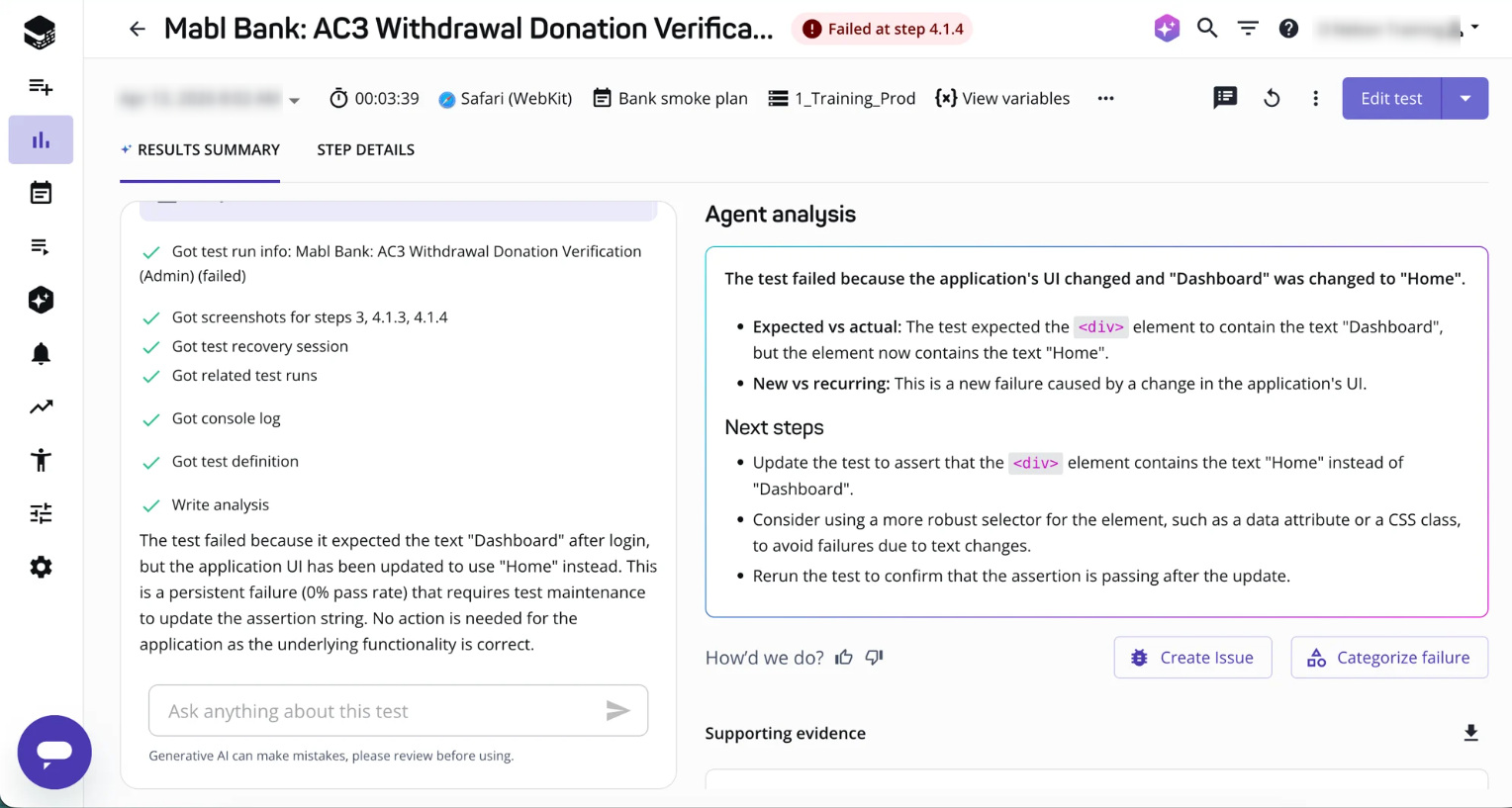
Key Features from Mabl
Mabl offers a wide variety of features with the goal of simplifying both test creation and long-term maintenance. These capabilities are built to reduce manual effort while keeping test execution aligned with modern development workflows.
Some of the key features include:
Test Creation and Authoring
- Low-code / no-code test creation using the Mabl Trainer
- AI-assisted test creation and suggestions, where test scenarios can be created from natural language inputs
- Support for custom JavaScript, enabling more advanced test logic when required
- Reusable flows and data-driven testing for scalable test design
Test Execution and Infrastructure
- Cloud-based execution environment removes the need to manage infrastructure
- Local execution via CLI runner
- Parallel execution is supported, improving test coverage and speed
- Cross-browser testing support
Intelligent Automation and Stability
- Auto-healing powered by AI, where UI elements are identified using multiple attributes
- Intelligent wait times help reduce flaky tests
- Automatic link crawling, which helps identify broken links across applications
Integrations and CI/CD Support
- Integrations with CI/CD tools such as GitHub, GitLab, and Jenkins
- Command-line interface (CLI) for test execution and management
- APIs for triggering tests and retrieving results
Reporting, Insights, and Analytics
- Detailed reporting and diagnostics, including logs, screenshots, and HAR files
- Visual testing capabilities (Visual Assist) for detecting UI changes
Additional Capabilities
- Performance and accessibility testing within the same platform
- Email testing support
- Environment-based test management and version control features
Teams Best Suited for Mabl
Mabl is commonly used by teams that want to create and maintain automated tests without relying heavily on traditional scripting or custom-built frameworks.
- Agile teams practicing CI/CD Tests can be integrated into continuous integration and delivery pipelines and executed as part of regular build processes.
- QA teams with limited coding expertise The low-code interface allows tests to be created and managed without extensive programming knowledge.
- Teams aiming to reduce test maintenance effort Features such as auto-healing help tests adapt to application changes, reducing the need for manual updates.
- Teams expanding automated test coverage Tests can be created using reusable flows and shared components, without the need to build and maintain a separate automation framework.
However, for teams that require full control over test logic or rely heavily on custom frameworks, alternative approaches may be more suitable.
Pros of Mabl
- Ease of use and accessibility The platform is designed to be approachable, and tests can be created without requiring deep programming knowledge. This makes it easier for non-technical team members to contribute.
- Faster test creation through recorded workflows Tests are created by capturing user interactions, which allows initial test coverage to be built quickly compared to code-first approaches.
- Reduced maintenance through auto-healing UI elements are identified using multiple attributes, and test steps are automatically adjusted when minor UI changes occur. As a result, fewer tests need to be manually updated.
- Integrated debugging and diagnostics Test failures are accompanied by logs, screenshots, and network data, which makes it easier to investigate issues.
- Support for cross-browser testing Tests can be executed across multiple browsers without requiring additional setup.
- Availability of learning resources and support Documentation, tutorials, and community channels are available, which help teams get started and resolve issues more efficiently.
- Lower dependency on engineering teams Since less coding is required, test creation and maintenance can be handled more independently by QA or product teams.
Cons of Mabl
In terms of the negative, here are some of the areas worth keeping an eye out for based on critical feedback in the market:
- Limited flexibility compared to code-first tools Advanced test scenarios may require workarounds or custom scripting.
- Trainer-based workflow may slow down complex test creation Building large or highly customized test suites can feel slower compared to writing code directly.
- Performance considerations Test execution times may be longer in some cases, particularly for larger suites.
- Learning curve for platform-specific concepts Concepts such as flows, environments, and variables need to be understood before the tool can be fully utilized.
- Not fully no-code in all scenarios JavaScript may still be required for more advanced use cases.
- Pricing may not suit all teams As a premium SaaS tool, costs can increase as usage scales.
While many of these limitations are not uncommon for low-code platforms, they should still be considered during evaluation.
When Mabl Might Not Be the Right Choice
Mabl may not be the right fit when flexibility, cost control, or deep customization are the primary concerns.
- Highly customized test logic is required
- Teams rely heavily on open-source ecosystems
- Budget constraints are strict
- Complex backend or API validation is the primary focus
In such cases, code-first frameworks may provide greater long-term flexibility and control.
Which is Better: Selenium or Mabl?
| Feature | Selenium | Mabl |
|---|---|---|
| Setup | Requires framework setup | Ready-to-use platform |
| Coding Required | High | Low/minimal |
| Maintenance | High (manual updates needed) | Reduced (auto-healing applied) |
| Flexibility | Very high | Moderate |
| CI/CD Integration | Manual configuration required | Built-in and streamlined |
| Scalability | Depends on infrastructure | Cloud-based and scalable |
| Cost | Free (open-source) | Paid subscription |
| Best For | Engineering-heavy teams | Fast-moving product teams |
It can be observed that Selenium offers greater flexibility and control, while Mabl focuses on reducing effort and accelerating test creation. The better choice depends on whether customization or speed is the higher priority.
How Mabl Fits Into a Modern Testing Stack
- Tests are triggered automatically during deployments
- Failures are captured early in the development cycle
- Feedback loops are reduced for developers
Thus, quality is ingrained into the release process rather than being validated at the end.
Conclusion
Mabl brings a lot of valuable features and solutions to the software test automation space, but whether or not it’s a good fit for your team is worth spending some time to consider.
For example, if your team is hoping to address testing needs by leveraging a lot of non-technical or lightly technical team members, Mabl may be a great option since its tools cater to this crowd. However, if your team is highly technical and will likely stay that way, you may not find the benefits of those user-friendly tools as valuable as the specificity you gain from coding tests directly.
Frequently Asked Questions (FAQs)
- Is Mabl suitable for beginners in test automation?
Yes, Mabl is designed to be beginner-friendly. Test creation is simplified, and minimal coding knowledge is required.
- Can Mabl completely replace Selenium?
Not fully. Selenium is still preferred when full control and customization are needed, while Mabl is opted for speed and ease of use.
- Is Mabl worth the cost?
It can be worth the investment for teams that prioritize faster releases and reduced maintenance effort. However, smaller teams may find the cost a restrictive factor.