
If you think coding is the only critical component in the software development lifecycle (SDLC), then you probably need to revisit your ideas. The component standing on equal footing or perhaps more critical than coding is software testing. Whether it is ensuring application functionality, meeting user expectations, or ensuring the application remains reliable under different conditions, software testing does it all.
Next comes the testing tools, which are the most crucial part of software testing and quality assurance in SDLC, in meeting the testing objectives. However, one of the most common decisions for development and QA teams is whether to use open-source or commercial testing tools.
| Key Takeaways: |
|---|
|
This article outlines the differences between open-source and commercial testing tools, discusses their advantages and disadvantages, and helps organizations understand when each option is most appropriate.
What are Testing Tools?
Testing tools are software applications that support various testing activities by automating, managing, and executing function, performance, and security tests to ensure software quality.
Using testing tools, the team can detect defects early, ensure product quality, and streamline the testing process. Common synonyms for testing tools include QA tools, automated testing software/frameworks, quality engineering tools, and software QA tools.
Testing tools are either open source or commercial. Open source tools provide access to their source code that developers can modify or customize as required. Commercial tools are proprietary solutions that vendors offer and require licenses or subscriptions to use.
Testing Tools Benefits
- Increased Efficiency: Testing tools automate repetitive tasks, allowing testers to focus on complex and creative test scenarios.
- Improved Accuracy: They reduce human errors in test execution.
- Broader Coverage: Testing tools enable testing across different browser-OS combinations, devices, and user scenarios.
- Faster Feedback: They provide quick results in the CI/CD pipeline, accelerating development cycles.
Examples of Testing Tools
The following table provides examples of various testing tools available in the market:
| Type of Testing Tool | Example |
|---|---|
| Functional/Automation Tools | Automate UI and API tests to reduce manual effort. Selenium, Playwright, Cypress, Appium, Katalon Studio. |
| Codeless/AI-Powered Testing Tools | Use AI to reduce test maintenance (self-healing) and make test creation accessible to non-technical users. testRigor, Testim (Tricentis), Mabl, AccelQ. |
| Performance/Load Testing Tools | Measure system speed, stability, and scalability. Apache JMeter, LoadRunner, NeoLoad. |
| Test Management Tools | Plan, track, and report on quality assurance activities. Jira with Zephyr, TestRail, Redmine. |
| API Testing Tools | Validate backend services and interfaces. Postman, SoapUI. |
What are Open-Source Testing Tools?
Open-source testing tools are tools/software whose source code is freely available to the public for customization. Developers can use, modify, and distribute these tools in accordance with their licenses.
Open-source tools are often developed collaboratively by global communities of developers and testers. Because of their flexibility and cost advantages, these tools are widely used, especially by startups and smaller organizations.
You can think of open-source testing tools as community-built solutions in which developers worldwide collaborate to create and improve software. This approach results in robust tools that have active user communities and extensive documentation.
Open source test automation tools provide flexible frameworks that can be adapted to various testing scenarios. For teams with specific requirements and tight budgets, open-source testing tools offer tremendous value.
Examples of Open Source Testing Tools
- Selenium – The go-to framework for browser/web automation testing
- Appium – For mobile application testing across platforms
- JMeter – A powerful tool for performance and load testing
- Cypress – A newer JavaScript-based end-to-end testing framework
- Robot Framework – A generic test automation framework
All these open-source tools have gained massive popularity over the years, mainly because of their zero-cost licenses and the flexibility to adapt them to specific testing needs.
Pros and Cons of Open-Source Testing Tools
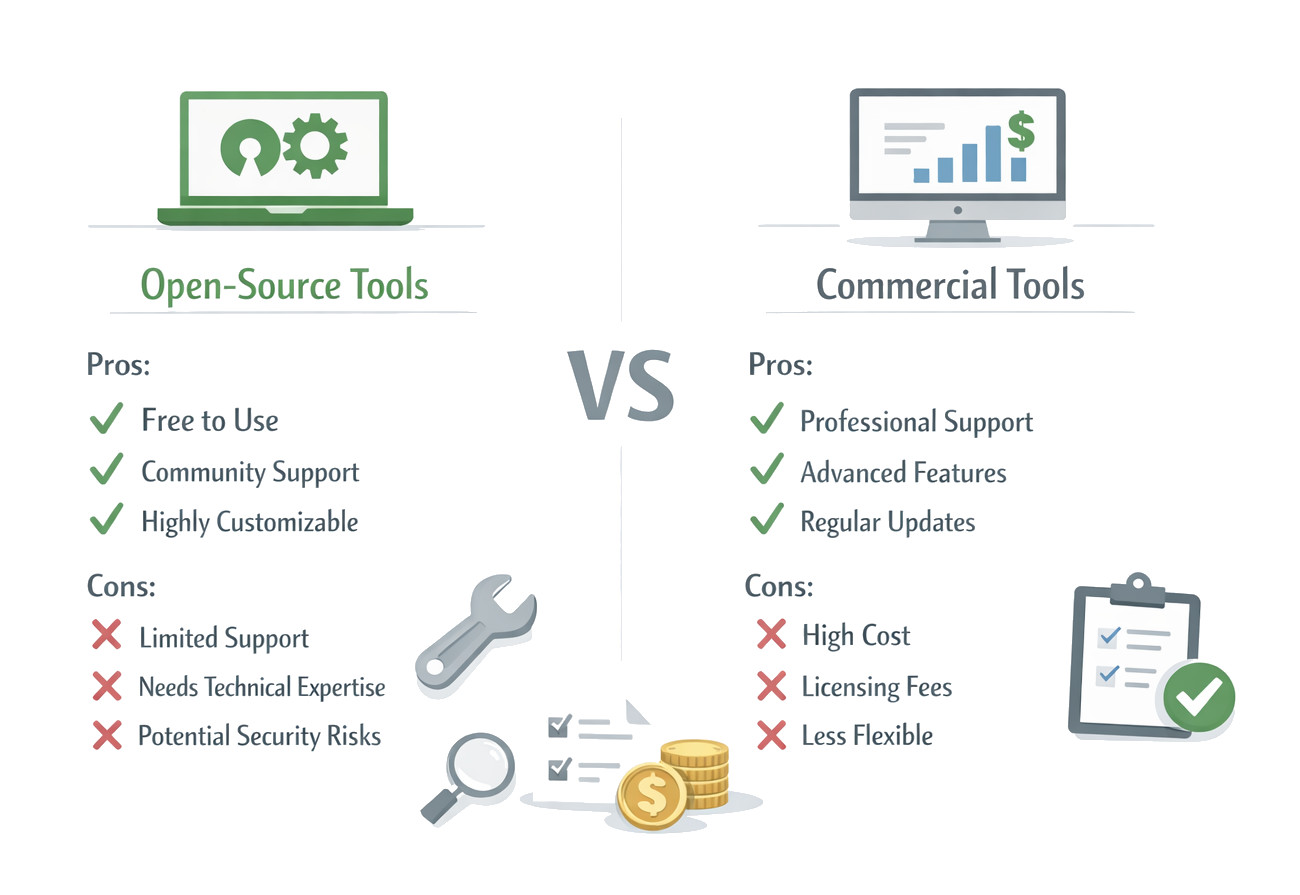
Open-source testing tools are cost-effective and flexible. They offer features such as free licensing, high customization, and strong community support. However, these tools require high technical expertise, lack dedicated 24/7 support, and typically have a steep learning curve.
Pros
- Cost Effectiveness: Open source testing tools are free to use, eliminating licensing costs. This is the biggest advantage open source testing tools have, attracting startups and small companies with limited budgets.
- Flexibility and Customization: Open source testing tools provide access to source code, allowing developers to update and customize the tools based on their needs. It also provides flexibility for easy integration with existing frameworks, CI/CD pipelines, and development environments.
- Strong Community Support: Open source testing tools usually have large communities of developers and testers actively contributing to the source code in the form of improvements, bug fixes, and documentation. Users can access community forums, discussion groups, and open repositories to quickly find solutions.
- Transparency and Security: Source code for open source testing tools is accessible to the public, and developers can inspect it to identify vulnerabilities and verify the internal working of the tool. An organization can maintain better control over the functionality and security of the tool because of this transparency.
- Integration Capabilities: Open source testing tools can seamlessly integrate with other open source technologies and frameworks.
- No Vendor Lock-in: Open source tools are not proprietary to a single vendor. Since the code is publicly accessible, users are not dependent on a single vendor’s roadmap or financial stability.
- Fast Innovation: Open-source tools are community-driven and get regular updates and new features quickly. You do not need to wait for the next official release from a commercial vendor.
For example, you can use Selenium to write scripts in multiple programming languages such as Java, Python, Ruby, and JavaScript, making it adaptable to various development stacks.
Open source development is a kind of collaboration and ensures continuous innovation and improvement.
Cons
- Lack of Dedicated Support: Open source testing tools rely solely on community support. They do not have a dedicated vendor assistance and hence have to rely on forums or documentation for issue resolution. This is a limitation for organizations requiring guaranteed response times and troubleshooting assistance.
- Steeper Learning Curve: Since the tools are open source, they usually require programming knowledge and technical expertise to configure and maintain. Skills are needed to configure the environment, write scripts, or debug the code. When it comes to non-technical teams or teams lacking specialized testing expertise, this becomes a challenge.
- Limited Built-in Features: Open source testing tools have limited features and lack built-in analytics, AI-driven testing, or visual dashboards as compared to commercial tools. If you want this functionality, you may be required to install additional plugins or integrations.
- Maintenance Responsibility: Organizations have to maintain the tools and also manage updates, issue fixes, and ensure proper configuration.
- Security Concerns: Since the source code of open source tools is publicly accessible, it can sometimes expose vulnerabilities and can be a target of hackers. Open code, if not properly managed, can sometimes expose vulnerabilities.
- Hidden Costs: Although open-source testing tools are free to use, there may be hidden costs, such as costs for training, infrastructure, and troubleshooting, that can exceed the initial savings of licensing fees.
- Compatibility Issues: Open-source testing tools may not always blend well with your existing systems. There might be compatibility issues that may require additional time to ensure proper functionality.
What are Commercial Testing Tools?
Commercial testing tools are proprietary software solutions developed and sold by vendors that specialize in testing technologies.
Unlike open-source testing tools, commercial tools require licensing fees or subscription payments for use.
These tools usually include features such as professional support, comprehensive features, and user-friendly interfaces to simplify the testing process. They also offer enterprise features such as scalability, advanced automation, and integration with enterprise systems.
Commercial testing tools often come as complete packages with comprehensive features, professional support, and regular updates managed by dedicated development teams.
Examples of Commercial Testing Tools
- testRigor: Codeless/Gen AI-powered automation testing in plain English
- Katalon Studio: Functional and automation testing
- TestComplete (SmartBear): A powerful tool for functional and automation testing across desktop, web, and mobile.
- Postman (Commercial Plans): API testing and development
- LoadRunner (OpenText): Performance and load testing
- TestRail (Idera): Test management and quality platform
These tools accelerate feedback loops, optimize resource management, and improve testing accuracy, though they come with licensing costs.
Pros and Cons of Commercial Testing Tools
Commercial testing tools offer comprehensive, user-friendly, and supported solutions for enterprise testing needs. They offer robust reporting, vendor support, and advanced features. However, these tools often come with high subscription costs, lower flexibility than open-source options, and potential vendor lock-in. Commercial testing tools are well-suited for large-scale, complex projects that require reliable, out-of-the-box functionality.
Pros
- Dedicated Vendor Support: Access to professional support is one of the most significant benefits of commercial tools. Vendors provide troubleshooting, training, technical support, and documentation. With this, teams can resolve issues quickly and maintain productivity.
- Comprehensive Features: These tools include a wider range of built-in features, including:
- Test management
- Reporting and analytics
- AI-driven test automation
- Cross-platform testing
- Advanced security features
- User-Friendly Interfaces: Commercial testing tools have their own graphical user interfaces (GUIs) and low-code/no-code features, allowing non-technical users to create automated tests. These features also reduce training time and improve productivity.
- Scalability and Enterprise Capabilities: Commercial tools are suitable for enterprise-level applications and complex projects as they are designed to handle large-scale testing environments.
- Regular Updates and Enhancements: Vendors constantly release new features, improvements, and enhancements to ensure compatibility with modern technologies.
- Low Initial Technical Setup: Commercial tools have ready-to-use solutions that require less scripting or environment setup compared to open-source alternatives.
- Advanced Reporting: These tools provide detailed, high-quality visual reporting to analyze test results effectively.
These features streamline testing processes and improve efficiency.
With regular updates, organizations stay up to date with industry trends and testing standards.
Cons
- High Cost: Commercial testing tools are not free. They require license fees, subscription costs, and additional maintenance expenses, and are significantly higher, especially for large teams or long-term projects. For startups and small businesses, this is a financial burden.
- Limited Customization: Developers do not have access to the commercial testing tools’ source code. Hence, customization is limited to the features provided by the vendor.
- Vendor Lock-In: Relying on a specific commercial tool leads to vendor lock-in; organizations become dependent on a particular vendor’s ecosystem. In such situations, switching tools can be challenging and costly.
- Less Transparency: Commercial tools are proprietary, limiting transparency. Users cannot peek into its internal code.
- Maintenance Effort: Commercial testing tools have high licensing fees and vendor dependencies, leading to higher long-term costs.
- Scalability Limitations: Some commercial tools may struggle to meet the performance demands of large-scale enterprises, whereas customized frameworks can handle them more effectively.
- Learning Curve: Commercial testing tools are easy to get started with, but advanced features may require specialized training in the tool’s specific methodology.
Open-Source vs. Commercial Testing Tools
The following table summarizes the key differences between the open source tools and commercial testing tools:
| Factor | Open-Source Testing Tools | Commercial Testing Tools |
|---|---|---|
| Cost | Usually free | Paid licenses or subscriptions |
| Customization | Highly customizable | Limited customization |
| Support & Maintenance | Community support | Professional vendor support |
| Features | Basic to moderate | Comprehensive features |
| Learning Curve | Often steep | Usually easier to use |
| Scalability | Depends on configuration | Designed for enterprise scale |
| Ease of Use & Training | Requires advanced technical expertise and steep learning curves. | Offer user-friendly interfaces (GUI) with easy setup and training. |
| Integration & Security | Provide API access and plugins, but may require extra coding for integrations. | Commercial tools often provide smoother integration with enterprise systems and better compliance with compliance standards. |
When to Choose What?
- Budget constraints exist
- Teams have strong technical and programming expertise
- Customization and flexibility are important
- Organizations prefer community-driven solutions
Open source testing tools are often used by startups, research teams, and small development teams.
- Enterprise-level support is required
- Teams need user-friendly interfaces
- Projects involve large-scale testing environments
- Organizations require advanced features and analytics
Large enterprises and organizations with complex testing requirements often choose commercial testing solutions.
Conclusion
Open-source and commercial testing tools have existed for many years, and both offer valuable benefits. Open-source tools are ideal for organizations with limited budgets and technical expertise as they provide flexibility, customization, and cost savings. Commercial tools, on the other hand, offer comprehensive features, uninterrupted professional support, and scalability, making them suitable for enterprise environments and complex projects.
Ultimately, the tool you use depends on the organization’s specific needs, with factors such as project size, team expertise, budget, and long-term maintenance requirements guiding the decision. Many organizations go for a hybrid approach, combining open-source tools with commercial platforms to balance cost and functionality.
As software development continues to evolve, testing tools also advance with innovations such as AI-driven automation, cloud testing environments, and improved integration with DevOps pipelines. Understanding the strengths and limitations of both open-source and commercial tools provides valuable insights and helps teams to make informed decisions that enhance software quality and testing efficiency.
Frequently Asked Questions (FAQs)
- Which is better: open-source or commercial testing tools?
There is no universal answer for this. It all depends on the organization’s needs. Here are some pointers:
- Open-source tools are better for teams with technical expertise and limited budgets.
- Commercial tools are ideal for enterprises that require advanced features, support, and scalability.
- Are open-source testing tools really free?
Yes and no. While most open-source testing tools are free to use, there may still be indirect costs, such as setup, infrastructure, maintenance, and skilled personnel needed to implement and manage them.
- Do commercial testing tools require coding knowledge?
Most traditional tools required coding knowledge. However, many modern commercial tools offer low-code or no-code interfaces, allowing testers with limited programming experience to automate tests. But some advanced functionalities may still require scripting knowledge.
- Why do companies choose commercial testing tools?
Organizations often choose commercial tools because they provide:
- Dedicated technical support
- Advanced built-in features
- User-friendly interfaces
- Faster implementation
- Enterprise-level scalability
- Can companies use both open-source and commercial testing tools together?
Yes. Many organizations adopt a hybrid approach, using open-source tools for flexibility and cost efficiency while commercial tools for advanced features, reporting, and support.